

Affiliate Link Management: Programs Move, Domains Burn, Affiliates Pay

Contents 11
An affiliate link looks like something you own. It's a route: an address on the network's domain with your ID inside, and every part of that route belongs to someone else.
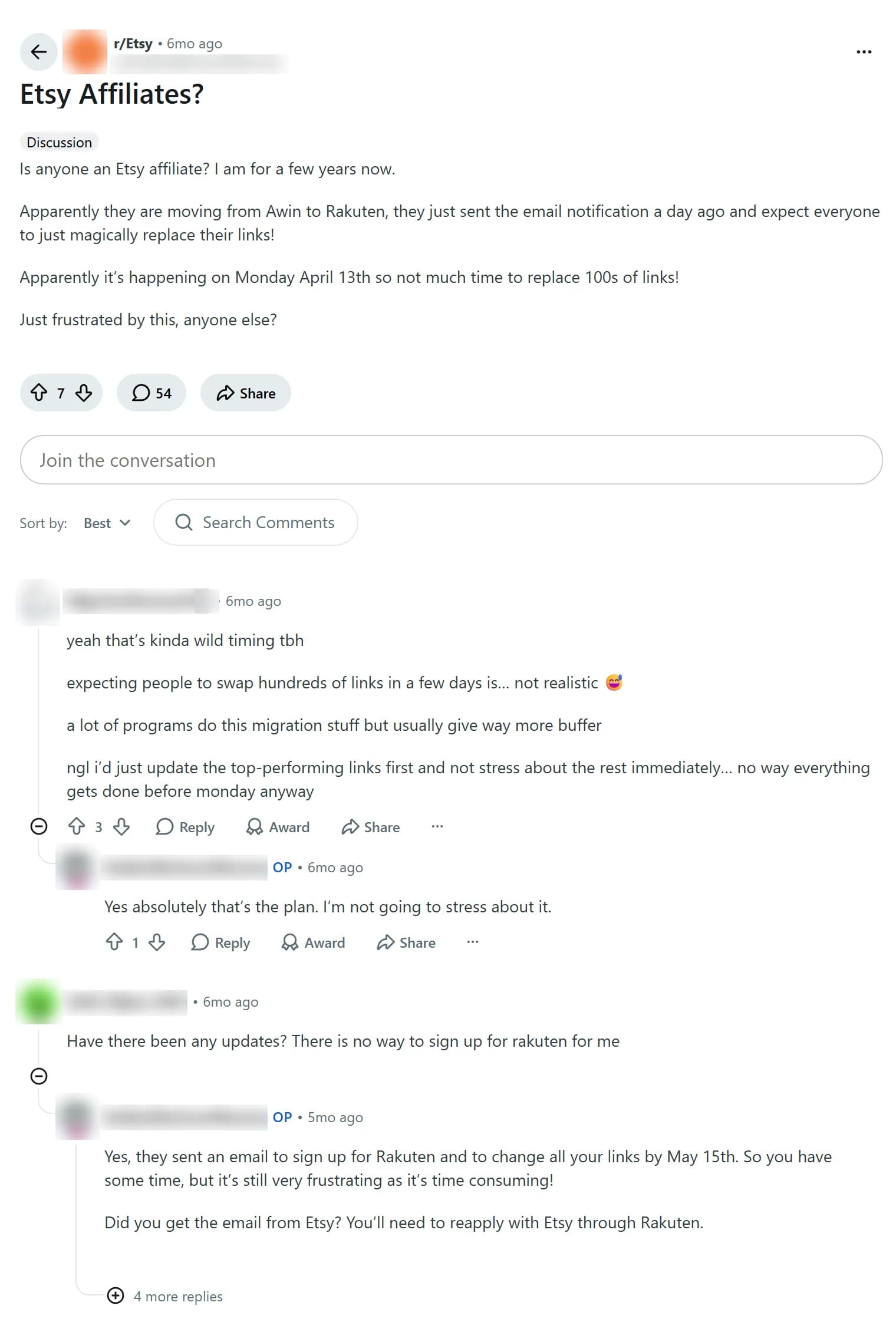
In April 2026 Etsy told affiliates it was leaving Awin for Rakuten Advertising: launch on April 13, old links replaced by May 15, according to affiliates who quoted the email. Now Rakuten itself is moving its programs to impact.com. From the affiliate's chair, 2 moves in a year look like an industry imploding. It's consolidating, which looks the same from where you're standing, but it isn't.
Routes change for business reasons (the program moves) and for survival reasons (the network burns a tracking domain and replaces it), and every change costs the affiliate. Below: who controls each part of a link, how to switch domains without losing conversions, and how to make the next change a single edit within ad and program rules.
Why affiliate links stop working: the program changes networks
The business reason is the one everybody sees. Etsy's program ran on Awin for years, and the terms Etsy still publishes (last updated May 29, 2024) say it "is operated through the Awin Affiliate Network." An r/Etsy thread from April shows the switch from the affiliate side: sign up to Rakuten, re-apply to Etsy there, rebuild links in the Deep Links tool, with no link shortener like Awin's. At least 2 affiliates said they were rejected on re-application, one of them with Etsy on Awin since 2020. "Years of posting links and poof," as another put it.
A migration doesn't have to be rushed to break links. When Awin upgraded ShareASale users to its own platform, most links kept tracking, but short links with no clicks in the 12 months before the migration now lead to a page saying "This link is inactive."

The numbers I trust most are old: in 2019 Trackonomics scanned more than 7,000 pages on 25 major publisher sites and found link rot on almost half of the pages carrying affiliate links, with 3–10% of live affiliate links affected. Old numbers, same mechanics. And programs keep the right to break your links in writing: Etsy "may with or without notice change, suspend or discontinue an Affiliate Link."
A program move is the loud way a link breaks. The quiet one happens inside the network, and to see it you have to take the link apart.
Network migrations and domain swaps: what breaks and who pays
An affiliate link has 3 owners. The domain belongs to the affiliate network, the choice of network belongs to the program, and your affiliate ID is a record in the network's database that means something only inside it. You own none of the 3, so the link can break in 2 ways.
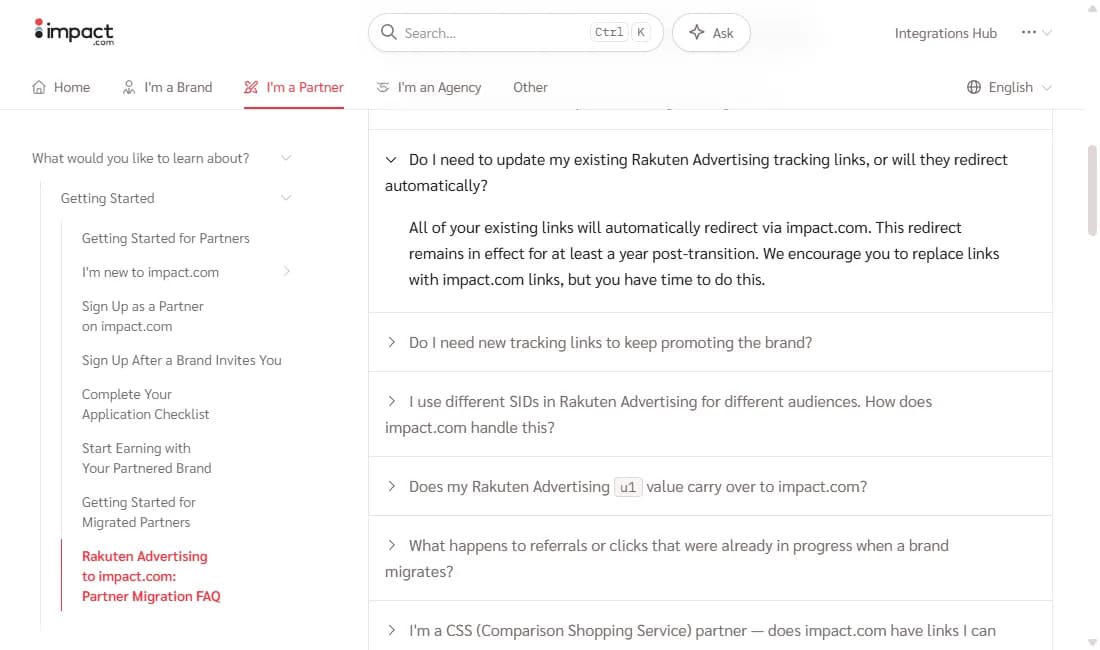
The program moves. Your ID means nothing in the new network, and every link has to be regenerated. Rakuten Advertising now tells publishers it will migrate advertiser programs to impact.com "over this year and next" in "carefully planned waves," and impact.com's partner FAQ says old Rakuten links "automatically redirect via impact.com" for "at least a year post-transition," but the redirect "only works for linked accounts." Whether Etsy's program moves again is for Etsy and Rakuten to announce.
The network swaps the domain. Your ID survives, only the route changes. In impact.com's brand docs, links on a previous tracking domain "will continue working and automatically redirect" through the new one, and brands are told to coordinate with partners, which "helps reduce any unnecessary latency." For you that means an extra hop, no stated end date for the redirect, and an update that is your job.
Both events land on the same bill. First, placements you can't edit: bought native placements, paid links on other sites, links inside apps, old posts, bio links. They send traffic for years, and after a move they send it into a dead link or a redirect someone else can switch off. Nobody reimburses that.
Second, attribution. Under last-click attribution, a customer is yours only while they return through your link inside the cookie window: Etsy's is 30 days on the web and 7 days in the app. After a switch the customer stays on the brand's email list and in its remarketing, and repeat purchases go to whoever owns the last click.
Third, the work and the proof. A small site is a search-and-replace job; at 200 sites or 100 programs, checking links becomes the job. Screenshot earnings, clicks and links before any transition: attribution disputes during migrations are common, and the burden of proof sits with you.
A program move comes with an email and a deadline. A domain swap is maintenance, and it can arrive as a single line in the dashboard.
Tracking domains are consumables
A network is paid by the advertiser, not by you. Its job is an uninterrupted flow of traffic to the advertiser, and tracking domains are the outer layer that collects it. In practice, when a domain gets blocked or flagged, the network switches it off and asks you to replace your links. If you don't, that's your problem.
Most swaps are about delivery, not the offer. Ad platforms, browsers and antivirus vendors keep blocklists, and a redirect domain lands on them after complaints, a restricted vertical, aggressive creatives or a wave of identical campaigns. Microsoft's SmartScreen checks sites against "a dynamic list of reported phishing sites and malicious software sites," and when a URL has no established reputation, "the item is marked as a higher risk and presents a warning to the user." A fresh replacement domain has no reputation at all.
Ad blockers work the same way: the October 2026 build of EasyPrivacy, a filter list blockers subscribe to, has rules for awin1.com, shareasale.com, linksynergy.com (Rakuten), anrdoezrs.net (CJ), 7eer.net and sjv.io (impact.com). Rakuten's own publisher help admits that with a blocker on, "the link may not go through to the advertiser's website."
Other swaps are planned. Networks in restricted verticals (gambling, betting, dating, nutra, finance, crypto) practice domain rotation in advance, so no single address carries all the traffic. A move to another tracker or host changes the click domain, often along with the subid format and the postback. Domains split by GEO or source change with the routing, and a hacked or spam-burned domain simply gets retired.
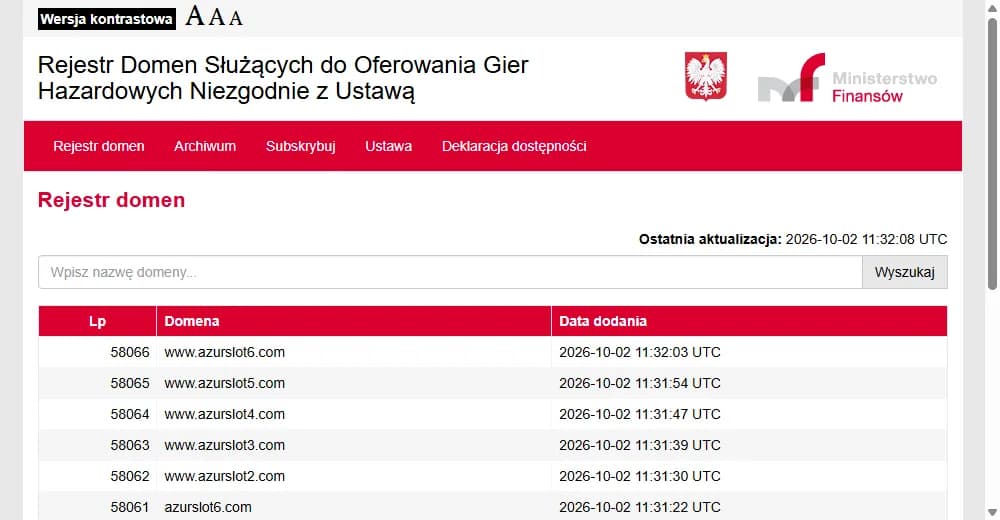
Gambling turns this into an assembly line. Poland's Ministry of Finance keeps a public register of domains offering gambling in violation of the law: 58,053 entries on October 2, 2026, 6,994 of them added in the last 12 months. The newest show how mirror sites work: www.azurslot2.com through www.azurslot6.com went in between 11:31:30 and 11:32:03 UTC.
Brazil's Finance Ministry counts more than 50,000 illegal domains blocked with the telecom regulator Anatel since October 2024 (as of June 19, 2026); India's IT ministry reported 1,410 blocking directions against betting and gambling sites and apps from 2022 to February 2025. Different units, same result: a dead route for whoever was sending traffic there.
So a swap proves nothing by itself. It's routine when it comes with notice and a reason, old links keep redirecting for a while, and the subid, click ID and postback keep working. It's a warning sign when domains change weekly without explanation, attribution rules change with the domain, or approved leads drop while support goes quiet. For those I use the rule I keep for networks that start freezing balances: questions to the manager in writing, money withdrawn, traffic paused until the answers come.
One kind of swap has nothing to do with survival. Showing the ad platform one address while sending users through another is cloaking, and "the domain belongs to the network" won't save your ad account: the account that ran the ad is the one that gets banned.
Changing affiliate link domains: how to switch without losing conversions
Even an honest swap lands in your campaigns as risk. The first risk is attribution: every new hop can drop the subid, click ID, UTM tags, fbclid or gclid, and with them the tie between click and conversion. Google's auto-tagging help says it plainly: "If your website uses redirects, it's also important to make sure the GCLID is passed to the final landing page in order to track conversions." Otherwise you pay for traffic whose leads never reach your account.
The second risk is spend that goes nowhere. An old link can die or route to another offer while the budget runs; a new one can be slower, add a hop or swap the prelander, and each costs conversion rate, so don't blame the creative first. Then comes the money: fewer approved leads, a longer hold, stats recounted after the fact, sometimes new payout terms slipped in with the new domain.
The third risk is your ad account: a new domain may carry a bad reputation from schemes the platform already banned, and pixels, hosting and identical pages tie it to you. The worst case is a redirect that quietly swaps your affiliate ID. I've worked with a network that switched my traffic to its own links on weekends, so it isn't paranoia, but rule out status delays, fraud filtering, duplicates and time zones first.
Before you scale anything on the new link:
- Save the old link, campaign settings and stats, then compare old and new links parameter by parameter: aff_id, subid, UTM, click_id, fbclid, gclid. Some names change by design: Rakuten's u1 maps to impact.com's subId1.
- Send a test click with a unique subid on desktop, Android and iOS, and check that your affiliate ID survives every hop.
- Check that the click shows up in the network's stats under your account.
- Run a test conversion, or ask the manager to verify one, and confirm the postback fires.
- Reconcile 3 events: the ad platform's click, your tracker's click and the network's lead.
- Move 5–10% of traffic first, never every campaign at once.
- Compare CR, EPC, approval rate, status delay and revenue per click with the old link.
- Get the reason for the change and the old domain's shutdown date in writing.
- Keep the old link running until conversions on the new one attach to your account.
That's 9 steps per link, per campaign, per network, every time a domain moves. All of it gets easier when the network's link sits behind one you own.
Affiliate link management: a link layer you control
The fix is old and boring: don't publish the network's link. Publish yoursite.com/go/etsy-mugs and let it redirect to the current affiliate URL. When the program moves or the network swaps a domain, you change the destination once, test a single link instead of every placement, and everything pointing at /go/ follows.
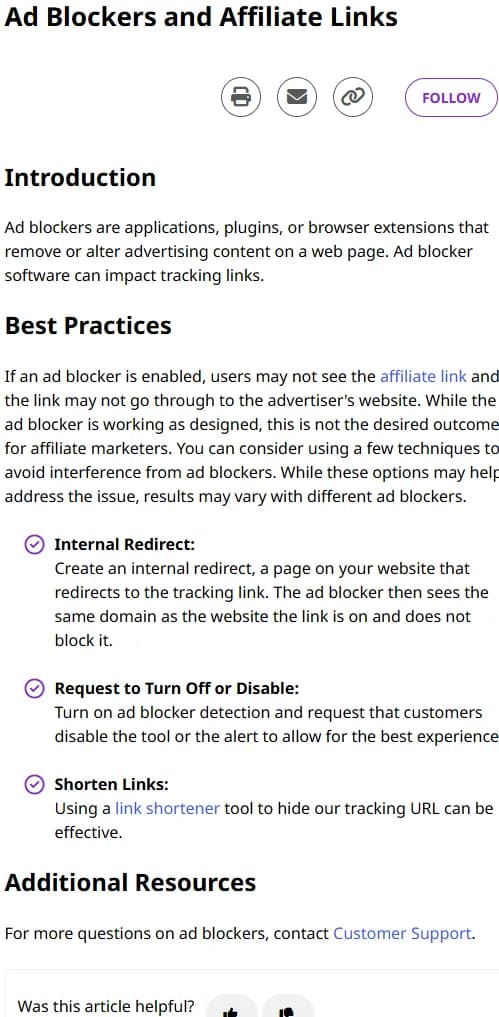
Networks recommend it themselves. Rakuten's publisher help on ad blockers lists it first: "Create an internal redirect, a page on your website that redirects to the tracking link. The ad blocker then sees the same domain as the website the link is on and does not block it." Etsy even asks affiliates "not to hardcode Affiliate Links," though it means its own creatives.
On WordPress, a plugin such as ThirstyAffiliates or Pretty Links builds these links; off WordPress, a hosted service such as Geniuslink does the job. Use a temporary 302 redirect or a 307, not a 301: browsers may cache a permanent redirect and keep sending visitors to the old destination after you've changed it. Mark the links rel="sponsored".
The price: an extra hop per click and a single point of failure, since a site outage takes every /go/ link down. And plugins don't scale: 200 sites means 200 installs to edit. Past a handful of sites, or the day you start buying traffic, the idea has to live in one place.
Affiliate link tracker: Keitaro vs Binom
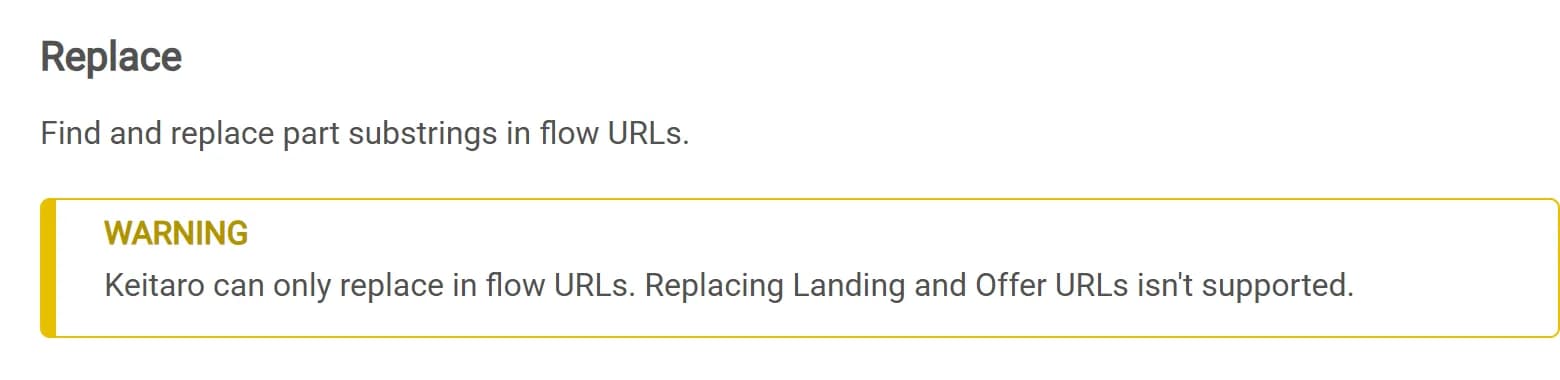
That place is a tracker. In Keitaro every placement gets a campaign URL on your tracker domain, and offers live in flows. When a program moves or a network swaps its domain, you change the flow; the URL in every ad, app and bio stays. For a switch across dozens of campaigns, Keitaro's bulk Replace swaps a substring, like an old tracking domain or affiliate ID, in flow URLs, though not in offer URLs. Binom bulk-edits offers too.
The default flow catches every click that fits no other flow. Put a fallback offer there, and when you switch off a dead offer or a burned domain, clicks land on something that pays, not an error page.
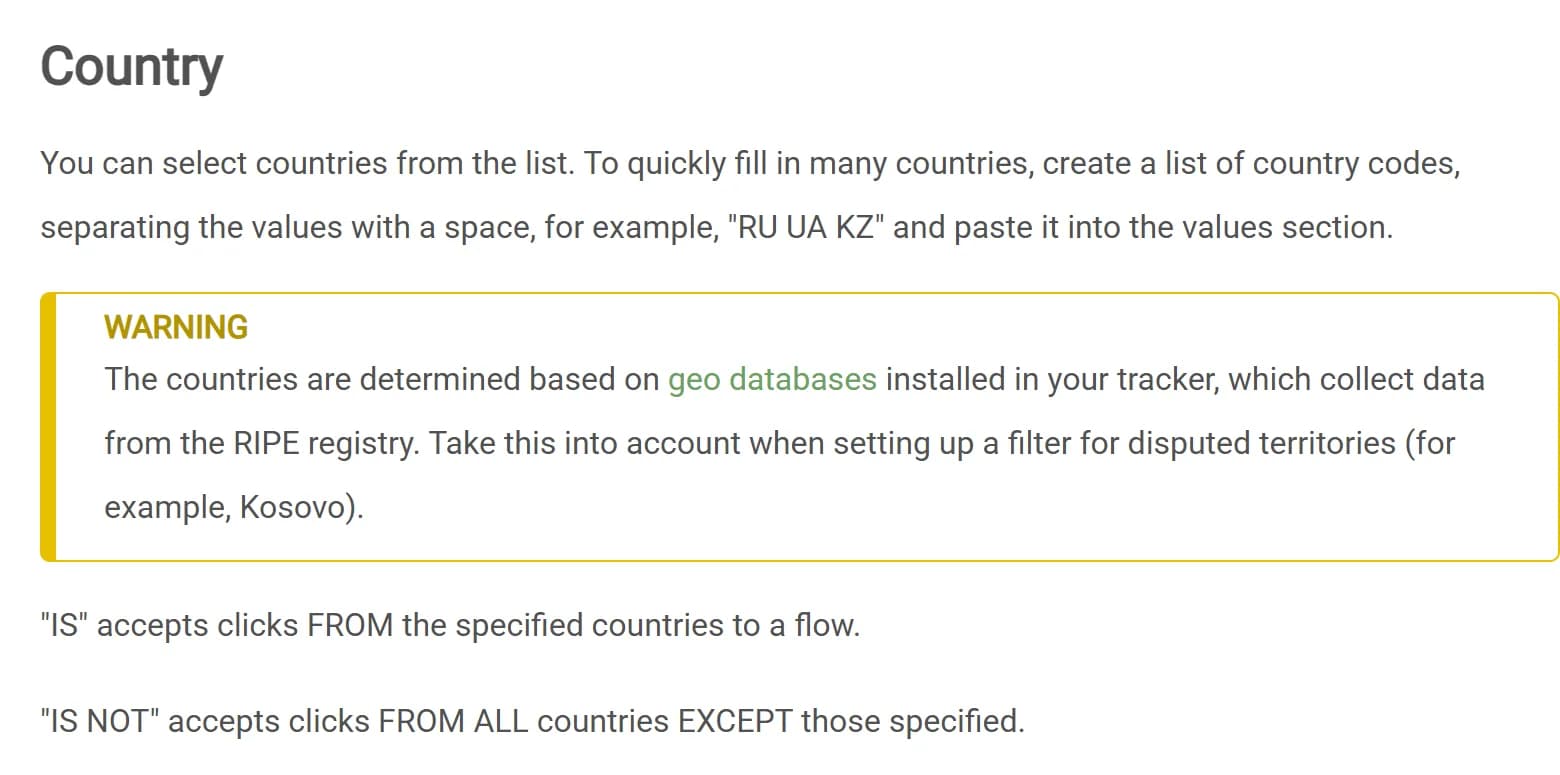
Geo filters are where a tracker earns its fee. Years ago, one of my early traffic experiments was a set of Instagram accounts, nutrition-consultant and healthy-recipe personas, with a link in bio to a weight-loss landing page. The offer accepted only Kyrgyzstan and Kazakhstan, while much of the audience came from Turkey, Spain and Poland, useless for that offer. A tracker would have split it at the link: a Country filter sending KG and KZ to the offer, the default flow sending everyone else to another landing page. Geo databases miss at the edges.
Keitaro is self-hosted on a server you rent. When we checked, Starter was €40 a month billed yearly with 1 domain, Advanced €72 with 100; the currency may vary by region. Starter's single domain leaves no room for a spare. Binom v2 is $149 a month, $104 billed yearly, with unlimited domains; Binom Cloud is $299 a month, no server needed.
Both offer redirectless tracking from code on your own page. Binom's LP Pixel exists for sources that "don't support redirect links (Google Ads, Facebook, MyTarget)," though the offer click still redirects; Keitaro's KClient JS, from the Advanced plan, works "without a visible redirect."
Keitaro is cheaper to start, Binom's flat price covers unlimited domains, and for a few sites a plugin is the honest answer. Pick the interface you can stand at 3 a.m.
Redirects and paid traffic: what Google Ads and Meta accept
A tracker solves the swap on your side. The catch: the whole point of your own redirect is domain1 sending to domain2. When domain2 dies and the network sends domain3, you edit the tracking link so it still starts with domain1 but leads to domain3. Google doesn't accept exactly that.
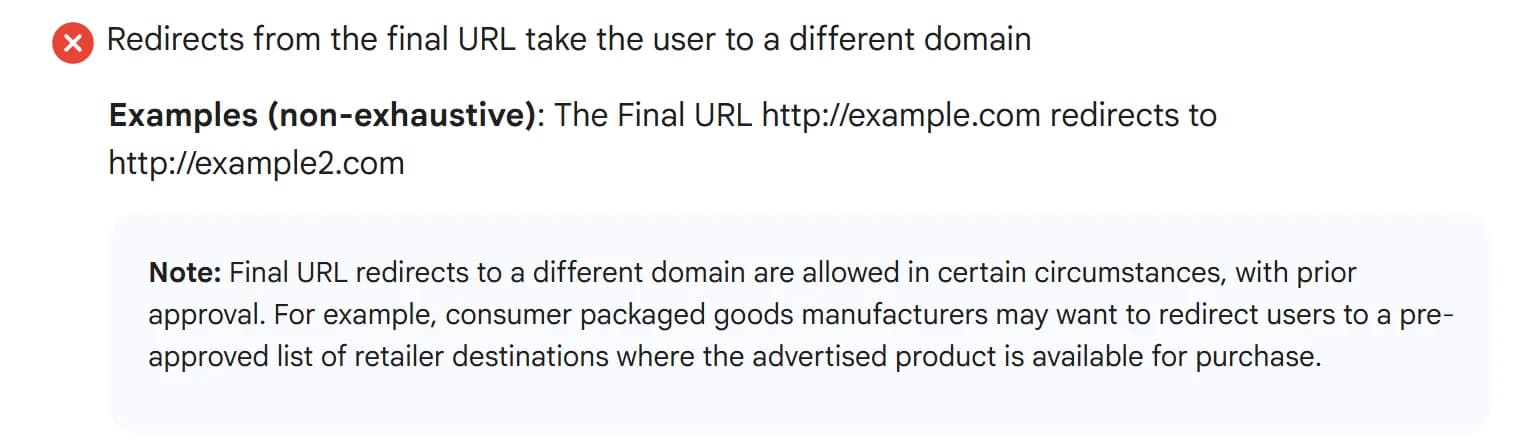
In policy terms, a final URL redirecting to a different domain is Destination mismatch: the ad is disapproved. Google's policy page now adds that such redirects are allowed "in certain circumstances, with prior approval," and its example is consumer goods brands. We found no published way to request that approval for an affiliate setup. Don't build on it.
Showing reviewers something different from users is worse: cloaking under the Circumventing systems policy, with accounts "suspended upon detection and without prior warning." Trackers as such are fine: "using appropriate click trackers and redirecting users is okay" when nothing is hidden, and Google tells advertisers to use a click tracker it has certified.
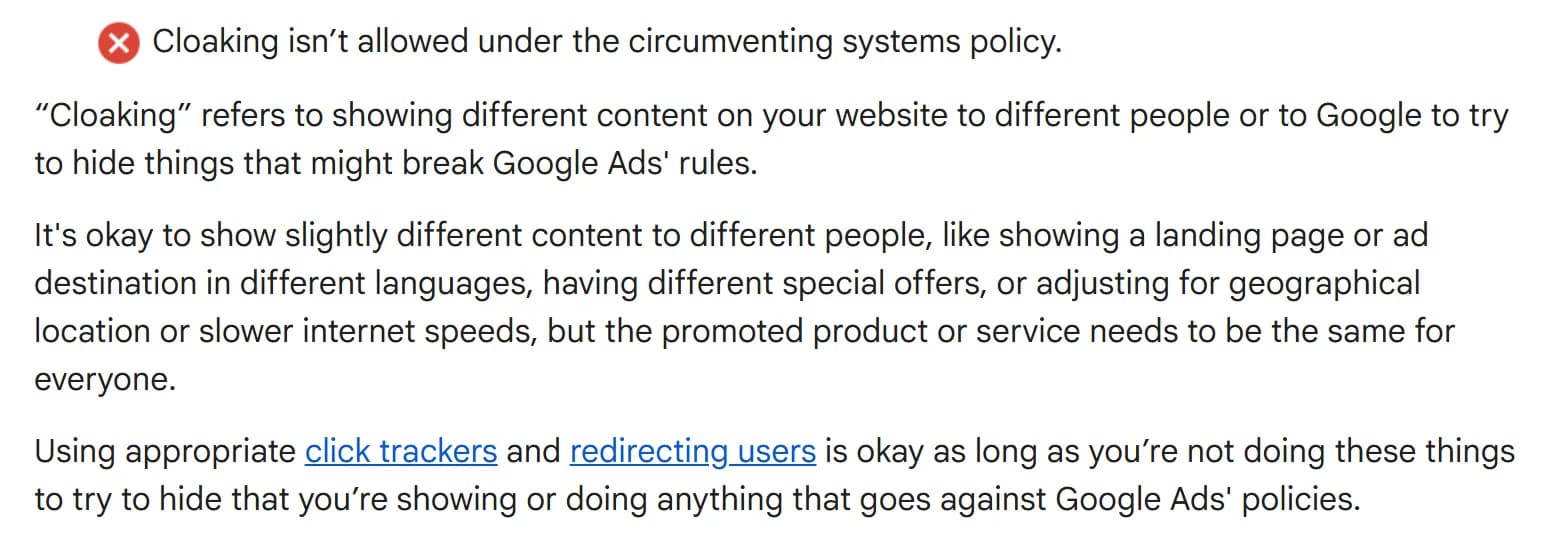
Meta draws the same line. Its Spam standard defines cloaking as presenting different off-platform content "to our integrity systems versus what is shown to users," and counts automatic redirects to "a substantially different domain without any user action" as deceptive.
The setup that survives both: the ad points to your page, final URL on your domain, with real original content. The swappable /go/ or tracker link sits behind the buttons on that page. The domain in the ad never changes; domain3 gets swapped in on the outbound click.
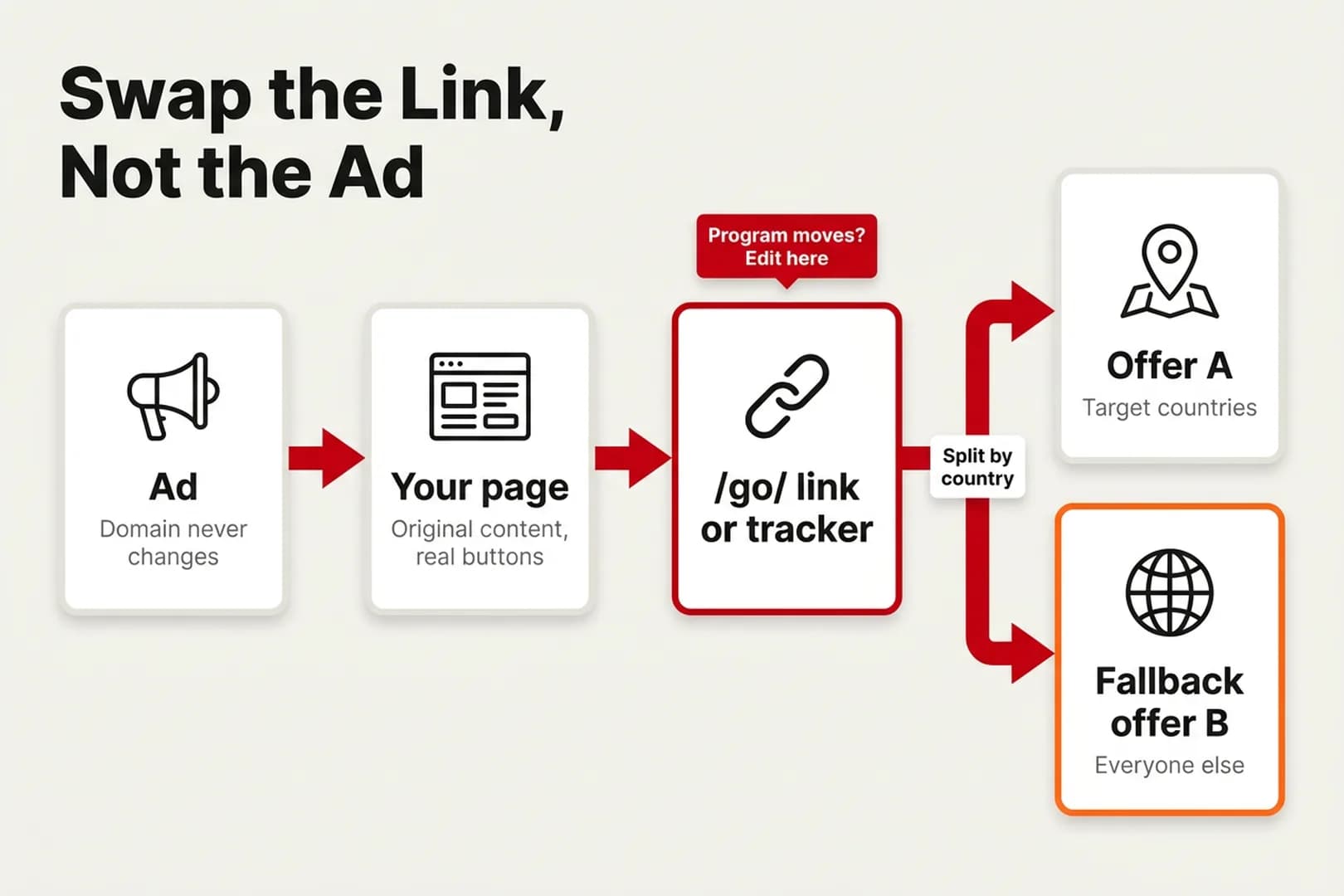
The price is the page: Google's Insufficient original content policy bans "bridge pages, doorways, gateways, or other intermediate pages that are only used to link to other sites." A real review or comparison works. A headline with a button is a bridge page.
Yes, trackers sell the other road: Binom advertises "built-in cloaking systems," and media buyers run them. The price: Google suspends on detection, without warning and for good, and the funnel on that account dies with it. Most of the money I've lost in media buying went on Facebook, pushing ads through without understanding the details.
The legitimate route is an agency account with a live line to moderation, where a manager can explain what your tracking link is and why: a real agency, not a rented account. Google once came down hard on me because I didn't want to hand it the advertiser's details, so expect that question and have the answer ready.
Check the program's rules before you buy traffic
Clearing the platform is half the job, because the program has its own rulebook. Etsy doesn't ban paid traffic outright, but its terms forbid:
- bidding on "Etsy" searches or using its trademarks in paid search, the classic brand bidding ban;
- "direct link PPC activity to Etsy.com";
- social media ads that use your affiliate link;
- sending "traffic through automatic redirects on a website page."
And if the buyer's last click was paid, or a paid click went straight to your affiliate link, there's no commission.
What works is warming traffic on your own ground: a blog, a consultant-style app, a discount prelander. Etsy approves "all unique sites and URLs" separately and bars voucher sites and pop-ups without written permission. Creators who make most of their sales from social media have to go through the Creator Collective.
Etsy's published terms, still from the Awin era, don't say whether a redirect on your own domain counts as altering its links. Ask in writing before you buy traffic to your page or wrap a program's links (Etsy lists etsyaffiliates@etsy.com), and keep the reply.
Checklist: what to do
Questions and answers
Why isn't my affiliate link working?
Usually the program moved networks, the network retired the link or swapped its tracking domain, the offer ended, or an ad blocker stopped the network's domain. Test it in a browser without extensions, then ask your manager whether the domain changed.
What happens to my affiliate links when a program changes networks?
You re-apply and generate new links, since the old ID means nothing in the new network. Old links survive at the networks' discretion: Awin kept most ShareASale links alive, Etsy set a May 15 deadline, and impact.com redirects old Rakuten links for at least a year if you link your accounts.
Why do affiliate networks change tracking domains?
Mostly for delivery: a domain lands on a platform, browser or ad-blocker list, gets compromised, or the network changes trackers; in restricted verticals, networks rotate domains in advance. A swap with notice and an intact subid and postback is routine. Weekly unexplained swaps with falling approvals are a reason to pause traffic.
Does Google Ads allow affiliate links?
We found no rule banning them as such. Google polices the destination: redirects to another domain, bridge pages and cloaking. Send the ad to your own content page, and check the program too: Etsy bans direct-link PPC.
Do I need a tracker for affiliate links, Keitaro or Binom?
For a single site and a handful of programs, a plugin is enough. A tracker pays off with many sites, placements you can't edit, geo splits, media buying or networks that swap domains often.
Author’s conclusion
An affiliate link is a rental. Programs move, networks form alliances, domains get blocked and replaced, and every one of those decisions is made by someone the advertiser pays. The industry's fine. It's just one where the people doing the work carry all the switching costs.
My advice: before the next migration email or domain notice lands, put a link layer you control in front of every program: /go/ links for a site, a tracker for many sites or paid traffic. Test new domains on a slice of traffic, point ads at your own page, keep the swap behind the button, and get each program's yes in writing.
Lu Discover, Editor-in-chief
Sources for this article
- etsy.com — Etsy Affiliates Policy, last updated May 29, 2024 (Awin wording, link changes, hardcoding, cookie periods, paid search and social ad rules, approved sites, Creator Collective)
- reddit.com — r/Etsy: "Etsy Affiliates?" thread on the move from Awin to Rakuten (April 2026)
- success.awin.com — Awin: ShareASale to Awin platform upgrade FAQ ("This link is inactive")
- trackonomics.net — Trackonomics: link rot study of 7,000+ pages on 25 publisher sites (April 2, 2019)
- pubhelp.rakutenadvertising.com — Rakuten Advertising Publisher Help: Rakuten Advertising Partners with impact.com (migration in waves, edited September 30, 2026)
- help.impact.com — impact.com: Rakuten Advertising to impact.com Partner Migration FAQ (redirect for at least a year, linked accounts only, u1 to subId1)
- help.impact.com — impact.com: set up a custom tracking domain (old domain keeps redirecting, coordinate with partners)
- learn.microsoft.com — Microsoft Defender SmartScreen overview (reputation checks and warnings, April 23, 2026)
- easylist.to — EasyPrivacy filter list, October 2026 build (rules for affiliate network tracking domains)
- pubhelp.rakutenadvertising.com — Rakuten Advertising Publisher Help: Ad Blockers and Affiliate Links (internal redirect, edited October 8, 2025)
- hazard.mf.gov.pl — Polish Ministry of Finance: register of domains offering gambling in violation of the law (58,053 entries, checked October 2, 2026)
- gov.br — Brazil Ministry of Finance: more than 50,000 illegal domains blocked with Anatel (June 19, 2026)
- pib.gov.in — India PIB, MeitY reply in Lok Sabha: 1,410 blocking directions for betting and gambling sites and apps, 2022 to February 2025 (March 26, 2025)
- support.google.com — Google Ads Help: about auto-tagging (GCLID must pass through redirects)
- keitaro.io — Keitaro: pricing, plus docs on campaign URLs, flows, bulk Replace, default flow, Country filter and KClient JS (docs.keitaro.io)
- binom.org — Binom: pricing (v2, Cloud), features (bulk editing, built-in cloaking) and docs on LP Pixel (docs.binom.org)
- support.google.com — Google Ads: Destination requirements (Destination mismatch, prior-approval note, appeals)
- support.google.com — Google Ads: Insufficient original content (bridge pages)
- support.google.com — Google Ads: Circumventing systems (cloaking, click trackers, certified trackers)
- transparency.meta.com — Meta Community Standards: Spam (cloaking, deceptive redirects)
Related stories
 Guide
GuideHow Much Budget Do You Need to Test an Offer? What $100 Can and Can't Tell You
 Analysis
Why Most Affiliates Never Scale Past $10K a Month: The Ceiling Is Cash, Caps and Accounts, Not Talent
 Guide
Guide
Comments
0 commentsNo comments yet.
Add a comment