

antidetect browser
Incogniton
Incogniton Review 2026: Fair Opinion on Core Updates, Pricing, AI Assistant and Teams
Antidetect browser for Windows and macOS from a Dutch company, with a REST API, SDKs and an MCP server from the Entrepreneur plan and cloud Android phones at $3 a month; free plan with 10 profiles for 2 months, then 3; paid from $19.99 a month.
Affiliate link: we may earn a commission if you sign up. It never changes our score or verdict. How we make money
| Type | Antidetect browser |
|---|
| Website | incogniton.com |
|---|---|
| hello@incogniton.com | |
| Socials | |
| In our catalog since | Oct 22, 2026 |
About Incogniton
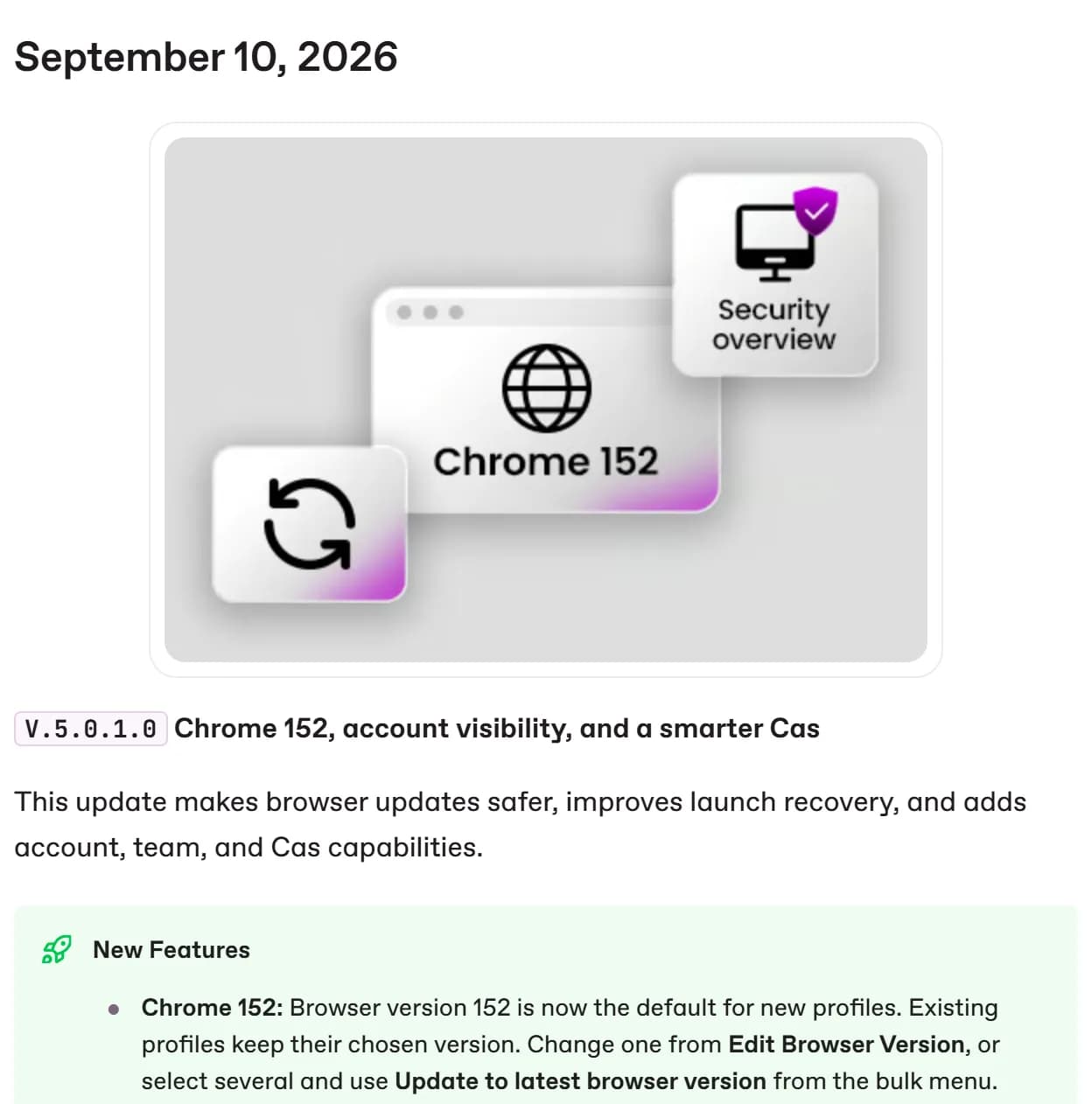
Incogniton is an antidetect browser for Windows and macOS run by WorkingGreen B.V. in the Netherlands. Every profile gets its own fingerprint and an isolated environment, and the company states that it uses real device fingerprints. New profiles use the Chrome version the vendor sets as default, Chrome 152 since September 10, 2026, while existing profiles keep their version.
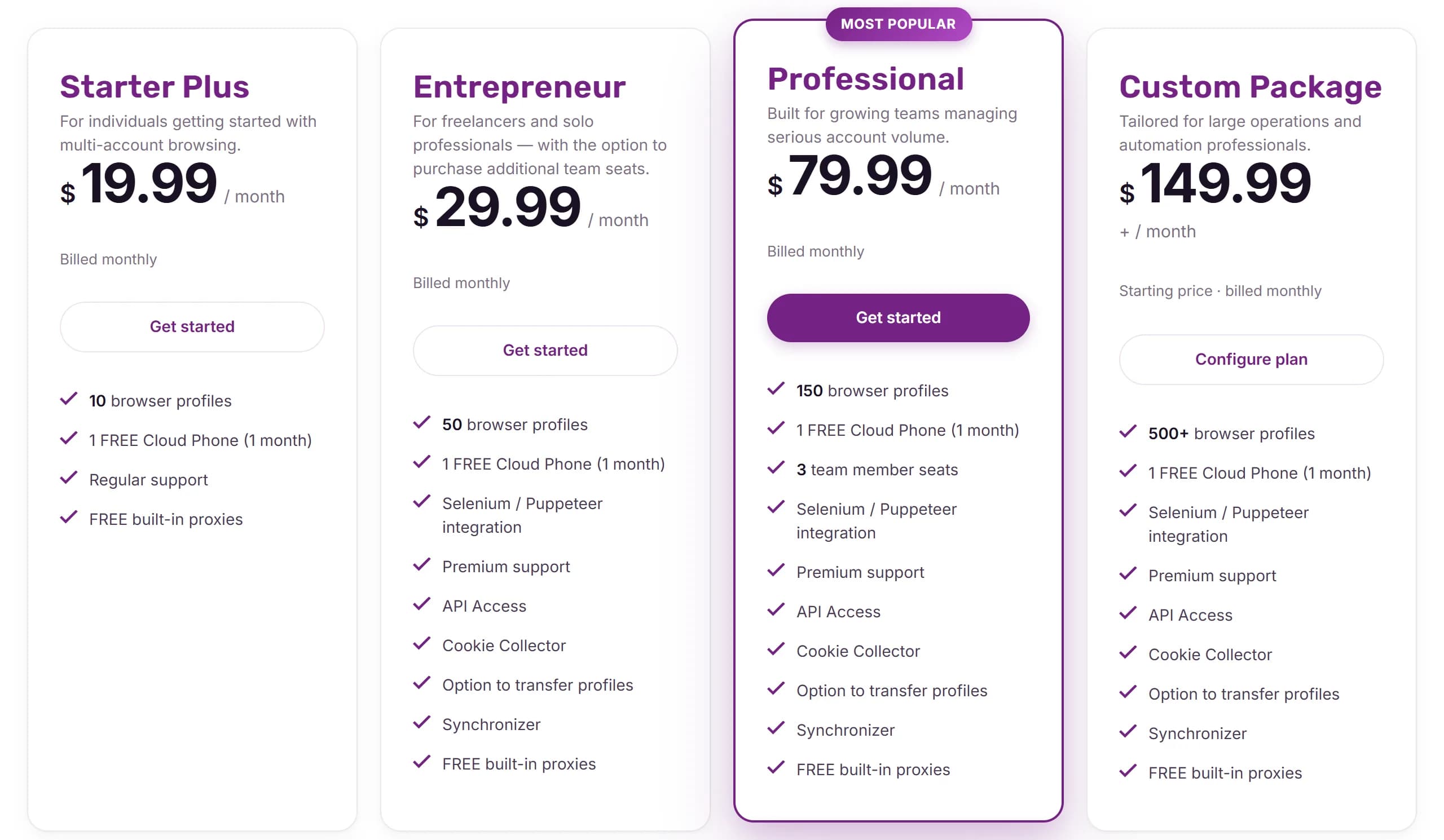
The free plan gives 10 profiles for the first 2 months and 3 after that, without API, synchronizer or team features. Starter Plus costs $19.99 a month for 10 profiles, Entrepreneur $29.99 for 50, Professional $79.99 for 150 with 3 team seats and Custom from $149.99 for 500 or more with 10 seats, up to 25 at $5 per extra seat. Paying for 6 months brings Professional to $55.99 a month and paying for a year to $47.99. Payment is by card, PayPal or crypto via Coinbase.
From Entrepreneur up there is a REST API with Selenium and Puppeteer support, Node.js and Python SDKs, a CLI, an MCP server, a window synchronizer and the AI assistant Cas. Cloud phones are Android devices billed at $3 per phone a month with 30 minutes of run time included and extra minutes from $8 per 1,000. Incogniton's affiliate program pays 20% recurring commission for as long as the referred customer stays active, with payouts from $10.
Incogniton: our review

Incogniton is a Dutch antidetect with a solid API, an MCP server, an AI assistant that drives profiles and a team activity log. Its weak spot is the core: Chrome 152 on October 22, with Chrome on 156. For 100 profiles you need Professional at $79.99 a month.
Incogniton is the quiet one among antidetects: a Dutch company, a public changelog going back to 2020 and a 2026 full of AI features. Its built-in assistant, Cas, can open pages, click through steps and restore profiles on command, and the API with SDKs and an MCP server starts at $29.99 a month. The weak spot is the browser core. On October 22, 2026, new profiles get Chrome 152 while Chrome itself is on 156, because Incogniton moves 3 versions at a time, about once a quarter.
This review is built on what Incogniton publishes, all checked on October 22, 2026: the pricing pages, the changelog, the API docs and the terms of service. For how its core compares with Dolphin, AdsPower, Octo and GoLogin, see Antidetect Browsers for Media Buyers 2026: Real Differences.
What is Incogniton, and who makes it?
An antidetect browser for Windows and macOS on a Chromium core. It's made by WorkingGreen B.V., registered in Schiphol Rijk near Amsterdam, and its support team is based in Amsterdam. The changelog goes back to July 2020. There's no Linux version and no Firefox engine.
Each profile is a separate browser with its own fingerprint, proxy, cookies and extensions. In June 2026 Incogniton released V5, a rebuilt app with a Proxy Shop, a public automation API, an MCP server and full team management. The latest version, 5.0.1.3, came out on October 19, 2026.
How up to date is Incogniton's browser core?
Behind Chrome by 4 versions on October 22. Version 5.0.1.0 made Chrome 152 the default for new profiles on September 10, 2026. Since then Chrome has released 153, 154, 155 and 156, and Incogniton's October 19 update didn't change the core.
How Incogniton has moved, from its changelog and Chrome's release schedule:
- 141. Chrome stable release: September 30, 2025. Default in Incogniton: October 16, 2025. Days after Chrome: 16.
- 143. Chrome stable release: December 2, 2025. Default in Incogniton: December 17, 2025. Days after Chrome: 15.
- 146. Chrome stable release: March 10, 2026. Default in Incogniton: March 12, 2026. Days after Chrome: 2.
- 149. Chrome stable release: June 2, 2026. Default in Incogniton: June 23, 2026. Days after Chrome: 21.
- 152. Chrome stable release: August 25, 2026. Default in Incogniton: September 10, 2026. Days after Chrome: 16.
- 153 to 156. Chrome stable release: September 8 to October 20, 2026. Default in Incogniton: not yet. Days after Chrome: 44 days and counting for 153.
The pattern is fast jumps with long pauses. When Incogniton updates, it does so within 3 weeks of Chrome, but it skips versions: 146, then 149, then 152. That rhythm worked when Chrome shipped every 4 weeks. Since September 2026 Chrome ships every 2 weeks, so the same pause now leaves profiles 4 to 6 versions behind. Incogniton hasn't said whether it will update more often.
Old profiles stay old. New profiles get the new core, but existing ones keep their version until you change it in Edit Browser Version or select several and run Update to latest browser version. A profile created in March is still on Chrome 146 unless you update it.
How good are Incogniton's fingerprints?
Incogniton doesn't explain its method. The pricing page promises "real device fingerprints" and says profiles pass Pixelscan, BrowserLeaks and BrowserScan. Those checkers show whether a profile is consistent; they don't show what an ad platform's own detection sees. Since June 2026 you can re-roll a profile's fingerprint from the Details tab without opening the editor, and Widevine support lets profiles play DRM-protected video.
What outside sources say. In Browser Polygraph, an academic study presented at IMC 2024 and run on a financial company's traffic, the detector caught 78% of sessions from Incogniton 3.2.7.7, a version from around May 2023. It says nothing about today's V5. It does say that detectors study antidetects by name, and a profile with a mismatched time zone, fonts or proxy gets caught no matter which core it runs.
Automation: API, MCP and the Cas assistant
The API comes with Entrepreneur, from $29.99 a month. It's a local REST API for creating, launching, stopping, updating and deleting profiles and for cookies, with Puppeteer and Selenium endpoints. Incogniton publishes Node.js and Python SDKs, a CLI and examples for Playwright, Puppeteer and Selenium. Starter Plus and the free plan have no API.
The MCP server connects AI tools. The app generates ready configs for Claude Desktop, Claude Code, Cursor, Windsurf, VS Code and Codex CLI, and since October 19 AI tools connected through MCP can control the browsers they launch.
Cas is the built-in AI assistant. It arrived in March 2026, learned to drive real profiles in July and to remember how you work in September. You can ask it to open pages and click through steps, manage tabs, start and stop profiles, run a real proxy check or restore a profile from a backup; it asks for confirmation before restoring. There's no classic RPA builder.
2 more tools on Entrepreneur and above: the Synchronizer, which repeats clicks from a main profile in others, and the Cookie Collector, which visits saved URL lists to collect cookies before you use a profile for account farming.
Team work: seats, roles and the activity log
Seats start on Professional. Starter Plus and Entrepreneur include no team seats, though Entrepreneur lets you buy extra ones at a price the site doesn't show. Professional includes 3 team member seats for $79.99 a month. The Custom package starts at 500 profiles with 10 seats, and each extra seat costs $5 a month on monthly billing.
Control is detailed. V5 brought roles with a permission matrix, and since September 2026 team admins have an Activity tab: login history, failed logins, profile sessions, who's online and total active time per member, exportable to CSV or Excel. Admins can also turn off 2FA for a member and hide update prompts for a role.
Mobile: cloud Android phones
Incogniton has no mobile browser profiles that we found. For mobile work it rents cloud Android phones: $3 a phone a month, with 30 minutes of running time included. You pick the device model and Android version, attach a built-in proxy or your own, and can share phones with team members. The pricing page calls each one a real Android device on ARM hardware, not an emulator; the docs call it a virtual smartphone on cloud servers.
The $3 is only the start. Extra running minutes cost $8 per 1,000 or $15 per 2,000, shared across all your phones. By our math, a phone that runs 1 hour a day for 30 days needs about 1,800 minutes, so it costs around $18 a month. Every paid plan includes 1 cloud phone free for the first month.
Signing up, refunds and our link
You can start free, but not for long. The free starter package gives 10 profiles for the first 2 months, then drops to 3. No card is needed. It has no API, Synchronizer, Cookie Collector, team or profile transfer.
Refunds are tight. Incogniton's terms allow a refund only within 24 hours of purchase. Test on the free plan first, and buy only when you're sure.
Payment is by PayPal, Visa, Mastercard or American Express, or in BTC, ETH, LTC, DOGE or DAI through Coinbase; VAT may apply. Every plan includes free built-in proxies, but for ad accounts you'll still want your own residential or mobile proxies. Sign up through our link.
Incogniton pricing in October 2026
Prices from the pricing page on October 22, 2026, in USD:
- Starter Plus. Profiles: 10. Team seats: none. 1 month: $19.99. 6 months, paid up front: $83.94 ($13.99 a month). 12 months, paid up front: $143.88 ($11.99 a month).
- Entrepreneur. Profiles: 50. Team seats: extra seats for a fee. 1 month: $29.99. 6 months, paid up front: $125.94 ($20.99 a month). 12 months, paid up front: $215.88 ($17.99 a month).
- Professional. Profiles: 150. Team seats: 3. 1 month: $79.99. 6 months, paid up front: $335.94 ($55.99 a month). 12 months, paid up front: $575.88 ($47.99 a month).
- Custom. Profiles: 500 to 5,000. Team seats: 10 to 25. 1 month: from $149.99. 6 months, paid up front: from $629.94 ($104.99 a month). 12 months, paid up front: from $1,079.88 ($89.99 a month).
Read the pricing page carefully. For 6 and 12 months it shows only a price per month, but you pay the whole term up front: Professional costs $335.94 for 6 months or $575.88 for a year. That's 30% and 40% off monthly billing. The page opens on the 6-month view, so the first price you see isn't what you pay. The free plan, 10 profiles for 2 months and then 3, is covered above. On Custom, each extra 500 profiles adds $50 a month on monthly billing.
For a media buyer the math is uneven. 50 profiles with the API cost $29.99, but the next step is 150 profiles for $79.99, so 100 profiles cost as much as 150. On a yearly plan Professional works out to $47.99 a month, paid as $575.88 up front.
If you want to refer people yourself, Incogniton's affiliate program pays 20% of referred customers' payments for as long as they stay active.
Incogniton vs other antidetect browsers
How it compares at about 100 profiles, on monthly billing, October 22, 2026:
- Incogniton. 100 profiles: $79.99 (Professional, 150). 3 to 4 people: $79.99 (3 seats). On the free plan: 10 profiles for 2 months, then 3. Mobile: cloud Android, $3 a phone plus minutes. Chromium kernel on October 22: 152.
- AdsPower. 100 profiles: $36. 3 to 4 people: $46 (3 users). On the free plan: 2 profiles, synchronizer. Mobile: iOS app. Chromium kernel on October 22: 155.
- GoLogin. 100 profiles: $39. 3 to 4 people: $109 (Business). On the free plan: 3 profiles. Mobile: Android and iOS apps, Cloud Android. Chromium kernel on October 22: Orbita 153.
- Octo Browser. 100 profiles: 79 EUR. 3 to 4 people: 169 EUR (Team). On the free plan: none, 2-day trial. Mobile: iOS and Android apps. Chromium kernel on October 22: Octium 156.
- Multilogin. 100 profiles: $40 (Business). 3 to 4 people: $40. On the free plan: 5 cloud profiles. Mobile: cloud Android on real devices. Chromium kernel on October 22: Mimic 155.
- Dolphin{anty}. 100 profiles: $89. 3 to 4 people: $109 (3 users). On the free plan: 3 profiles. Mobile: none yet. Chromium kernel on October 22: 155.
- BitBrowser. 100 profiles: $15 (4 users). 3 to 4 people: $15. On the free plan: 10 profiles, API, RPA. Mobile: cloud Android, real iPhones. Chromium kernel on October 22: not published (last named: 134).
Incogniton vs AdsPower is automation and team control against price and core freshness. AdsPower charges $36 for 100 profiles against $79.99 and runs Chrome 155; Incogniton has the MCP server, the Cas assistant and a detailed team activity log. See our AdsPower review.
Incogniton vs GoLogin is close on the core, 152 against Orbita 153, but not on structure. GoLogin is cheaper for 100 profiles and has phone apps; Incogniton includes 3 seats on Professional, while GoLogin needs Business for a team. Read our GoLogin review.
If you sign up for one of the others, here are our referral links: AdsPower, GoLogin, Octo Browser and Dolphin{anty}.
Pros and cons of Incogniton
Pros
- REST API with Node.js and Python SDKs, a CLI and an MCP server from $29.99 a month
- Cas, a built-in AI assistant that drives profiles, manages tabs and checks proxies on command
- Team activity log with logins, sessions and active time, exportable to CSV or Excel
- Roles with a permission matrix and 3 seats included on Professional
- When the core is updated, it lands within 3 weeks of Chrome
- 40% off on yearly billing
- Cloud Android phones from $3 a month, and 1 free for the first month on paid plans
- A Dutch company with a detailed public changelog since 2020
Cons
- Chrome 152 by default on October 22, 4 versions behind Chrome 156
- Updates skip versions, and existing profiles stay on their old core until you update them
- 100 profiles cost $79.99 a month, more than 2 times what AdsPower or GoLogin charge
- No API, Synchronizer or Cookie Collector on Starter Plus or the free plan
- The free plan drops from 10 profiles to 3 after 2 months
- Refunds only within 24 hours of purchase
- The $3 cloud phone includes only 30 minutes of running time
- No mobile browser profiles found, and no Linux version
Checklist: what to do
Questions about Incogniton
Is Incogniton free?
Partly. The free starter package gives 10 profiles for the first 2 months, then 3, with no card required. It has no API, Synchronizer, Cookie Collector or team features.
How much does Incogniton cost?
On monthly billing, Starter Plus costs $19.99 for 10 profiles, Entrepreneur $29.99 for 50 and Professional $79.99 for 150 with 3 team seats. Custom starts at $149.99 for 500 profiles and 10 seats. Paying 6 months up front saves 30% and a year 40%: Professional costs $335.94 for 6 months or $575.88 for a year.
Which Chrome version does Incogniton use?
Chrome 152 is the default for new profiles since September 10, 2026. On October 22 Chrome is on 156. Existing profiles keep their version until you update them.
Does Incogniton have an API?
Yes, from the Entrepreneur plan at $29.99 a month: a local REST API, Node.js and Python SDKs, a CLI, an MCP server and examples for Playwright, Puppeteer and Selenium.
Does Incogniton have mobile profiles?
We didn't find mobile browser profiles in its docs. Incogniton rents cloud Android phones instead, $3 a phone a month with 30 minutes of running time; extra minutes cost from $8 per 1,000.
Is Incogniton safe?
We found no reported incidents. The company is registered in the Netherlands and publishes a detailed changelog. The risk is the core lag: check the version before you run expensive accounts.
Incogniton or AdsPower: which is better?
AdsPower is cheaper for 100 profiles and runs a newer core, Chrome 155. Incogniton is stronger in automation and team control, with an MCP server, the Cas assistant and an activity log. For budget and core freshness, AdsPower; for automation and team oversight, Incogniton.
Compare Incogniton with other antidetect browsers
- Incogniton vs GoLogin 2026: Which Mid-Range Antidetect Wins?
- Best Antidetect Browser for Android 2026: Cloud Phones, Android Apps and Emulated Profiles
- Cheapest Antidetect Browser With Team Features 2026: What 3, 5 and 10 People Really Pay
- Antidetect Browser Pricing Comparison 2026: What 31 Browsers Really Cost
- Average rating 5.0
- Average rating 4.8
- Average rating 4.8
- Average rating 4.7
Our verdict on Incogniton
A tidy, well-documented antidetect for automation-minded solo buyers and small teams, held back by a core that skips Chrome versions and a steep step up to 100 profiles.
Incogniton does a lot right in 2026: an API with SDKs and MCP from $29.99, an AI assistant that actually drives profiles, a detailed team activity log, and a changelog that tells you what changed. The core is the problem. It moves 3 versions at a time, and with Chrome now shipping every 2 weeks, that leaves new profiles on Chrome 152 while Chrome is on 156. And at 100 profiles you pay for 150.
My advice: start on the free 10 profiles, and if the tools fit, take Entrepreneur on a long term for automation or Professional for a team of 3. Watch the changelog, and update profiles in bulk after each core release. If your accounts depend on a fresh core today, run them in Octo, Dolphin or AdsPower and keep Incogniton for automation and less sensitive work.
Member reviews of Incogniton
No member reviews yet. Member reviews count 5 times more than ratings from other sites. Sign up free to write one.
No member reviews yet. Be the first to rate Incogniton.
Loading…
Are you this company? Claim the page
Incogniton reviews around the web
Public reviews from Trustpilot. Their ratings count toward the users’ score with less weight than member reviews.
 David
GREAT BROWSER GREAT BROWSER
- Arkadiy Stepanov
Good soft!! Good soft!!
- Serega
I don't have any words to describe my experience with this browser, 1st issue - when I added different proxy from DIFFERENT COUNTRY after removing the profile - IP didn't change when I checked it, I mean after running the profile it was changed, but still time, etc was showed as the first one, what?? restarting browser helped. Then I don't know why but everytime google, no matter what proxy I used just required me to pass captcha, while other anti-detect browser dolphin, even tho it's also kinda shitty, but it didn't have issues like that. I tried to use noise on different things, it didn't help as well. And the icing on the cake - Incognition just ate all of my available RAM, freaking created i don't know 92 background processes for 1 running windows with 4 tabs. Insane crap, just like to delete it immediately. And yeah i still tried to create an account on that on 1 platform - yeah after creating of couse it was banned, what the hell
About these reviews. We gather them from public pages so you can see how Incogniton is rated outside aliencpa. We take the latest reviews from each source, without picking them by tone. Each is quoted in full, word for word, and translated into English where marked; the source icon links to the original. We don’t verify them, and our editorial policy doesn’t cover them. Their ratings count toward the users’ score, but member reviews from aliencpa readers always weigh more and come first. Worked with Incogniton? Write a member review.
Incogniton is listed in our antidetect browser catalog. Paid packages can pin a card and extend it; they never buy a rating, a review or a verdict.
Comments on Incogniton
Open to everyone, no sign-up. Comments don’t change the rating.
No comments yet.
Add a comment