

What Fingerprint Checkers Really Check: We Ran 4 Broken Browsers Through 8 of Them

Independent and reader-supported. Some links here are affiliate links: if you sign up through them, we may earn a commission at no cost to you. It never changes our scores or verdicts. Affiliate disclosure
Contents 10
Every antidetect browser vendor has a screenshot with green checkmarks. GoLogin publishes a test of 12 browsers on 3 checkers, Kameleo runs a weekly masking report, ShardBrowser lists 100% on BrowserScan in its README, and RoxyBrowser's home page says it "can bypass renowned detection tools, including Fingerprint, CreepJS." Media buyers do the same before they log into an ad account: open Pixelscan, wait for the green word, go.
So what does a green result actually tell you? To find out, we built 4 browsers with known flaws and ran each through 8 public checkers on October 23, 2026, then read what the checkers say about themselves and who runs them. I've used Dolphin, Linken Sphere, AdsPower and Multilogin in my own work; this piece is built on that test and on what the checkers, the vendors and detection companies publish. For how detection works on the other side, see How Antidetect Browsers Get Caught in 2026.
How did we test the checkers?
We didn't test an antidetect. We tested the checkers. The idea is simple: if you know exactly what's wrong with a browser, you can see which checker notices it. All 4 setups ran on 1 Windows 11 PC in Chrome 156, driven by Playwright, the automation library that many antidetect APIs plug into. No antidetect, no proxy, 1 run per checker, each in a fresh browser context.
The 4 browsers and their flaws:
- Stock headless. Chrome exactly as Playwright starts it in headless mode: "HeadlessChrome" in the user agent, the webdriver flag on, and the PC's own time zone, which belongs to a neighboring country with the same UTC offset as the IP.
- Hidden automation. The same browser with the normal Chrome user agent, the automation flag switched off and a time zone in the IP's country. It's still controlled by a script through the Chrome DevTools Protocol (CDP).
- Fake Safari. Setup 2, but the user agent claims Safari 26 on macOS. Underneath it's still Chromium on Windows with a Direct3D graphics renderer.
- Wrong time zone. Setup 2, but the time zone is set to Los Angeles while the IP is in Europe.
The 8 checkers: Pixelscan, BrowserScan, Iphey and Whoer, which give a score or a verdict; Sannysoft and CreepJS, which show test results without a final grade; and 2 tools built by detection people, Fingerprint's playground and deviceandbrowserinfo.com by Antoine Vastel, Head of Research at Castle.
What did the checkers catch?
- Pixelscan. 1. Stock headless: Inconsistent, automation detected. 2. Hidden automation: Consistent, no automation. 3. Fake Safari: Inconsistent, masking and automation detected. 4. Wrong time zone: Inconsistent, time zone spoofed.
- BrowserScan. 1. Stock headless: 85%, bot detected. 2. Hidden automation: 100%, no bot. 3. Fake Safari: 95%, no bot. 4. Wrong time zone: 90%.
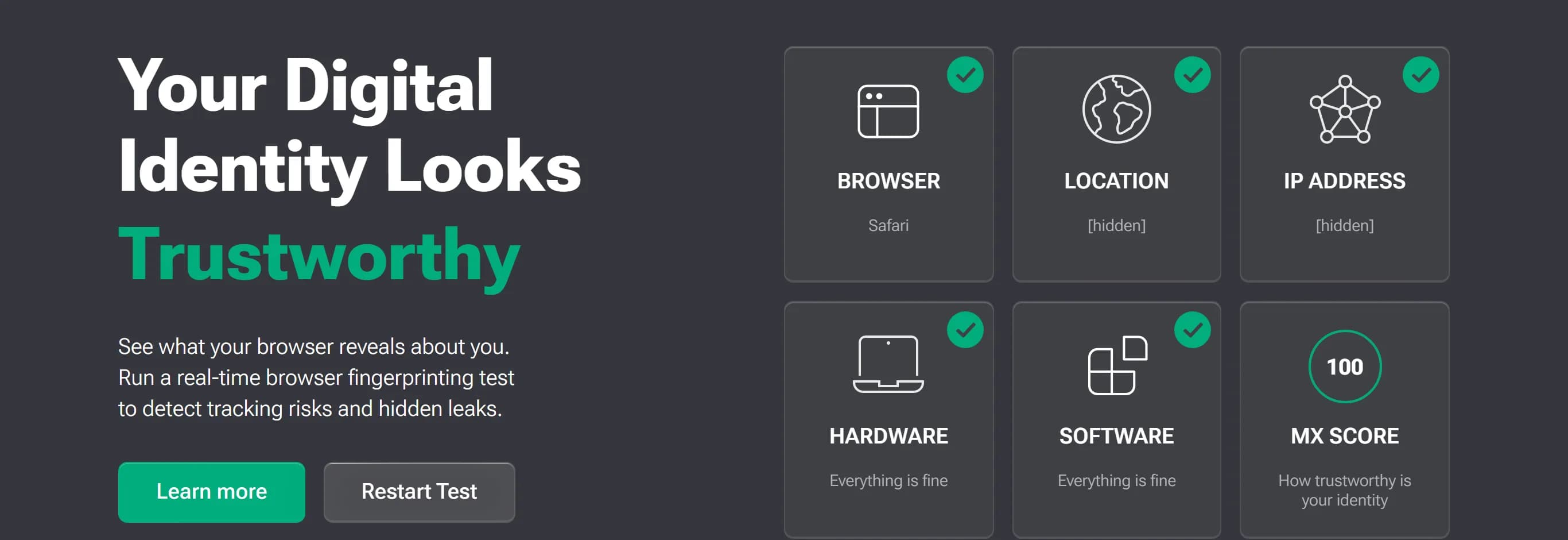
- Iphey. 1. Stock headless: Unreliable, 60. 2. Hidden automation: Unreliable, 90. 3. Fake Safari: Trustworthy, 100. 4. Wrong time zone: Unreliable, 80.
- Whoer. 1. Stock headless: Stopped by the site's bot check. 2. Hidden automation: 100%. 3. Fake Safari: 100%. 4. Wrong time zone: 90%.
- Sannysoft. 1. Stock headless: Webdriver test failed. 2. Hidden automation: All passed. 3. Fake Safari: All passed. 4. Wrong time zone: All passed.
- CreepJS. 1. Stock headless: 100% headless. 2. Hidden automation: 33% headless. 3. Fake Safari: 33% headless. 4. Wrong time zone: 33% headless.
- deviceandbrowserinfo.com. 1. Stock headless: Bot. 2. Hidden automation: Bot (CDP automation). 3. Fake Safari: Bot (CDP automation). 4. Wrong time zone: Bot (CDP automation).
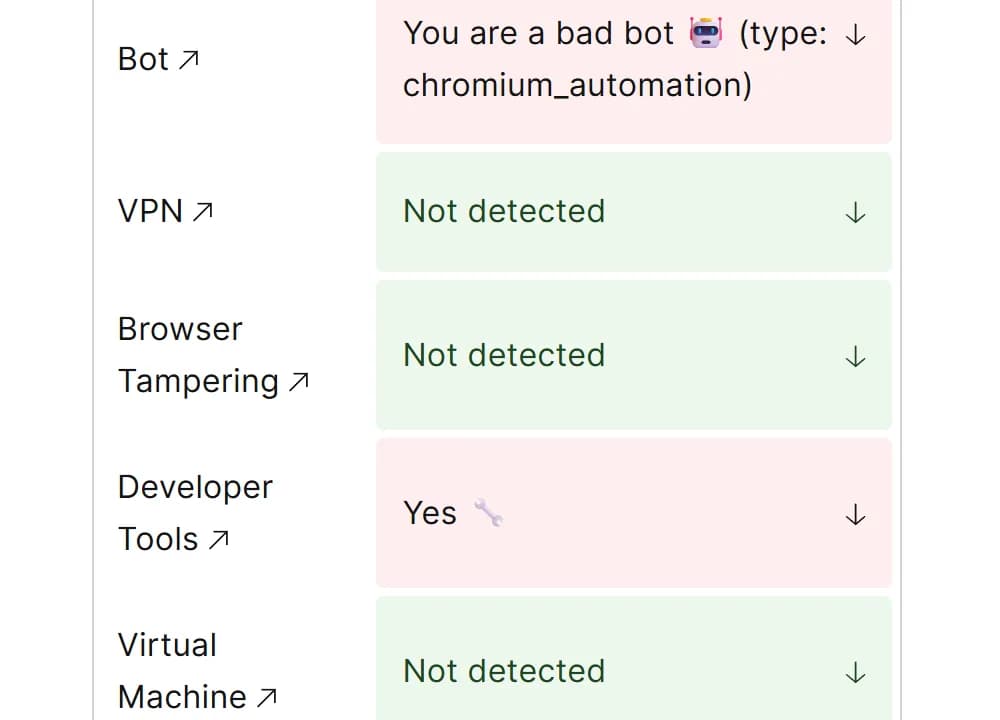
- Fingerprint playground. 1. Stock headless: Bad bot, VPN, DevTools. 2. Hidden automation: Bad bot, DevTools. 3. Fake Safari: Tampering, DevTools. 4. Wrong time zone: Bad bot, VPN, DevTools.
The wrong time zone was the easy one. Every scoring checker noticed it: Pixelscan said "Timezone spoofed," BrowserScan took off 10%, Iphey dropped to 80, Whoer to 90, and Fingerprint flagged a VPN by time zone mismatch. BrowserScan and Fingerprint also caught the subtler case in setup 1, a time zone from the wrong country with the right offset. Pixelscan didn't.
Automation was the hard one. The browser in setup 2 was run by a script from start to finish. Pixelscan called it "consistent" with "No automated behavior detected," BrowserScan gave it 100% with no bot, Whoer 100%, and Sannysoft passed every test. Only Iphey flagged "an automated browser environment signal," and only while the browser said it was Chrome. The 2 tools from detection people flagged it as automation every time.
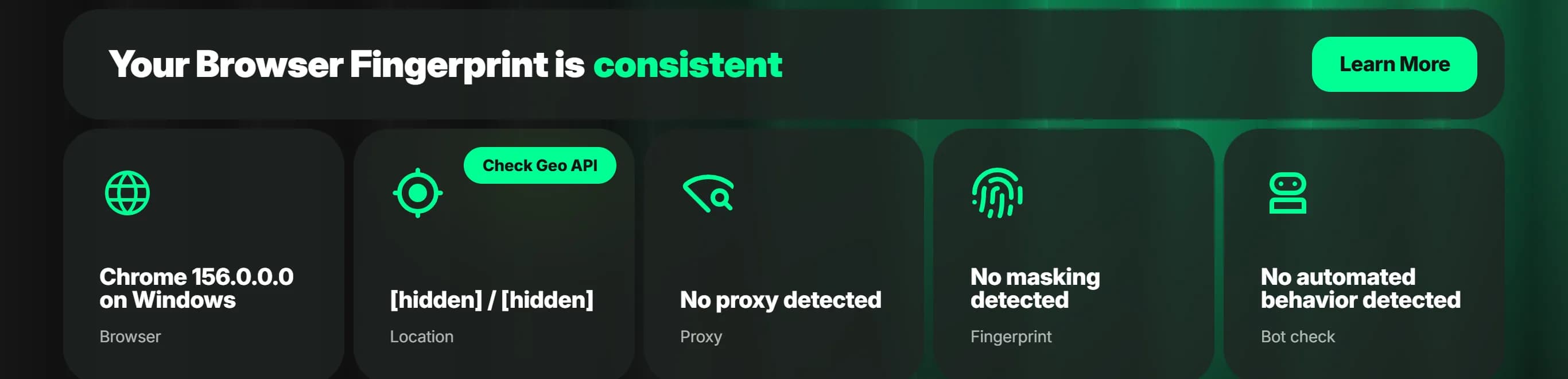
The fake Safari split the field. Pixelscan caught it ("Masking detected") and so did Fingerprint ("Browser Tampering"). BrowserScan noticed it too ("Different browser version," with the note "It looks like you changed the UserAgent"), took off just 5% and still showed 95%, although its own browser checker page says it "Detects whether the browser kernel version matches the UA." Iphey rated it 100, "Trustworthy," with "No suspicious signals detected," while its own data showed a Direct3D graphics renderer that no Mac has. The same engine with the same automation was flagged when it said Chrome and passed when it said Safari.
Remember what this is. 4 deliberately broken browsers on 1 machine, 1 run each, on 1 day. A real antidetect patches far more than we did, so this says nothing about any vendor. It shows what each checker looks at, and that the scoring ones barely look at automation.
What does each checker actually measure?
Pixelscan gives a consistency verdict. Its about page says it "evaluates the consistency and detectability of your browser environment," including user agent integrity, OS consistency, rendering signals, hardware, time zone and language, and automation indicators, and that a mismatch such as a "Windows user-agent with macOS signals" gets highlighted "immediately." In our test it did exactly that. Consistent means the parts agree with each other, not that a platform will trust them.
BrowserScan shows a "Browser fingerprint authenticity" percentage and takes off points for each finding we saw: 10% for "Different time zones," 5% for "Bot Control," 5% for "Different browser version." It publishes no formula. A fake browser at 95% shows that the number is a sum of deductions, not a probability that you'll pass anywhere.
Iphey shows an "MX Score" and a Trustworthy or Unreliable verdict. Its page credits "Fingerprint technology powered by MixVisit," an open-source fingerprint library whose README calls iphey.com its demo. Iphey says it compares your settings with "our databases of browser fingerprints, collected from real people," and that a low score "may be due to the use of low-quality proxies, a mismatch between your time zone and your IP, or clear signs of automation."
Whoer shows "Your disguise" as a percentage. By its own description the score "shows how secure your connection is when using a VPN or proxy" and checks "for potential leaks like DNS, WebRTC, and IP leaks." It's about the connection, not the browser fingerprint, which is why a fake Safari got 100%.
Sannysoft is a page of classic headless tests, labeled as Intoli's tests plus fpScanner. It caught only the browser that announced itself as headless.
CreepJS gives no pass or fail. It shows raw signals and percentages such as "headless" and "like headless." Its author, GitHub user abrahamjuliot, describes the goal as "to shed light on weaknesses and privacy leaks among modern anti-fingerprinting extensions and browsers," and warns that "The ONLY official live deployment is on GitHub Pages"; other domains claiming to be CreepJS should be "treated as a malicious honeypot."
BrowserLeaks gives no score at all: it lists raw values for IP, WebRTC, canvas, WebGL, fonts, TLS and more. That makes it the best place to compare a profile against what it claims.
deviceandbrowserinfo.com lists bot signals as true or false and says plainly what it doesn't cover: "This test does not use IP reputation or user behavior."
Fingerprint's playground shows the same signals Fingerprint sells to sites, plus a suspect score that its docs call "a weighted representation of all Smart Signals present in the payload." It also showed velocity signals, how many IPs and linked visitor IDs the same device used in the past 24 hours. No single-visit checker has that history.
Who runs the checkers you trust?
- Pixelscan — No company named. Partner offers, such as 20% off Multilogin and 35% off NodeMaven.
- BrowserScan — No company named. Its "Antidetect Browser" menu link goes to AdsPower.
- Iphey — No company named; powered by MixVisit. Partner offers, including GoLogin and a proxy seller.
- Whoer — No company named. Its own VPN; promotes residential IPs and a multi-account browser.
- CreepJS — Individual developer on GitHub. Nothing.
- BrowserLeaks — No company named. Nothing; says it doesn't store fingerprints.
- deviceandbrowserinfo.com — Antoine Vastel, Head of Research at Castle. Proxy detection and other fraud data.
- Fingerprint playground — Fingerprint. Device identification for sites.
Pixelscan's privacy policy is worth reading in full. It says: "Most publicly available IP, proxy, and browser fingerprint tests are, in fact, honeypots created by anti-fraud companies." In the same policy Pixelscan says it stores "browser fingerprint information and IP addresses of our visitors" and may share anonymized data with partners "to indicate to them when their end-users are passing or failing our tests." Who are the partners? "Our partners are web bot and anti-detect browser developers interested in improving quality of their services." In plain words, antidetect developers can learn when their users fail Pixelscan, which makes a Pixelscan pass something vendors can tune for. That is not the same thing as what Meta's or Google's systems check.
BrowserScan sits inside AdsPower's site. AdsPower's fingerprint checker page embeds BrowserScan in a frame and calls it "Our Browser Fingerprint Checker." Neither site states who owns BrowserScan, but when a vendor serves a checker as its own, read its scores for that vendor's profiles with that in mind.
Castle's Antoine Vastel put the incentive question directly in July 2025: "While projects like Amiunique and Cover Your Tracks are built by researchers and nonprofits, others promote anti-detect browsers, spoofing extensions, or proxies." The 4 scoring checkers above all sell or promote something to the same people who use them.
How do vendors use checker scores?
As marketing, and sometimes honestly. GoLogin tested 12 antidetects on Pixelscan, Iphey and CreepJS on October 2, 2026 and wrote that "Only three passed all three cleanly: Gologin, Octo Browser and Hidemium." It also says "This review is published by Gologin," and adds a fair warning: "A clean result in all three doesn't make a browser invisible; it means no checker found a leak with these settings on this day." Note that Iphey, one of the 3 checkers, lists GoLogin among its partner offers.
Kameleo publishes a weekly report against 13 tests, from BrowserScan, CreepJS, Iphey, Pixelscan and Fingerprint to live sites such as Amazon, Reddit and Cloudflare's challenge. As of October 19, 2026 its Chroma kernel passed 13 of 13 on Windows and 11 of 13 on macOS and Linux, against 4 or 5 of 13 for plain Chrome. Publishing a result below 100% is rarer than it should be.
Others just claim a pass. Incogniton's pricing page says its profiles pass Pixelscan, BrowserLeaks and BrowserScan. ShardBrowser's README lists 100% on BrowserScan and a consistent result on Pixelscan, yet on the day its Chromium 156 build came out, users on GitHub reported audio noise that was "detectable in one read." Details are in our ShardBrowser review.
The same vendors say not to trust the green. Octo Browser's blog: "the goal of an anti-detect browser is not getting green checkmarks in a checker, but the absence of bans in your target service." It adds that a clean local Chrome "may sometimes show an Inconsistent status" on Pixelscan, for example when geo databases disagree. Multilogin's help center: "Focus on the specific signal being flagged rather than trying to make every checker show the same score."
What can't any checker see?
Everything outside 1 page view. Vastel described these sites as "a one-time, client-side snapshot of your browser's environment." His list of what they miss: "They don't test stability across sessions or time," and "They don't factor in cross-layer identifiers like cookies, local storage, IP address, or login behavior." On scores he is blunt: authenticity or anomaly scores "are only meaningful if they're calibrated at scale, across real-world browsers, operating systems, and usage patterns. Without that, they risk flagging perfectly normal setups as 'fake' or 'suspicious.'"
That's exactly where platforms look. As our detection piece shows, detection companies score an IP's 7-day history, whether the same device looks the same week after week, how many accounts behave alike, and the payment methods and documents behind the accounts. A checker can't test any of it, because it sees you once.
And the automation you run. If you drive profiles through your antidetect's API with Puppeteer or Playwright, test the profile while the script controls it. In our test that's the setup the popular checkers waved through and the detection tools flagged.
How should you use checkers?
For specific mismatches, they're useful. A wrong time zone, a WebRTC address that isn't your proxy, a user agent that disagrees with the graphics renderer, a font list from the wrong OS: these are what checkers find well, and fixing them is worth it.
Read the signals, not the score. A 95% on BrowserScan hid a fake browser, and Iphey's only 100 in our test went to the fake one. Open the details and look at what was flagged.
Use 1 tool from the detection side. Fingerprint's playground and deviceandbrowserinfo.com were the only ones that flagged script control every time. Neither is what your ad platform runs, but both look for the same kinds of signals.
Use raw values to check claims. On BrowserLeaks or CreepJS, check that the graphics renderer, fonts and time zone match the device your profile claims to be.
Don't chase green everywhere. Checkers use different databases and rules, so 2 of them can disagree about the same profile. Fix the specific signal, then stop.
Mind where you send your fingerprint. Pixelscan says it stores fingerprints and IPs and shares pass or fail data with partners; BrowserLeaks says it doesn't store fingerprints; CreepJS warns that copies on other domains are honeypots. If you check profiles that run expensive accounts, that matters.
Checklist: what to do
Questions and answers
Is Pixelscan accurate?
It's good at what it says it does: checking whether the parts of a fingerprint agree with each other. In our test it caught a fake Safari and a spoofed time zone, but it called a script-controlled Chrome consistent, with no automation detected. Its own policy says it shares pass or fail data with antidetect developers.
Why does BrowserScan show less than 100%?
It takes off points for each finding: in our test 10% for a time zone that didn't match the IP, 5% for a browser controlled by a robot and 5% for a changed user agent. Open the list under the percentage and fix those items. A high percentage doesn't prove the profile is clean: a fake Safari got 95%.
My profile shows Inconsistent on Pixelscan. Is it broken?
Not necessarily. Octo notes that even a clean local Chrome can show Inconsistent, for example when geo databases disagree about the IP. Look at which part failed. If it's the time zone or the location, check the IP with another lookup tool before you change the profile.
Which checker is the most reliable?
None of them alone. In our test the 2 tools built by detection people, Fingerprint's playground and deviceandbrowserinfo.com, caught automation that the popular scoring checkers missed, while Pixelscan was the best of the scoring ones at catching a fake browser. Use 2 or 3 that look at different things.
Does passing every checker mean my accounts are safe?
No. A checker sees 1 visit from 1 page. Platforms also look at the IP's history, whether your device stays the same over time, how your accounts behave together and what links them. Passing checkers is a minimum.
Author’s conclusion
Fingerprint checkers are a good mirror for obvious mistakes and a bad judge of whether you'll get banned. In our test every scoring checker caught a wrong time zone, only some caught a browser lying about what it is, and the popular ones gave a script-controlled Chrome 100% or "consistent." The checkers that buyers trust most are run by sites that sell or promote antidetects, proxies and VPNs, and at least one shares pass or fail data with antidetect developers. The only tools that flagged automation every time came from detection people.
My advice: keep checkers in your routine, but use them for specific signals. Open the details, fix the time zone, WebRTC, renderer and font mismatches they find, add 1 detection-side tool, and test automated profiles while the script runs. Then stop chasing green: what decides your accounts is the proxy's history, how stable each profile stays and how your accounts behave, and no checker sees any of it.
Lu Discover, Editor-in-chief
Sources for this article
- pixelscan.net — Pixelscan about page: what the fingerprint check evaluates
- pixelscan.net — Pixelscan privacy policy: no honeypots policy, stored data and partners (last updated February 5, 2026)
- browserscan.net — BrowserScan browser checker: kernel version against the user agent
- adspower.com — AdsPower fingerprint checker page embedding BrowserScan
- iphey.com — Iphey: MX score, method and partner offers (checked October 23, 2026)
- github.com — MixVisit fingerprint library README: iphey.com as its demo
- whoer.net — Whoer: disguise score, VPN, residential IPs and multi-account browser
- github.com — CreepJS README: purpose and official deployment warning
- browserleaks.com — BrowserLeaks: tests and data statement
- deviceandbrowserinfo.com — Are you a bot test: signals and scope
- deviceandbrowserinfo.com — About: Antoine Vastel, Head of Research at Castle
- demo.fingerprint.com — Fingerprint playground: Smart Signals demo
- docs.fingerprint.com — Fingerprint docs: suspect score
- bot.sannysoft.com — Sannysoft bot test page: Intoli tests and fpScanner
- blog.castle.io — Castle, Antoine Vastel: what browser fingerprinting tests like Amiunique and Browserleaks really show and what they miss (July 16, 2025)
- gologin.com — GoLogin: test of 12 antidetect browsers on Pixelscan, Iphey and CreepJS (October 2026)
- kameleo.io — Kameleo masking status report (results of October 19, 2026)
- roxybrowser.com — RoxyBrowser home page: claim about bypassing Fingerprint and CreepJS
- incogniton.com — Incogniton pricing page: checker pass claims
- github.com — ShardBrowser README: checker results reported by the vendor
- github.com — ShardBrowser issue 120: audio noise detectable in the first Chromium 156 build
- blog.octobrowser.net — Octo Browser: how anonymity checkers Pixelscan, BrowserLeaks, Whoer and CreepJS work
- multiloginx.helpjuice.com — Multilogin help center: browser fingerprint inconsistencies
Companies in this article
- RoxyBrowserAntidetect browserNot rated yet
- AdsPowerAntidetect browserNot rated yet
- GoLoginAntidetect browserNot rated yet
- KameleoAntidetect browserNot rated yet
- IncognitonAntidetect browserNot rated yet
- Octo BrowserAntidetect browserNot rated yet
- MultiloginAntidetect browserNot rated yet





Related stories
 Analysis
WebRTC, DNS and TLS Leaks in Antidetect Browsers: What Gets Past Your Proxy
 Analysis
How Antidetect Browsers Get Caught in 2026: The Signals That Give a Profile Away
 Comparison
Comments
0 commentsNo comments yet.
Add a comment