

RoxyBrowser Review 2026: Pay Per Profile, a Kernel Days Behind Chrome and Seats You Buy Once
Antidetect browser on Chromium for Windows, macOS and Linux with an API and an AI agent on every plan; free plan with 2 profiles, paid profiles priced per piece, 100 extra profiles for $28 a month or $16.80 on a 360-day plan, plus 1-day and 7-day passes.
Affiliate link: we may earn a commission if you sign up. It never changes our score or verdict. How we make money
| Type | Antidetect browser |
|---|
| Founded | 2018 |
|---|---|
| Website | roxybrowser.com |
| support@roxybrowser.com | |
| Socials | |
| In our catalog since | Oct 22, 2026 |
About RoxyBrowser
RoxyBrowser is an antidetect browser run by LINKV TECH PTE. LTD. in Singapore, and its terms of use are governed by Singapore law; the site footer also lists NOVATECH HONGKONG GROUP CO., LIMITED. The company says it was founded in 2018 and has more than 3 million users. Each profile keeps its own fingerprint, cookies and cache, and the company states that it emulates more than 100 parameters, including canvas, audio, WebGL and fonts. The browser runs on Chromium without a named build of its own, and the changelog lists kernel updates to Chromium 153 on September 9, 154 on September 24 and 155 on October 14, 2026; stable Chrome reached 156 on October 20.
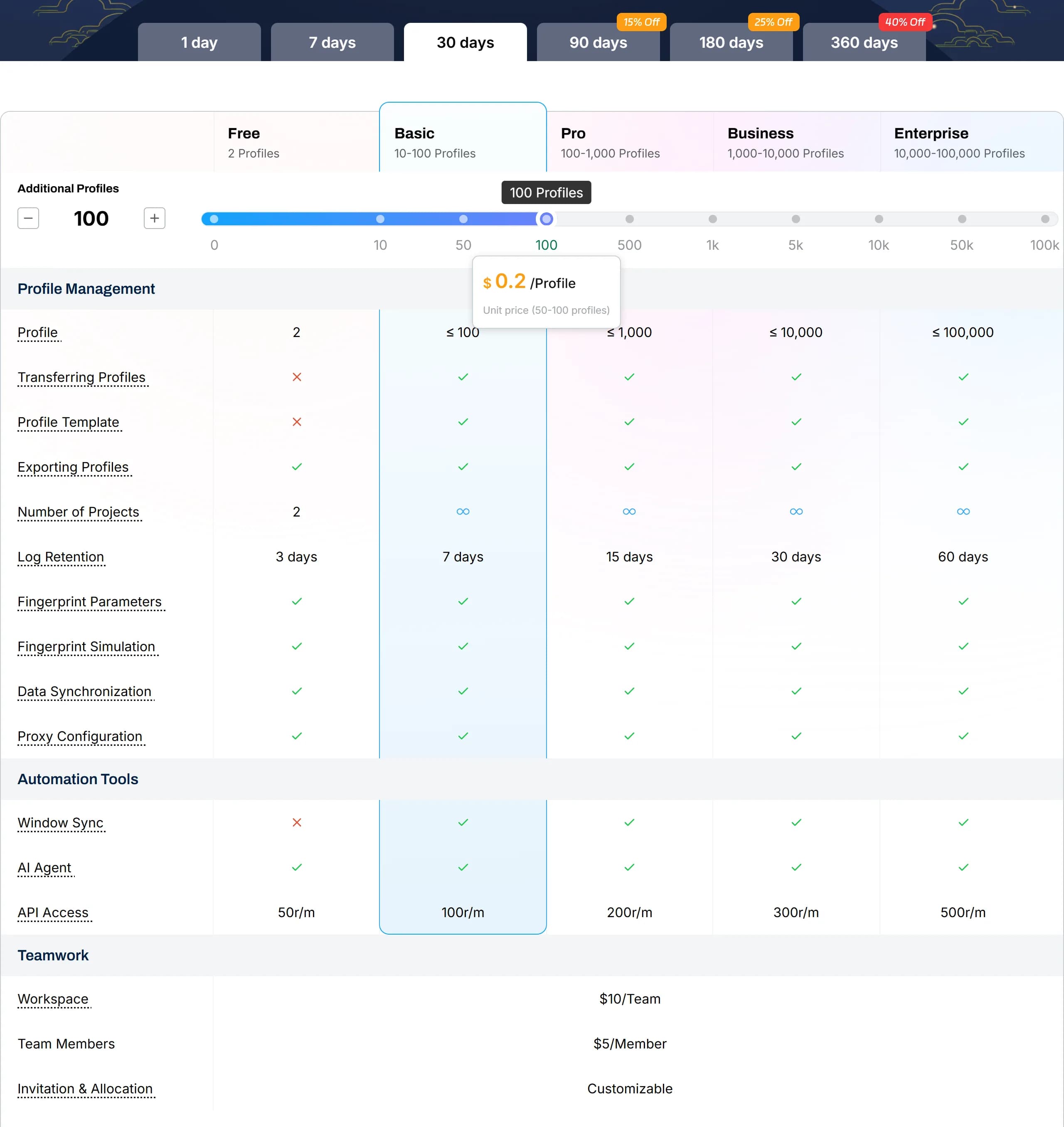
The free plan has 2 profiles, and paid profiles are added on top of them. Each paid profile is priced per 30 days at a rate that falls with volume: $0.80 for each of the first 10, $0.25 up to 50, $0.20 up to 100, $0.15 up to 500 and $0.12 up to 1,000. So 10 extra profiles cost $8, 100 cost $28 and 1,000 cost $148 for 30 days. Paying for 90, 180 or 360 days takes 15%, 25% or 40% off, which brings 100 profiles to $16.80 a month, and 1-day and 7-day passes for 100 profiles cost $4.67 and $1.87 a day. Team members cost $5 each and extra team workspaces $10, both valid permanently after purchase. Payment is by card, Apple Pay, Google Pay, Alipay, WeChat Pay, USDT, Bitcoin and local methods such as Pix, UPI and SBP.
Apps run on Windows 10 and later, macOS 12 and later on Apple Silicon and Intel, and Ubuntu 22.04 and later; the download page has no mobile apps, and there are no cloud phones. The local API is open on every plan, from 50 requests a minute on the free plan to 500 on Enterprise, and works with Selenium, Puppeteer and Playwright. Roxy AI Agent, which plans and runs tasks from a single command, is also available on the free plan, and MCP support was added in October 2025; the window synchronizer, profile templates and profile transfers start with paid profiles. Teams are isolated workspaces with member permissions and an operation log kept for 3 to 60 days depending on the plan. RoxyBrowser's referral program pays 15% of referred users' spending on profiles and team members and 10% on proxies, with USDT payouts from $50.
RoxyBrowser: our review

RoxyBrowser sells exactly the profiles you need: 100 cost $28 for 30 days or $16.80 a month on a 360-day term, with 1-day and 7-day passes. Its Chromium kernel usually follows Chrome within a week. Team members cost $5 once, and the API works on the free plan.
RoxyBrowser doesn't sell plans, it sells profiles. You set the number you need, from 10 to 100,000, and the term, from 1 day to 360 days, and the price follows: 100 profiles cost $28 for 30 days, or $16.80 a month if you pay for 360. Its Chromium kernel usually reaches Chrome's version within a week, and team members cost $5 each, paid once.
This review is built on what RoxyBrowser publishes: its pricing page, changelog, documentation, download page and terms, all checked on October 22 and 23, 2026. For how its kernel compares with Dolphin, AdsPower, Octo and GoLogin, see Antidetect Browsers for Media Buyers 2026: Real Differences.
What is RoxyBrowser, and who makes it?
A desktop antidetect browser for Windows, macOS and Linux. Version 4.0.8 runs on Windows 10 and later, in 64-bit and 32-bit builds, on macOS 12 and later for Apple Silicon and Intel, and on Ubuntu Desktop 22.04 and later. There's no mobile app; profiles can emulate Android and iOS browsers on the desktop.
The company is in Singapore. The site footer names LINKV TECH PTE. LTD. at 25 Seah Street, Singapore, and a Hong Kong company, NOVATECH HONGKONG GROUP CO., LIMITED, without saying what it does. The terms are under Singapore law. The about page says RoxyBrowser was founded in 2018 and has served over 3 million users; we found nothing that confirms either number.
The site sells more than the browser: its own RoxyIP proxies, and a "global marketing" service that posts videos through what it calls 20,000+ real overseas accounts. Keep that in mind when you read its claims about account safety.
How RoxyBrowser pricing works
You pay per profile, in brackets. The first 10 profiles cost $0.80 each per 30 days, profiles 11 to 50 cost $0.25, and 51 to 100 cost $0.20. So 10 profiles cost $8, 50 cost $18 and 100 cost $28. Above 100 the price falls to $0.15 and then lower, and you buy in steps of 100: 500 profiles cost $88 and 1,000 cost $148.
The term sets the discount. 90 days take 15% off, 180 days 25% and 360 days 40%, so 100 profiles cost $23.80, $21 or $16.80 a month. The 2 free profiles come on top of whatever you buy.
Day passes are rare in this market. Since version 4.0.6 in September 2026 you can buy profiles for 1 day or 7 days: 100 profiles cost $4.67 for a day or $13.09 for a week. For a short test of a new offer or GEO, that's cheaper than paying for a month.
Changing the count mid-term. On an auto-renewing subscription, added profiles take effect at once for the price difference; a lower count starts at the next renewal, and the newest profiles lose access first. A fixed subscription can't be reduced at all.
Which kernel is RoxyBrowser running?
Chromium 155, shipped on October 14, 2026. RoxyBrowser doesn't name its build, but its changelog lists every kernel update with a date, which MoreLogin, BitBrowser and Nstbrowser don't. Here's how fast it followed Chrome over the last 6 versions:
- 150. Chrome stable: June 30. RoxyBrowser kernel: July 3. Days after Chrome: 3.
- 151. Chrome stable: July 28. RoxyBrowser kernel: August 18. Days after Chrome: 21.
- 152. Chrome stable: August 25. RoxyBrowser kernel: August 31. Days after Chrome: 6.
- 153. Chrome stable: September 8. RoxyBrowser kernel: September 9. Days after Chrome: 1.
- 154. Chrome stable: September 22. RoxyBrowser kernel: September 24. Days after Chrome: 2.
- 155. Chrome stable: October 6. RoxyBrowser kernel: October 14. Days after Chrome: 8.
So usually within a week, once 3 weeks. Chrome 156 came out on October 20; on October 23 the changelog didn't have it yet. The July changelog called the Chrome 150 update an "industry-first integration"; that's the vendor's claim.
Why it matters. A profile that claims an old Chrome stands out to the sites you log into, and Chrome now ships every 2 weeks. A kernel that follows within days is one of the main things you pay an antidetect for.
How RoxyBrowser handles fingerprints
It doesn't explain the method. The home page says RoxyBrowser "can bypass renowned detection tools, including Fingerprint, CreepJS." We found no published analysis of its fingerprints by a detection company or researchers, so judge it on your own checks.
The changelog gives some hints. The Chromium 153 update fixed "Canvas noise injection issues," which suggests Canvas noise is added in the kernel. The 151 update aligned WebGL output with Chrome by hiding driver version suffixes, and fixed "detection anomalies when mobile emulation is used" on a public fingerprint checker.
Security claims without documents. The home page shows SOC 2 Type II and ISO/IEC 27001:2022 badges. We found no audit report, certificate number or auditor's name to back them. The documentation says cloud sync stores profiles encrypted in the cloud and encrypts data in transit.
Automation: API, MCP and an AI agent
The API works on every plan, including Free. Scripts call a local API at port 50000 with a token from the client, and RoxyBrowser names Selenium, Puppeteer and Playwright as supported. The limit grows with your profile count: 50 requests a minute on Free, 100 up to 100 profiles, then 200, 300 and 500. Since September the API can create profiles from saved templates.
Official MCP servers are on GitHub since August 2025, so AI assistants can open and drive profiles. Roxy AI Agent 2.0, released in August 2026, plans and runs RPA scripts, skills and prompts, with templates for warming TikTok, Facebook and Instagram accounts. Its announcement promises that "1 Roxy AI replaces a 20-person operations team"; test it on cheap accounts first.
What the free plan leaves out: window sync, profile templates and profile transfer, all of which start with the first paid profiles. The AI agent and the API are ticked on Free.
Team work: seats you pay for once
This is the part that's easy to misread. The pricing page lists members at $5 and extra teams at $10 without a period. The documentation answers it: "Team members and additional teams are permanently valid after purchase." So a member costs $5 once, not every month. A team of 3 on 100 profiles costs $28 a month plus $10 once.
Roles are fixed, not custom. An Owner controls everything, a Manager can do everything except delete the team, an Editor changes profiles, accounts and proxies in assigned projects, and a Viewer only opens and closes profiles and adds notes. Work is split into projects: 2 on Free, unlimited on paid plans.
Logs depend on your profile count. Since August 2026 the operation log records who opened and closed each profile, kept for 3 days on Free, 7 days up to 100 profiles, and 15, 30 or 60 days on larger counts. A week of history is short if you need to find out who touched an account last month.
Terms that matter for media buyers
No refunds. The terms say "all paid services are non-refundable" and "all payments are final." That's another reason to start with a day pass or a 30-day term.
Your platforms' rules are your problem. The terms ban fraud, spam and "large-scale unauthorized marketing on social media platforms," and say RoxyBrowser doesn't "support or encourage any violations of third-party platforms' terms of service." It can suspend or terminate an account without refund. The FAQ adds that no antidetect "can guarantee that your accounts will never be banned," which is the honest version of the marketing.
The terms look unfinished. They're dated "December [22], 2025" with the day in brackets, and the dispute clause still reads "[the designated court or arbitration institution in Singapore]." A legal page left as a template says something about how carefully the rest is maintained.
Signing up, our link and code
Start free. The pricing page gives 2 free profiles forever; one FAQ page in the documentation says 3, so expect 2. Sign up through our link. The code 3TK5Gp gives 10% off spending; enter it at registration if the link doesn't fill it in.
Payment methods go far beyond cards: cards, Apple Pay, Google Pay, Alipay, WeChat Pay, USDT (TRC20), Bitcoin, Pix, UPI, SBP, SberPay, YooMoney and more than a dozen local methods. You can also top up a Roxy Wallet balance, and promotions sometimes add a bonus to top-ups.
If you want to refer people yourself, RoxyBrowser's referral program pays 15% of what referred users spend on profiles and members and 10% of their proxy spending, after a 7-day review.
RoxyBrowser pricing in October 2026
Prices from the pricing page on October 22, 2026, in USD; the 2 free profiles come on top:
- 10. 1 day: $1.33. 7 days: $3.78. 30 days: $8. 360 days, per month: $4.80.
- 50. 1 day: $3. 7 days: $8.40. 30 days: $18. 360 days, per month: $10.80.
- 100. 1 day: $4.67. 7 days: $13.09. 30 days: $28. 90 days, per month: $23.80. 180 days, per month: $21. 360 days, per month: $16.80.
- 500. 1 day: $14.67. 7 days: $41.09. 30 days: $88. 360 days, per month: $52.80.
- 1,000. 30 days: $148. 360 days, per month: $88.80.
Members cost $5 and extra teams $10, both paid once. API limits are 50 requests a minute on Free and 100 to 500 on paid counts; log retention runs from 3 to 60 days.
RoxyBrowser vs other antidetect browsers
How it compares at about 100 profiles, October 22, 2026:
- RoxyBrowser. 100 profiles, monthly: $28. Yearly, per month: $16.80. 3 people, about 100 profiles: $28, plus $10 once. On the free plan: 2 profiles, API. Chromium kernel on October 22: 155.
- AdsPower. 100 profiles, monthly: $36. Yearly, per month: $21.60. 3 people, about 100 profiles: $46. On the free plan: 2 profiles, synchronizer, no API. Chromium kernel on October 22: 155.
- MoreLogin. 100 profiles, monthly: $35. Yearly, per month: $21. 3 people, about 100 profiles: $40. On the free plan: 2 profiles, API, RPA. Chromium kernel on October 22: 148 (last published, June).
- GoLogin. 100 profiles, monthly: $39. Yearly, per month: $19.50. 3 people, about 100 profiles: $109 (Business). On the free plan: 3 profiles, no API. Chromium kernel on October 22: 153.
- Nstbrowser. 100 profiles, monthly: $0 to $29.90, by launches. Yearly, per month: $17.93. 3 people, about 100 profiles: $0 to $29.90. On the free plan: 500 profiles, 30 launches a day. Chromium kernel on October 22: 153 in Docker.
- Dolphin{anty}. 100 profiles, monthly: $89. Yearly, per month: $53. 3 people, about 100 profiles: $109. On the free plan: 3 profiles, no API. Chromium kernel on October 22: 155.
RoxyBrowser vs AdsPower is the closest match: the same Chromium 155, a free API at RoxyBrowser against no-code RPA at AdsPower. RoxyBrowser is $8 a month cheaper for 100 profiles and much cheaper for teams, because its seats are paid once. See our AdsPower review.
RoxyBrowser vs Dolphin{anty} is price against tooling: Dolphin costs 3 times as much for 100 profiles and runs the same kernel version, but adds scenarios and a cookie robot built for ad accounts. Our Dolphin{anty} review has the details. For the whole field, see the antidetect browser pricing comparison.
If you sign up for one of the others, here are our referral links: AdsPower, MoreLogin, GoLogin, Nstbrowser and Dolphin{anty}.
Pros and cons of RoxyBrowser
Pros
- Pay for the exact number of profiles: 100 for $28 per 30 days, $16.80 a month on 360 days
- 1-day and 7-day passes for short tests
- A Chromium kernel that usually follows Chrome within a week, with dated updates in the changelog
- Team members at $5 and extra teams at $10, paid once
- The API on every plan, Selenium, Puppeteer and Playwright, official MCP servers
- Windows, macOS and Linux apps, including 32-bit Windows
- Crypto, SBP, YooMoney and many local payment methods; our code 3TK5Gp gives 10% off
Cons
- No refunds
- Window sync, templates and profile transfer aren't on the free plan
- Short log retention on small counts: 3 days on Free, 7 days up to 100 profiles
- Fixed roles, no custom permissions
- SOC 2 and ISO badges without a published report or certificate
- Terms left partly as a template; the site gives 2 or 3 free profiles depending on the page
- No mobile app or cloud phones; no published method or outside analysis of its fingerprints
Checklist: what to do
Questions about RoxyBrowser
Is RoxyBrowser free?
Yes. The free plan gives 2 profiles forever with the API at 50 requests a minute and the AI agent, but without window sync, templates or profile transfer. One documentation page says 3 free profiles; the pricing page says 2.
How much does RoxyBrowser cost?
You pay per profile: 10 profiles cost $8, 50 cost $18 and 100 cost $28 for 30 days. Longer terms take 15% to 40% off, so 100 profiles cost $16.80 a month on 360 days. There are also 1-day and 7-day passes.
Does RoxyBrowser have a promo code?
Yes, the code 3TK5Gp gives 10% off spending when you sign up through our link.
Which Chrome version does RoxyBrowser use?
Chromium 155, shipped on October 14, 2026. Over the last 6 versions it followed Chrome within 1 to 8 days, once 21 days. Chrome 156 came out on October 20 and wasn't in RoxyBrowser's changelog on October 23.
Are RoxyBrowser team members paid monthly?
No. The documentation says team members ($5 each) and additional teams ($10 each) are "permanently valid after purchase," so you pay once.
Is RoxyBrowser safe?
We found no reported breaches. It publishes a dated changelog for every kernel update. The weak spots are documents: SOC 2 and ISO badges without published reports, terms left partly as a template, and no outside analysis of its fingerprints.
Compare RoxyBrowser with other antidetect browsers
- Cheapest Antidetect Browser With Team Features 2026: What 3, 5 and 10 People Really Pay
- Antidetect Browser Pricing Comparison 2026: What 31 Browsers Really Cost
- Average rating 5.0
- Average rating 4.8
- Average rating 4.7
- Average rating 4.2

Our verdict on RoxyBrowser
The best value for a solo buyer or a small team that wants a current kernel, as long as you can live without refunds and custom roles.
RoxyBrowser gets the basics right: a Chromium kernel that usually follows Chrome within days and says so in a dated changelog, pricing that charges for the profiles you actually use, and team members you pay for once. At $28 for 100 profiles, or $16.80 a month on a long term, nothing with a kernel this fresh costs less. What it lacks is polish around the edges: fixed roles, short logs on small counts, security badges without documents and terms that still read like a draft.
My advice: sign up through our link with the code 3TK5Gp, test the free profiles and the API, then buy a 7-day pass for the profiles you need and run real accounts on it. If they hold, move to 30 days, and only then to 360.
Member reviews of RoxyBrowser
No member reviews yet. Member reviews count 5 times more than ratings from other sites. Sign up free to write one.
No member reviews yet. Be the first to rate RoxyBrowser.
Loading…
Are you this company? Claim the page
RoxyBrowser reviews around the web
Public reviews from G2 and Trustpilot. Their ratings count toward the users’ score with less weight than member reviews.
 Mr ait
easy to use I've been using RoxyBrowser for over a year now, and it's incredibly easy to use. I manage multiple social profiles for myself and my clients without any issues. Integration was simple and required minimal training. Highly recommend!
 Kent M.
Better organization for multiple accounts It works well for managing separate profiles and accounts. After a bit of initial setup and some regular use, it became easier to fit into my workflow, and it's helped me stay more organized overall. The plug-ins available in the extension center aren't very extensive. It would be much better if they were organized into separate categories for different social media platforms, so it's easier to find what you need. It gives me a more practical way to manage multiple profiles in one place. The biggest benefit is that it helps me stay organized and cuts down on some of the manual work.
- Yamilis I.
My favorite anti-detection tool RoxyBrowser allows us to securely manage multiple gaming community accounts on a single computer, avoiding the hassle of switching browsers and devices frequently. It does a great job of isolating browser fingerprints, and we hardly ever experience accounts being banned by association anymore. There are no annoying spots, it doesn't even have pop-up ads, the page is crisp and clean. As a game operator, before using Roxy, the biggest trouble is the trouble of switching between accounts on various platforms, but after using Roxy, we can safely operate our platform accounts to expand our business.
- Dileep M.
RoxyBrowser cares about the user experience. RoxyBrowser's new Transferring Profiles feature is so useful that it can directly transferring profiles to a new environment, which can reduce a lot of repetitive operations. Compared to other fingerprint browsers, RoxyBrowser has been around for a short time, but it's more innovative than most fingerprint browsers. Roxy's Customer Support team truly prioritizes real user experience. Once, I sent feedback complaining about the note display function — you had to hover the mouse for 2 seconds to see the remarks. To my surprise, in the very next update, the Roxy team actually implemented my suggestion! They changed it to instant display without delay and even made the notes expand automatically. This improvement has been a lifesaver for users like me who manage tons of windows daily — saving massive time when checking window annotations.
- Kellynda O.
Cheap and good fingerprint browser I consider RoxyBrowser to be the innovative fingerprint browser that is much more affordable than browsers of the same quality. With Roxy, I can isolate my account environment and greatly improve my sales and marketing effectiveness. There's nothing to dislike, the reason I chose Roxy is because it's not comparable in quality to the popular fingerprint browsers on the market, but it's much cheaper. The software's built-in online support is quick to respond and questions raised during use are always addressed.
- Cat P.
What it's like to use RoxyBrowser I've been using Roxy to help me manage my FaceBook account for a few months now, I've gone through the process of free version to the official version, the planning and cleanliness of the page has improved a lot, but I'm more concerned about the security and privacy of the multi-account management, and even though it's become less free, it still saves me 40% of the cost of marketing on FaceBook. At $8 per month, it has helped me solve the problem of managing my account marketing. There is no mobile, which can be limiting in some scenarios It helps me save money on account operation costs, and the built-in industry-advanced kernel makes it faster and safer for me to access the web.
About these reviews. We gather them from public pages so you can see how RoxyBrowser is rated outside aliencpa. We take the latest reviews from each source, without picking them by tone. Each is quoted in full, word for word, and translated into English where marked; the source icon links to the original. We don’t verify them, and our editorial policy doesn’t cover them. Their ratings count toward the users’ score, but member reviews from aliencpa readers always weigh more and come first. Worked with RoxyBrowser? Write a member review.
RoxyBrowser is listed in our antidetect browser catalog. Paid packages can pin a card and extend it; they never buy a rating, a review or a verdict.
Comments on RoxyBrowser
Open to everyone, no sign-up. Comments don’t change the rating.
No comments yet.
Add a comment