
Antidetect Browsers for Media Buyers 2026: Real Differences Between Dolphin, AdsPower, Octo, GoLogin & Linken Sphere

Independent and reader-supported. Some links here are affiliate links: if you sign up through them, we may earn a commission at no cost to you. It never changes our scores or verdicts. Affiliate disclosure
Contents 10
Dolphin{anty}, AdsPower, Octo Browser, GoLogin and Linken Sphere all run on Chromium patched by the vendor. Underneath the different logos sits the same engine that Chrome runs on, and the list of fingerprint settings you see in each of them is much the same. And yet a hundred profiles cost $36 a month in one of them and $89 in another.
So what is the difference you're paying for? This piece goes through it for media buying without the marketing table: how each vendor patches Chromium and how fast, what bot detection companies publish about catching these browsers, what you pay at 10, 100 and 300 profiles and with a team, and what no antidetect fixes for you. I've worked with Dolphin, Linken Sphere, AdsPower and Multilogin myself, but everything below is built on what the vendors publish, their changelogs and the public research, all checked on October 22, 2026. Prices and features of all 31 antidetect browsers we checked are in a separate pricing comparison.
Disclosure: the links to Dolphin{anty}, AdsPower, Octo Browser, GoLogin and Linken Sphere in the "Which one fits you" section are our referral links. If you pay through them, aliencpa earns a commission; that doesn't change anything written here.
Aren't they all the same Chromium?
Yes, mostly. Every one of the five antidetect browsers is a Chromium build with the vendor's patches on top. Octo calls its build Octium, GoLogin calls it Orbita, AdsPower calls it SunBrowser and also ships a Firefox build called FlowerBrowser. Dolphin and Linken Sphere don't give their builds a name and just say Chromium.
Here's how each vendor describes its spoofing, in its own words:
- Octo Browser: "Octo Browser's fingerprint management is implemented in its Chromium-based kernel, which protects your device from additional spoofing checks."
- AdsPower: "Its browser fingerprints are highly customizable and managed at the browser kernel level."
- GoLogin: "When a website asks Orbita for information about the device it's running on, Orbita returns the profile's values, not your computer's real values."
- Dolphin{anty}: for noise-based parameters it "generates a value that is as close as possible to the real one, but not identical," tied to the profile. The docs don't say at what level this happens.
- Linken Sphere: in September 2026 the team announced a third-generation canvas that, in its words, makes "a fingerprint unique without altering the source data." It doesn't describe the method further.
You've probably seen tables that split antidetects into "engine-level" and "JS injection". For these five that split doesn't hold: all of them patch the browser itself. Antoine Vastel of the bot detection company Castle put it this way in 2025: "anti-detect browsers often recompile Chromium browsers and lie at a lower level." The real question is how deep the patches go and whether a JavaScript layer is still left on top. That's where they get caught. When Castle looked at Undetectable, another popular antidetect, in March 2025, it found that lies told from JavaScript have side effects you can see from the page, and it caught Chromium profiles by traces of the vendor's injected script, functions with names like iframeCheck.
So the first thing you pay for is maintenance. How well and how fast the vendor keeps its Chromium fork patched and current.
Why does the kernel version matter so much now?
Chrome now ships a new version every 2 weeks. Google announced it on March 3, 2026: "Starting September 2026, Chrome will move to a two-week release cycle, from the current four-week cycle." Chrome 153 came out on September 8, 154 on September 22, 155 on October 6 and 156 on October 20. A year ago a kernel that was 1 version behind was 4 weeks old. Now 2 versions behind is already 4 weeks.
Why should a media buyer care? Your profile tells every site which Chrome version it runs, in the user agent and in Client Hints, and antidetects usually match that to the kernel. Real Chrome updates itself automatically, so a version that's months old stands out in normal traffic, and standing out is exactly what statistical detection looks for. If a vendor instead claims a newer version on top of an older kernel, a check that compares the claimed version with what the browser can actually do finds the gap.
Here's where the five stood on October 22, 2026, 2 days after Chrome 156:
- Dolphin{anty}. Kernel: Chromium. Version: 155. Released: October 12. Where the vendor publishes it: official Telegram channel.
- AdsPower. Kernel: SunBrowser (Chromium). Version: 155. Released: October 20. Where the vendor publishes it: official Telegram channel; release notes still show 154 of October 10.
- Octo Browser. Kernel: Octium (Chromium). Version: 156. Released: October 22. Where the vendor publishes it: Octium changelog.
- GoLogin. Kernel: Orbita (Chromium). Version: 153. Released: build file dated October 15. Where the vendor publishes it: not in release notes; we found it in GoLogin's own browser download API.
- Linken Sphere. Kernel: Chromium. Version: 155. Released: October 12. Where the vendor publishes it: official Telegram channel.
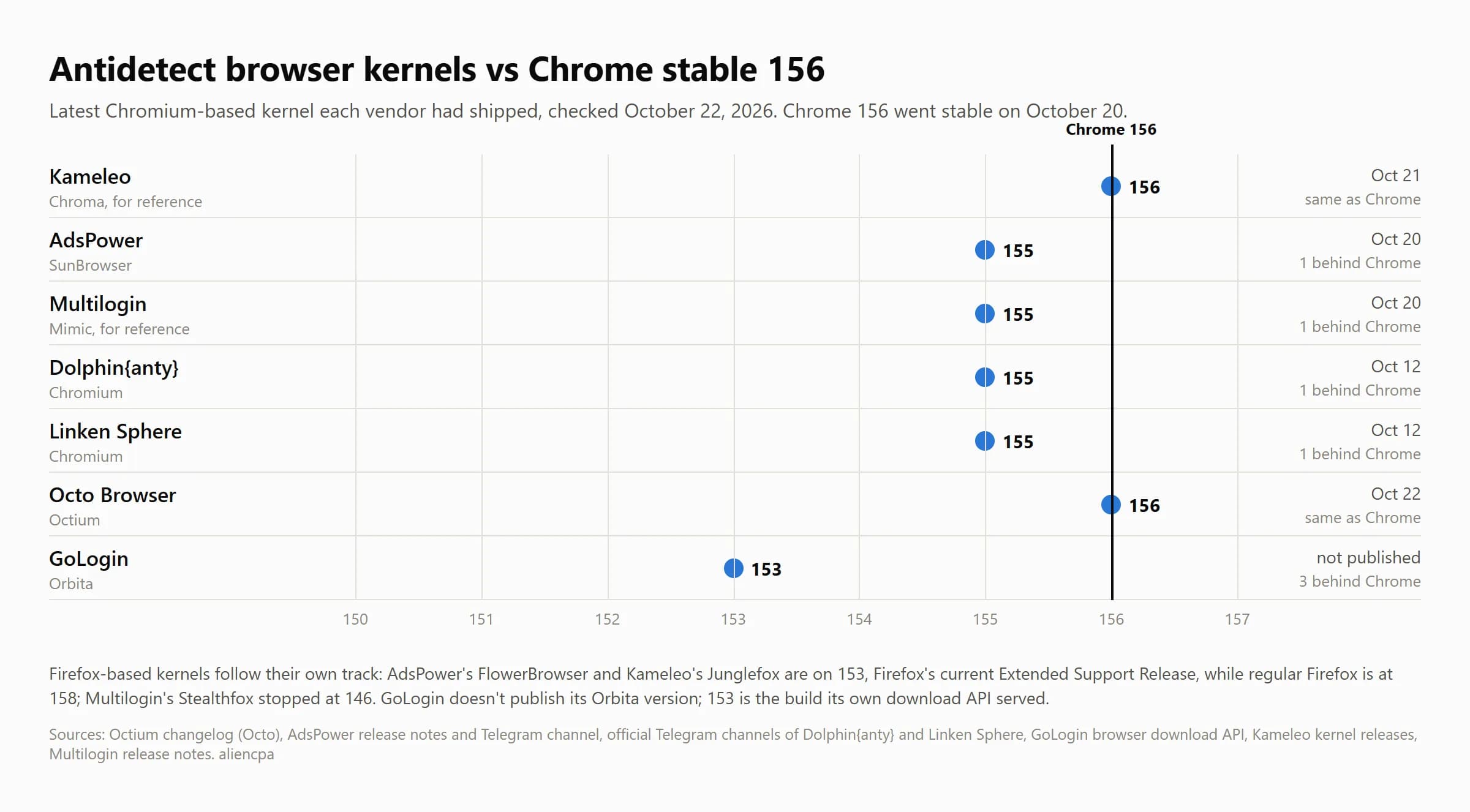
Octo already had 156, and the other 3 on 155 were 1 version behind, which is normal. A vendor needs a few days to port its patches to a new Chromium. Octo promises to update "as quickly as possible, so that no one notices any difference between Octo and Chrome sessions," and its changelog shows a new kernel every 2 weeks: 153 on September 10, 154 on September 24, 155 on October 8 and 156 on October 22, 2 days after Chrome. Dolphin's Telegram shows the same rhythm: 153 on September 17, 154 on September 29, 155 on October 12. The tables that say Dolphin lags several versions behind are out of date.
GoLogin is the one to watch. Orbita was 3 versions behind on the day we checked, and GoLogin doesn't publish the version in its release notes, so you can't track it without digging. Its docs also say that existing profiles have to be updated by you. AdsPower's Firefox kernel, FlowerBrowser, was on 153 while regular Firefox was on 158, but 153 is Firefox's current Extended Support Release, so that profile still looks like a real Firefox version.
For comparison, outside these five: Kameleo shipped Chroma 156 on October 21, a day after Chrome, and promises new builds within 5 days of every stable Chrome, though Chroma 153 to 155 came 2 to 4 weeks late in September and October. Multilogin released Mimic 155 on October 20 and says its core usually comes 1 to 2 weeks after Chrome.
Check the damn version. Look at the kernel version in your profile settings before a big launch, and check the vendor's changelog or channel once a month. If a profile shows a version 3 or more behind Chrome, update it or recreate it.
What do detectors actually look for?
They look for contradictions. Fingerprint, a company that sells device identification to sites, explained it in September 2026: a profile "might claim to be Safari on macOS while its rendering output, supported APIs, or font list point to Chromium on Windows. These contradictions are the most reliable tell that a browser is lying about itself." The second method is statistics: your combination of parameters is compared with real traffic, and a rare combination stands out.
Detection is getting better at it. In April 2026 Fingerprint added a machine learning layer to its antidetect detection and reported that "anti-detect browser detection increased from 2.1% → 6.4%" of the traffic it sees. In the description of that signal, Fingerprint names "AdsPower, DolphinAnty, OctoBrowser, and GoLogin" as examples of antidetect browsers. That's not a verdict on these 4: they're simply the ones most people use, so they're the first ones detection companies study.
The academic picture says the same. In Browser Polygraph, a study presented at the IMC 2024 conference and run on a real financial company's traffic, the detector caught 75% of sessions from GoLogin, 78% from Incogniton and 84% from Octo Browser. Keep the versions in mind: GoLogin 3.3, Incogniton 3.2 and Octo 1.10, all long replaced since. What matters is the pattern: a detector built for the job caught most sessions of every antidetect it tested.
Castle sums it up: "There are no silver bullets when it comes to detecting these browsers." Detectors correlate many signals at once. For you that means one good parameter doesn't cover for a bad one.
So what does a better antidetect buy you? Fewer contradictions out of the box and faster fixes when detectors find a new one. A cheap browser with a stale kernel leaves more contradictions for you to find yourself.
What else are you paying for?
Team work. This is where the prices really split. Dolphin includes 1 user in every plan and sells extra users only from Base: $10 a month each on Base, $20 on Team, $25 on Enterprise. AdsPower charges $5 a month per member ($3 on annual billing) on any paid plan. Octo has no team members below Team (169 EUR a month, 3 members plus the owner). GoLogin includes 1 seat from Business ($99) and sells more at $10 each. Linken Sphere lets you create a team only on Pro ($160 a month, up to 10 members). Most of them have roles and per-profile or per-folder rights. Octo and AdsPower keep an action log, Dolphin shows profile history and who is running a shared profile, and Linken Sphere keeps action history from Pro.
Automation without code. Dolphin has a no-code scenario builder and a synchronizer that repeats one window's actions in others, both from the $10 Starter plan. AdsPower has a no-code RPA builder and a synchronizer. Octo, GoLogin and Linken Sphere have no no-code builder; you automate them through the API.
API. Dolphin gives API access from Starter (1,500 requests a minute), AdsPower from Professional (300 a minute, 900 on Business), GoLogin from Professional (300 to 1,200 a minute by plan), Octo from Base (50 a minute) and Linken Sphere only from Pro, but without request limits. All five connect Puppeteer, Playwright and Selenium.
Mobile. AdsPower, GoLogin and Octo have iOS apps that run mobile profiles on the phone; GoLogin and Octo also have Android apps, and GoLogin's paid plans include Cloud Android, virtual Android phones on its servers. On desktop, AdsPower emulates Android and iOS fingerprints, and GoLogin and Octo emulate Android ones. Dolphin marks mobile fingerprints as coming soon. Linken Sphere emulates mobile devices from its Light plan and has no apps.
How much does each one cost at your size?
Prices on monthly billing, checked on each vendor's pricing page on October 22, 2026:
- Dolphin{anty}. Free plan: 5 profiles. About 10 profiles: $10 (Starter, 20). 100 profiles: $89 (Base). About 300 profiles: $159 (Team). 3 people, about 100 profiles: $109 (Base + 2 users).
- AdsPower. Free plan: 2 profiles. About 10 profiles: $9. 100 profiles: $36. About 300 profiles: $86 (Business). 3 people, about 100 profiles: $46 (100 profiles + 2 members).
- Octo Browser. Free plan: none, 2-day trial. About 10 profiles: 29 EUR (Starter). 100 profiles: 79 EUR (Base). About 300 profiles: 169 EUR (Team, 350). 3 people, about 100 profiles: 169 EUR (Team).
- GoLogin. Free plan: 3 profiles. About 10 profiles: $9. 100 profiles: $39. About 300 profiles: $99 (Business). 3 people, about 100 profiles: $109 (Business + 1 seat).
- Linken Sphere. Free plan: 5 sessions. About 10 profiles: $30 (Pure, 30). 100 profiles: $90 (Light, 150). About 300 profiles: $160 (Pro, 500). 3 people, about 100 profiles: $160 (Pro).
Annual billing changes the picture. AdsPower takes 40% off, GoLogin 50%, Octo 30%, Linken Sphere 20%, and Dolphin about 40% if you prepay 12 months. For 100 profiles that's $21.60 a month at AdsPower, $19.50 at GoLogin, 56 EUR at Octo, $72 at Linken Sphere (150 sessions) and $53 at Dolphin.
Notice what the table shows. At 100 profiles for 1 person, Dolphin ($89), Octo (79 EUR) and Linken Sphere ($90 for 150 sessions) cost more than twice what AdsPower ($36) and GoLogin ($39) charge. For a small team the gap grows: Octo and Linken Sphere need their team plans, which start at 169 EUR and $160. The cheapest team setup here is AdsPower: 100 profiles and 2 extra members for $46 a month, or $27.60 on annual billing. If seats are your main cost, Multilogin, which isn't in this five, sells 100 profiles with unlimited seats for $40 a month.
Read the free plans as test drives. Dolphin's docs announce a cut from 5 to 3 free profiles, without a date. GoLogin's free plan has no API and no team. Octo has no free plan at all. Linken Sphere's 5 free sessions have no time limit but no API.
What won't any antidetect fix?
Your proxy. The browser hides your device, not your network. Your connection has its own fingerprint before any page loads: Cloudflare's JA4 TLS fingerprint is "resistant to the randomization of TLS extensions," and Fingerprint flags a mismatch between the time zone of the browser and the location of the IP. A good antidetect behind a dirty or mismatched proxy is still a mismatch. Our NodeMaven review shows what checking a proxy before use looks like.
WebRTC and DNS leaks. Antidetects mask WebRTC, but one wrong setting or a default you never checked can send your real IP next to the proxy IP. Run every new profile through a leak test before you log into anything.
Your behavior and your accounts. Whether you buy accounts or do account farming yourself, platforms look at account age, payment details, how you log in and what you do once inside. A perfect fingerprint doesn't save an account that logs in from 5 countries a day or runs a payment card that's been banned before.
The rules. Meta's terms say: "Create only one account (your own) and use it for personal purposes." Google's circumventing systems policy says "you can't create multiple Google Ads accounts after getting suspended to try to get around Google Ads' policies," and calls such violations egregious, with suspension without warning. An antidetect separates the accounts you run for clients and teams. It doesn't make a banned advertiser a new one, and the platforms don't treat it that way.
Which one fits you?
There's no winner for everyone, and anyone who sells you one is selling. Here's how the five line up against real situations, based on the facts above. Our ranked list is in Best antidetect browser for media buyers 2026.
- You're solo, testing, and need the lowest bill: GoLogin or AdsPower. Both cost about $20 a month for 100 profiles on annual billing. Check GoLogin's kernel version yourself, since it isn't published.
- You farm and warm ad accounts by hand and want ready workflows without code: Dolphin{anty} or AdsPower. Dolphin's scenario builder and synchronizer start at $10; AdsPower adds an RPA builder and cheaper team seats.
- You run expensive accounts and care most about the kernel keeping up: Octo Browser. It has the clearest public kernel changelog of the five (a dated page, not just a Telegram channel) and an API from Base, but no free plan and team seats only from 169 EUR.
- You're technical, want manual control and a local API without request limits: Linken Sphere on Pro. Below Pro there's no API and no team. Our code ALIENCPA gives 20% off the first payment.
- You're a team of 3 or more on a budget: AdsPower at $5 per member, or look at Multilogin's Business plan with unlimited seats.
Whatever you pick, test it first. 4 of the 5 have a free plan and Octo has a 2-day trial. Create 2 profiles, run them through a fingerprint checker and a leak test with the proxy you'll really use, and only then pay for a year.
Checklist: what to do
Questions and answers
What is the real difference between antidetect browsers?
All 5 big ones run on Chromium patched by the vendor. The difference is how deep the patches go, how fast the vendor follows new Chrome versions, how consistent the fingerprint is out of the box, and what you get for teams, automation and mobile at your price.
Which antidetect browser has the most up-to-date kernel?
On October 22, 2026, Kameleo and Octo were on Chromium 156, 1 and 2 days after Chrome. Dolphin, AdsPower, Linken Sphere and Multilogin were on 155. GoLogin's Orbita was on 153. Versions change every 2 weeks, so check the vendor's changelog before you decide.
Can websites detect antidetect browsers?
Yes, often. Detection companies look for contradictions between parameters and for rare combinations. Fingerprint names AdsPower, Dolphin, Octo and GoLogin as examples of antidetect browsers its signal targets, and a 2024 study caught 75% to 84% of sessions from GoLogin, Incogniton and Octo versions of that time.
Which antidetect is cheapest for 100 profiles?
On monthly billing, AdsPower at $36 and GoLogin at $39. On annual billing, GoLogin at $19.50 and AdsPower at $21.60 a month. Dolphin costs $89 a month for 100 profiles, Octo 79 EUR, and Linken Sphere $90 for 150 sessions.
Is Dolphin{anty} behind on Chrome versions?
Not now. Its official Telegram channel announced Chromium 153 on September 17, 154 on September 29 and 155 on October 12, 2026, roughly every 2 weeks like Chrome itself.
Author’s conclusion
You don't pay antidetect vendors for a magic canvas. You pay for an engineering team that keeps a Chromium fork current every 2 weeks, for fewer contradictions in a fresh profile, and for the team and automation tools that save you hours. On the facts of October 2026, Octo, Dolphin, AdsPower and Linken Sphere keep up with Chrome, while GoLogin is among the cheapest but runs 3 versions behind and doesn't publish its version. Prices for the same 100 profiles differ by more than 2 times, and team seats widen the gap further.
My advice: decide by your team size and your workflow, not by the brand everyone in the chat uses. Put your real numbers in the price table above, test the 2 cheapest that fit on their free plans with your real proxy, and check the kernel version every month after you pay. The day your antidetect stops publishing its version is the day to start looking at the others.
Lu Discover, Editor-in-chief
Sources for this article
- octobrowser.net — Octo Browser: fingerprint management in the Chromium-based kernel
- docs.octobrowser.net — Octium changelog: Chromium 153 to 156 (September 10, September 24, October 8 and October 22, 2026)
- octobrowser.net — Octo Browser pricing (checked October 22, 2026)
- adspower.com — AdsPower: fingerprints managed at the browser kernel level
- adspower.com — AdsPower release notes (Chrome 154 kernel, October 10, 2026)
- t.me — AdsPower official Telegram channel: Chrome 155 kernel (October 20, 2026)
- adspower.com — AdsPower pricing (checked October 22, 2026)
- gologin.com — GoLogin docs: Orbita browser
- api.gologin.com — GoLogin browser download API: Orbita 153.1.0-0 (checked October 22, 2026)
- gologin.com — GoLogin pricing (checked October 22, 2026)
- docs.dolphin-anty.com — Dolphin{anty} docs: browser spoofing
- t.me — Dolphin{anty} official Telegram channel: Chromium 153, 154 and 155 (September 17 to October 12, 2026)
- dolphin-anty.com — Dolphin{anty} pricing (checked October 22, 2026)
- t.me — Linken Sphere official Telegram channel: Chromium 155 (October 12, 2026) and third-generation canvas (September 14, 2026)
- ls.app — Linken Sphere pricing (checked October 22, 2026)
- ls.app — Linken Sphere docs: automation and API
- kameleo.io — Kameleo browser kernel releases (Chroma 156, October 21, 2026)
- multilogin.com — Multilogin: core updates and how they work
- multilogin.com — Multilogin pricing (checked October 22, 2026)
- developer.chrome.com — Chrome for Developers: two-week release cycle (March 3, 2026)
- product-details.mozilla.org — Firefox versions: latest 158.0.1, ESR 153.5.1 (checked October 22, 2026)
- fingerprint.com — Fingerprint: how to detect anti-detect browsers (September 24, 2026)
- fingerprint.com — Fingerprint product update: anti-detect browser detection (April 2026)
- docs.fingerprint.com — Fingerprint Smart Signals reference: anti-detect browser and time zone signals
- blog.castle.io — Castle, Antoine Vastel: overview of anti-detect browsers (February 27, 2025)
- blog.castle.io — Castle, Antoine Vastel: how to detect the Undetectable browser (March 5, 2025)
- adamdoupe.com — Browser Polygraph, IMC 2024 (Kalantari et al.): detection of fraud browsers
- blog.cloudflare.com — Cloudflare: JA4 signals (August 12, 2024)
- facebook.com — Facebook Terms of Service
- support.google.com — Google Ads policy: circumventing systems
Companies in this article
- Dolphin{anty}Antidetect browserNot rated yet
- AdsPowerAntidetect browserNot rated yet
- Octo BrowserAntidetect browserNot rated yet
- GoLoginAntidetect browserNot rated yet
- Linken SphereAntidetect browserNot rated yet
- KameleoAntidetect browserNot rated yet
- MultiloginAntidetect browserNot rated yet
Related stories
 Comparison
Antidetect Browser Pricing Comparison 2026: What 31 Browsers Really Cost
 Top list
Best Antidetect Browser for Media Buyers 2026: Our Top 15, Ranked and Explained
 Guide
Guide
Comments
0 commentsNo comments yet.
Add a comment