

BitBrowser vs AdsPower 2026: Real Differences in Value, Kernel and Features

Independent and reader-supported. Some links here are affiliate links: if you sign up through them, we may earn a commission at no cost to you. It never changes our scores or verdicts. Affiliate disclosure
Contents 10
BitBrowser and AdsPower are the 2 Asian antidetect browsers that budget teams end up comparing, and on price it isn't close. 100 profiles with 4 users cost $15 a month at BitBrowser; at AdsPower 100 profiles cost $36 and each extra member $5, so 4 people pay $51. BitBrowser also gives 10 free profiles with an API and rents Android phones and real iPhones in the cloud. What it doesn't give you is the version of the browser engine your profiles run on. AdsPower publishes every kernel update; BitBrowser last named one, Chrome 134, in March 2025.
I've used AdsPower in my own work; for BitBrowser this comparison is built on what the company publishes. Everything below was checked on October 22 and 23, 2026: pricing pages, update logs on both sites and in BitBrowser's docs, API documentation, terms and refund rules, and AdsPower's official Telegram channel. Our AdsPower review has the full picture of AdsPower.
BitBrowser vs AdsPower at a glance
Checked October 23, 2026, with Chrome stable on 156:
- Company. BitBrowser: HongKong Bit-Internet Technology Limited. AdsPower: SUNFLOWER TECH PTE. LTD., Singapore.
- Chromium kernel. BitBrowser: not published; last named Chrome 134, March 2025. AdsPower: SunBrowser 155, October 20.
- Firefox kernel. BitBrowser: yes, version not published. AdsPower: FlowerBrowser on Firefox 153 ESR.
- Free plan. BitBrowser: 10 profiles, 1 member, 50 launches a day, API, RPA. AdsPower: 2 profiles, synchronizer, 7-day trial.
- 100 profiles. BitBrowser: $15 with 4 users. AdsPower: $36 with 1 user.
- 4 people on 100 profiles. BitBrowser: $15. AdsPower: $51.
- No-code automation. BitBrowser: RPA with a script market, synchronizer since October 2026. AdsPower: RPA, RPA Plus, AI Agent, synchronizer.
- API. BitBrowser: Local API on every plan, MCP. AdsPower: Local API from Professional, MCP and Skills.
- Mobile. BitBrowser: cloud Android phones, real iPhones in the cloud. AdsPower: Android and iOS fingerprints on desktop, iOS app.
- Team log. BitBrowser: not found. AdsPower: real-time logs.
- Platforms. BitBrowser: Windows, macOS. AdsPower: Windows, macOS, Linux.
- Refunds. BitBrowser: none. AdsPower: none once you pay.
Price: BitBrowser bundles the people
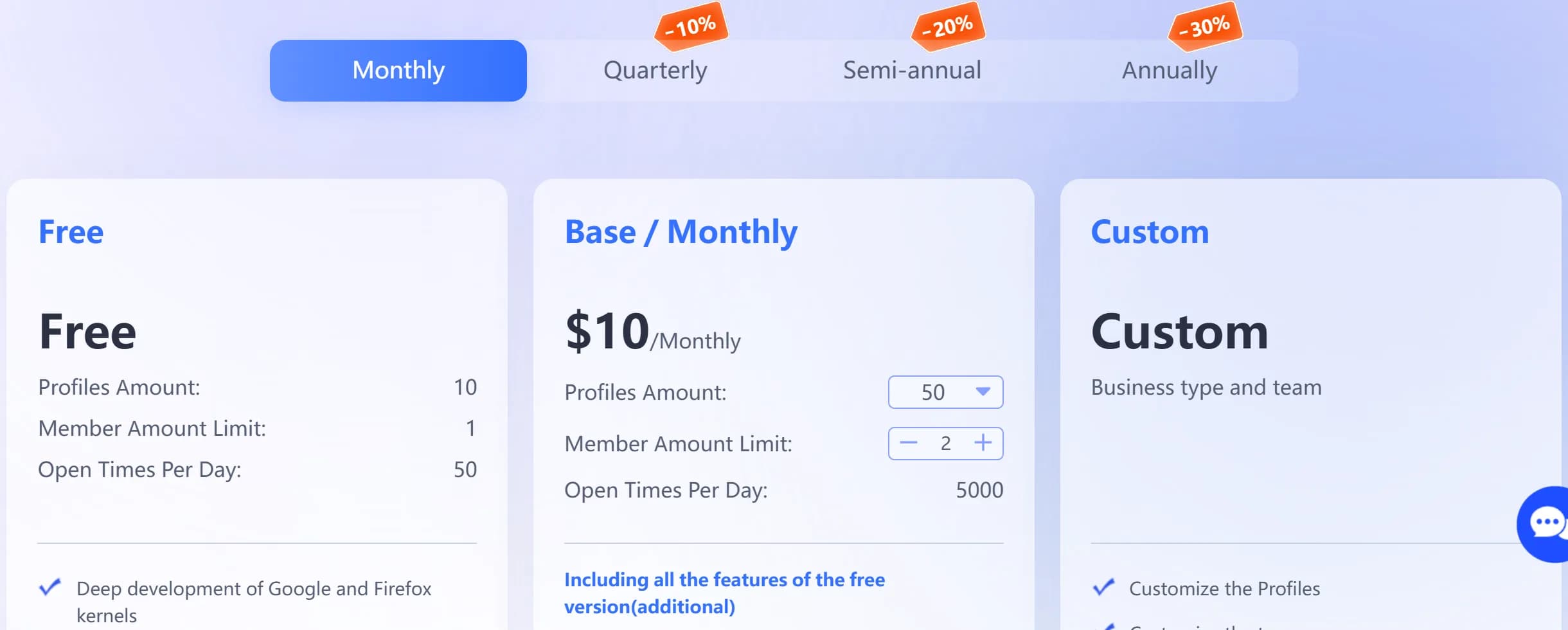
BitBrowser sells profile packs with users included. The free plan has 10 profiles and 1 member forever, with 50 browser launches and 20 new profiles a day. Base costs $10 a month for 50 profiles, 2 members and 5,000 launches a day; the 100-profile pack costs $15 with 4 users and the 200-profile pack $25 with 8. Larger custom packs are on request.
AdsPower sells profiles and charges per person. 10 profiles cost $9, 50 cost $21, 100 cost $36 and 300 cost $86 a month, with only the super administrator included; each member costs $5 a month on any paid plan.
- 1 person, 10 profiles. BitBrowser: $0, free plan. AdsPower: $9.
- 1 person, 50 profiles. BitBrowser: $10. AdsPower: $21.
- 1 person, 100 profiles. BitBrowser: $15. AdsPower: $36.
- 3 people, 100 profiles. BitBrowser: $15. AdsPower: $46.
- 4 people, 100 profiles. BitBrowser: $15. AdsPower: $51.
The gap is real at every size we could price. BitBrowser costs less than half for 1 person and about a third for a small team. 2 caveats: BitBrowser shows longer terms only for Base on its site ($84 a year, $7 a month, 30% off), with other packs' annual prices and the price of extra users visible only inside the client; AdsPower takes 40% off for a year, so 100 profiles cost $21.60 a month.
Kernel: what you trade for the price
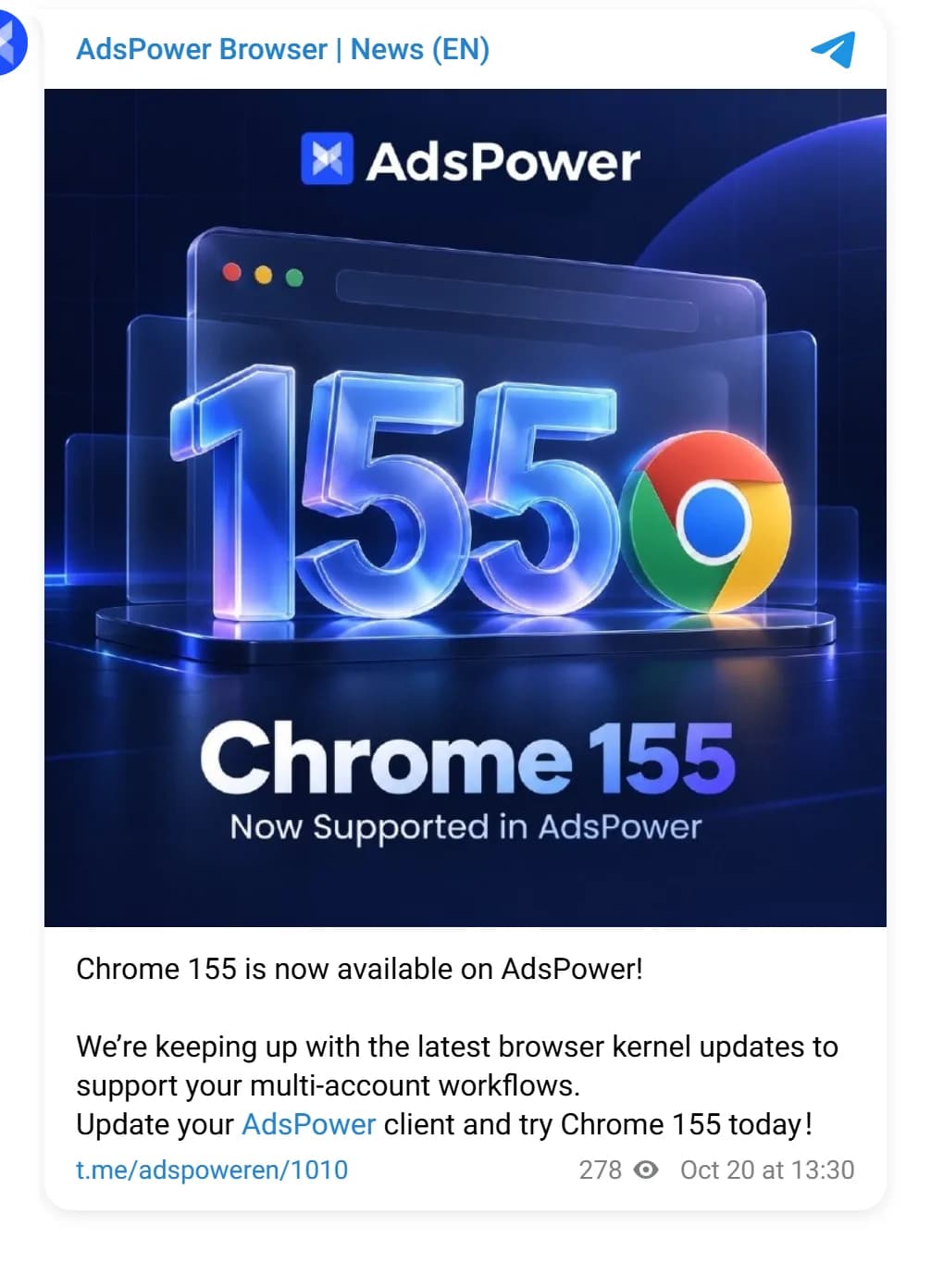
AdsPower publishes every update. In 2026 its SunBrowser shipped Chromium 151 to 155 between 14 and 18 days after each Chrome release, announced in its release notes and Telegram channel. On October 23 it was on 155, 1 version behind Chrome 156.
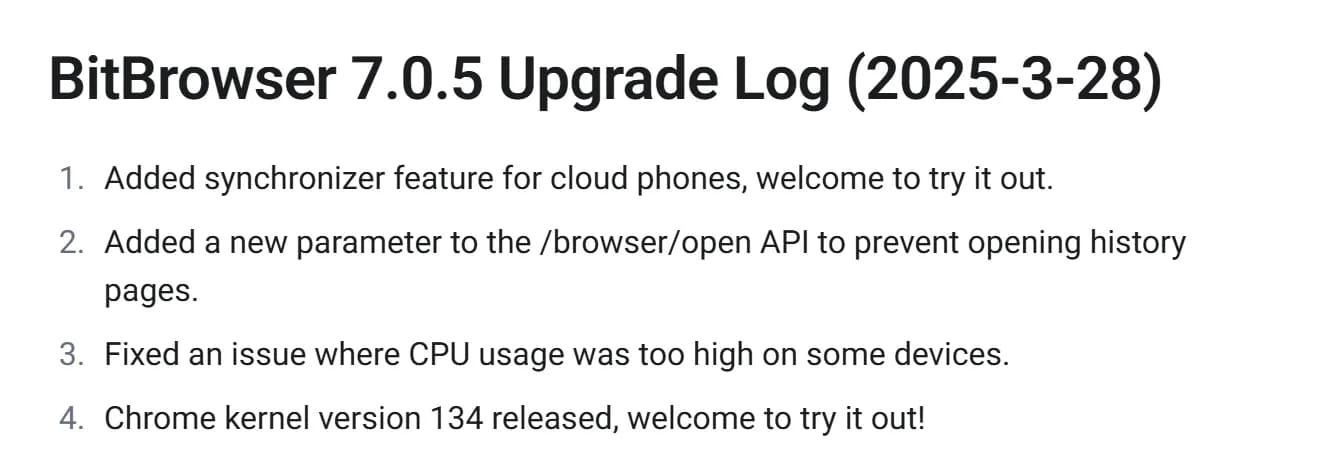
BitBrowser doesn't say which engine you run. It describes its approach only as "deep development of Google and Firefox kernels." The last explicit version in its update log is Chrome 134, in client 7.0.5 of March 28, 2025. The 7.2.0 update of October 20, 2026 mentions improving cookie writing for "browser engine versions 128 to 140," and the public API docs list kernel options only up to 126.
Why it matters. Chrome ships every 2 weeks. If BitBrowser profiles run engines in the 128 to 140 range, they claim browsers more than a year old, which is rare in real traffic and the kind of outlier statistical detection flags. If they're newer, BitBrowser just isn't telling you. Before you put expensive accounts on it, open a test profile, read the kernel version in its settings and ask support. Our piece on how antidetects get caught explains why an old engine stands out.
Outside attention goes to AdsPower. Fingerprint, a company that sells device identification to sites, names AdsPower among its examples of antidetect browsers, and Check Point's October 2026 report studied it, describing it as "Chinese in origin and subsequently registered across multiple jurisdictions." We found no published analysis of BitBrowser's fingerprints by a detection company or researchers.
Mobile: BitBrowser rents real phones
This is BitBrowser's other big advantage. BitCloudPhone for Android runs phones that BitBrowser says use real mobile chipsets, billed at $0.03 per phone profile per day plus $0.07 per 15 minutes of computing time, capped at $1.60 a day. BitCloudPhone for iOS, launched in July 2026, rents real iPhone SE devices from $30 a month each, which almost no other antidetect offers. Both run from the same desktop client, and BitBrowser also sells cloud Windows machines.
AdsPower stays on the desktop. It creates Android and iOS fingerprints for desktop profiles and has an iOS app; its Android app is announced, and it has no cloud phones. For accounts that live in apps, BitBrowser is the one of the 2 that can run them. See also our guides to Android and iPhone antidetects.
Automation and team control
Both automate on a budget, AdsPower more deeply. BitBrowser's free plan includes the Local API, RPA with a script market and extensions; Selenium, Puppeteer and Playwright connect through the API, headless mode arrived in August 2025, an MCP service for AI agents in August 2026 and a built-in synchronizer in October 2026. AdsPower's RPA robot builds browser workflows, with RPA Plus and an AI Agent for scheduled tasks, and its synchronizer works on every plan, even Free; the Local API starts on Professional with 300 requests a minute, 900 on Business, with MCP and Skills for AI agents.
AdsPower shows you more of what the team did. It gives per-member permissions by group or profile and real-time logs of logins, IP addresses, profile openings, proxies and RPA tasks. BitBrowser lets the owner control DevTools access, extensions and allowed or blocked URLs for each sub-account, but we found no team action log in its public docs.
Refunds, payment and security
Neither refunds. BitBrowser's user agreement says: "We do not provide any refund services," and calls purchases final. AdsPower's refund policy says no refunds once a purchase is confirmed, and you must tell it you won't renew at least 2 working days before your plan ends, or it can charge the next period from your account balance.
BitBrowser takes more ways to pay: Visa, Mastercard, PayPal, Alipay, WeChat Pay, MoMo, VietQR, PIX, YooMoney and SBP, through Recharge or the Cost Center in the client.
Know AdsPower's January 2025 incident. An attacker injected code into AdsPower that modified crypto wallet extensions installed through it between January 21 and 24, 2025, and stole seed phrases and private keys; Halborn estimated losses at $4.7 million from 5 users' wallets. It hit crypto wallets, not ad accounts. We found no confirmed security incident for BitBrowser. For both tools: no wallets in antidetect profiles, and 2FA on the account.
Which one should you choose?
By situation:
- Team of 2 to 8 on a tight budget, cheaper accounts — BitBrowser. 100 profiles and 4 users for $15.
- Expensive ad accounts where the kernel matters — AdsPower. Published Chromium 155, about 2 weeks behind Chrome.
- Accounts that live in Android or iOS apps — BitBrowser. Cloud Android phones and real iPhones.
- No-code automation of account farming routines — AdsPower. RPA, RPA Plus and AI Agent.
- A full team action log — AdsPower. Real-time logs of logins and profile openings.
- Testing for free with an API — BitBrowser. 10 free profiles with the Local API and RPA.
- Linux — AdsPower. BitBrowser has no Linux version.
One check before you commit to BitBrowser: open a test profile, note the kernel version and compare it with the current Chrome. If it's months behind, keep your most valuable accounts in a browser that publishes a current kernel.
Ready to try AdsPower? Here's our link: AdsPower. We don't have a referral link for BitBrowser; sign up on its site. In our ranking of the 15 best antidetect browsers AdsPower is 4th and BitBrowser 15th. See also AdsPower vs MoreLogin, team bills in Cheapest Antidetect Browser With Team Features and prices for all 31 browsers we checked in the pricing comparison.
Checklist: what to do
Questions and answers
Is BitBrowser or AdsPower better?
BitBrowser is better value: 100 profiles with 4 users for $15, 10 free profiles with an API, and cloud Android phones and real iPhones. AdsPower is better where trust matters: it publishes its kernel, Chromium 155, keeps real-time team logs and has the deeper no-code RPA.
Is BitBrowser cheaper than AdsPower?
Yes, at every size we could price. 100 profiles cost $15 at BitBrowser with 4 users included and $36 at AdsPower with 1, so a team of 4 pays $15 against $51.
Which kernel does BitBrowser use?
It doesn't publish it. The last version it named was Chrome 134, in March 2025, and its October 2026 update log mentions engine versions 128 to 140. AdsPower ran Chromium 155 on October 23, 2026.
Does BitBrowser have real iPhones?
Yes. BitCloudPhone for iOS rents real iPhone SE devices in the cloud from $30 a month each, launched in July 2026. It also runs cloud Android phones billed by time. AdsPower has no cloud phones.
Can I get a refund from BitBrowser or AdsPower?
No. BitBrowser's user agreement says it doesn't provide refunds, and AdsPower's refund policy says no refunds once a purchase is confirmed. Use the free plans first.
Author’s conclusion
BitBrowser for budget teams and app accounts; AdsPower for expensive accounts and anyone who wants to know which engine they run.
BitBrowser's offer is hard to beat on paper: a team of 4 on 100 profiles for $15, 10 free profiles with an API, and cloud phones that include real iPhones. The price you pay is trust: it hasn't named its Chrome kernel since March 2025, shows no team log and has no outside analysis of its fingerprints. AdsPower costs about 3 times more for a small team, but publishes a kernel 2 weeks behind Chrome, logs what your team does and automates more without code, with a 2025 security incident to keep in mind.
My advice: run cheap and app-based accounts on BitBrowser after checking the kernel version in a test profile, and keep your most valuable ad accounts on AdsPower or another browser that publishes a current kernel. Test both on their free plans, because neither gives your money back.
Lu Discover, Editor-in-chief
Sources for this article
- bitbrowser.net — BitBrowser pricing, checked October 22 and 23, 2026 (Free and Base plans, users, launches, quarterly, semi-annual and annual prices, FAQ with 100 and 200-profile packs, payment methods)
- bitbrowser.net — BitBrowser update log (7.2.0 of October 20, 2026: synchronizer, engine versions 128 to 140)
- doc.bitbrowser.net — BitBrowser docs: update log (Chrome kernel 134 in 7.0.5, March 28, 2025; MCP in 7.1.5; headless in 7.0.7)
- doc.bitbrowser.net — BitBrowser API docs (profile types, Android and iOS versions, kernel options)
- bitbrowser.net — BitCloudPhone for iOS (real iPhone SE devices, from $30 a month)
- bitbrowser.net — BitCloudPhone for Android (time-based billing)
- bitbrowser.net — BitBrowser download (system requirements)
- bitbrowser.net — BitBrowser user agreement (refund policy)
- adspower.com — AdsPower pricing, checked October 22 and 23, 2026 (profiles, monthly and annual prices, members, Local API limits, synchronizer on Free, 7-day trial)
- adspower.com — AdsPower release notes (Chrome 150 to 154 kernels, Firefox 153 kernel)
- t.me — AdsPower Browser News (EN): Chrome 155 now supported (October 20, 2026)
- adspower.com — AdsPower refund policy (no refunds after purchase, notice of non-renewal 2 working days before expiry)
- adspower.com — AdsPower teamwork (permissions and logs)
- adspower.com — AdsPower download page (Windows, macOS, Linux; Android app coming soon)
- halborn.com — Halborn: Explained, the AdsPower hack (January 2025)
- research.checkpoint.com — Check Point Research: the risk of AI-powered antidetect browsers in online fraud and influence operations (October 20, 2026)
- docs.fingerprint.com — Fingerprint Smart Signals reference: anti-detect browser examples
- product-details.mozilla.org — Firefox versions: latest 158.0.1, ESR 153.5.1
- chromiumdash.appspot.com — Chromium release schedule (stable dates for Chrome 151 to 156)
Companies in this article
- BitBrowserAntidetect browserNot rated yet
- AdsPowerAntidetect browserNot rated yet

Related stories
 Comparison
Undetectable vs AdsPower 2026: Are Unlimited Local Profiles Worth It?
 Comparison
AdsPower vs MoreLogin 2026: Which Budget Antidetect Is Better for Teams?
 Analysis
Comments
0 commentsNo comments yet.
Add a comment