
Best Antidetect Browser for Facebook Ads 2026: What Meta Allows and Which Browsers Fit

Independent and reader-supported. Some links here are affiliate links: if you sign up through them, we may earn a commission at no cost to you. It never changes our scores or verdicts. Affiliate disclosure
Contents 8
The companies in this top
Editorial order · places are not for sale- Not rated yet
Antidetect browser
- Antidetect browser for teams running ad and social media accounts, with a no-code scenario builder, synchron…
- Not rated yet
Antidetect browser
- Antidetect browser on its own Chromium kernel Octium, updated within days of Chromium releases, with an API…
- Not rated yet
Antidetect browser
- Antidetect browser released in 2017 and built around sessions and unlimited desktops, with a local API witho…
- Not rated yet
Antidetect browser
- Antidetect browser with SunBrowser (Chromium) and FlowerBrowser (Firefox) kernels, no-code RPA, a synchroniz…
- Not rated yet
Antidetect browser
- Antidetect browser with the Chrome-based Mimic core and cloud Android phones on real devices; free plan with…
Visit site Official site - Not rated yet
Antidetect browser
- Antidetect browser on its own Chromium build Orbita, with desktop, web, Android and iOS apps, cloud Android…

Facebook ads is where most media buyers first meet an antidetect browser. An agency runs ad accounts for 20 or 50 clients, a team of buyers shares the work, and each account needs its own clean, stable environment. But before choosing a tool, it's worth reading what Meta itself allows, because an antidetect separates your work; it doesn't change Meta's rules.
I've used Dolphin{anty}, Linken Sphere, AdsPower and Multilogin in my own work. Everything below is built on what Meta and the vendors publish, all checked on October 22, 2026: Meta's terms, Advertising Standards, Community Standards and Business Help Center, plus each browser's pricing, docs and product pages. For how these browsers rank overall, see Best Antidetect Browser for Media Buyers 2026.
What Meta's rules say
One personal account per person. Facebook's terms say: "Create only one account (your own) and use it for personal purposes." They also say: "Not share your password, give access to your Facebook account to others, or transfer your account to anyone else (without our permission)." And if Meta disables your account for a violation, "you agree not to create another account without our permission."
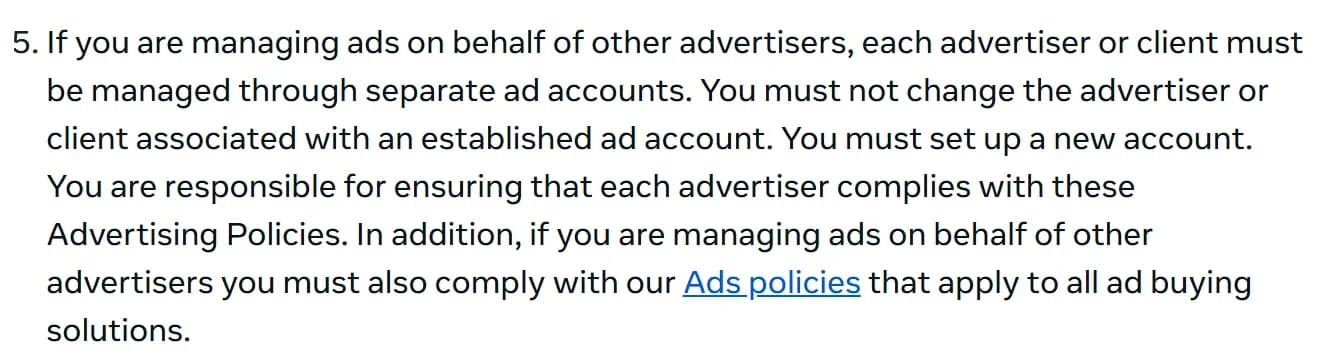
One ad account per client. Meta's Advertising Standards are direct about agency work: "If you are managing ads on behalf of other advertisers, each advertiser or client must be managed through separate ad accounts." The same page says "Helping anyone evade or circumvent our enforcement of our policies or terms of service is also prohibited," and that ad accounts "must be associated with a legitimate business or individual," with verification if Meta sees "signals of possible misrepresentation, suspicious activity or inauthentic behaviour."
Meta looks at linkage, not just the browser. Its Account Integrity standard says Meta may restrict or disable accounts and business assets that are "owned by the same person or entity as an account that has been disabled" or "created or repurposed to evade a previous account or entity removal." Its identity policy adds that Meta "will seek further information" if you "create or maintain multiple Facebook accounts."
What that means for an antidetect. Used for what Meta allows, an antidetect keeps each client's environment separate, gives every login a stable device and stops one person's cookies from leaking into another client's work. It doesn't make a disabled advertiser a new one, it doesn't make extra personal accounts allowed, and Meta checks payment details, identity and behavior, not only the browser.
How agencies are meant to work in Meta
Business portfolios hold the assets. Meta's help center says "You can personally create up to 2 business portfolios," you can belong to any number, and "Business assets can only belong to 1 business portfolio." For client work, Meta's route is partner access: a client shares Pages or ad accounts with your portfolio, with "full control of the business asset, or partial access," or you request to share an ad account "on behalf of another business," for example "you work for an agency, and the ad account belongs to a client."
Ad account limits grow with spend. "New business portfolios can only create one ad account. This goes up to 3 when a campaign delivers and a payment is made." After that, "your ad account limit increases based on your advertising spend," and "a closed ad account still counts toward your ad account limit." Daily spending limits work the same way: Meta sets them "based on their advertising and payment history."
2FA and device recognition are where the browser matters. Meta requires two-factor authentication for some business portfolios older than 90 days, with a code "each time they log in from an unrecognized device." It also explains that it needs to remember your computer and browser: "If you use private browsing mode or have your browser set to clear history when it closes, Meta cannot remember your device." A browser profile that keeps its own cookies and the same fingerprint for each person and client is exactly what lets Meta recognize the device every time.
What to look for in an antidetect for Facebook ads
- A stable profile per person and client. The same fingerprint, cookies and proxy at every login, so Meta's device recognition sees a known device.
- A fresh kernel. Chrome now ships every 2 weeks; a profile claiming an old Chrome version stands out.
- Proxy per profile. One stable proxy per client environment, matching the profile's time zone and language.
- Team control without passing logins around. Meta's terms forbid giving others access to your personal account, so use business portfolio roles for access to ad accounts, and the antidetect's roles and action logs to control who opens which client environment.
- Facebook-specific tools, if you want them: Dolphin{anty}, AdsPower and Linken Sphere are the only browsers on our list that publish features aimed at Facebook.
- Mobile, if your clients' accounts live in Meta's apps: cloud Android phones or phone apps.
The 6 antidetects that fit Facebook ad work best
The order follows our overall ranking, filtered for Facebook ad work.
- 1. Dolphin{anty}. Facebook-specific tools: "FB" profile type, Dolphin{cloud} integration. Kernel on October 22: Chromium 155, 6 days after Chrome. Team control: roles, shared folders, "Running" status. 100 profiles, monthly: $89, 1 user.
- 2. Octo Browser. Facebook-specific tools: none; Cookie Robot. Kernel on October 22: Octium 156, 2 days after Chrome. Team control: rights per folder and profile, action log on every plan. 100 profiles, monthly: 79 EUR.
- 3. Linken Sphere. Facebook-specific tools: "Facebook manager" on Pro. Kernel on October 22: Chromium 155, 6 days after Chrome. Team control: teams on Pro, session log. 100 profiles, monthly: $90 for 150 sessions.
- 4. AdsPower. Facebook-specific tools: Facebook solution, Facebook RPA templates. Kernel on October 22: SunBrowser 155, 14 days after Chrome. Team control: per-member permissions, real-time logs. 100 profiles, monthly: $36.
- 5. Multilogin. Facebook-specific tools: none; Cookie Robot from Pro 50. Kernel on October 22: Mimic 155, 14 days after Chrome. Team control: unlimited seats, 4 roles, logs "soon". 100 profiles, monthly: $40, unlimited seats.
- 6. GoLogin. Facebook-specific tools: none; Cookie Bot. Kernel on October 22: Orbita 153, about 5 weeks behind. Team control: roles, profile shares. 100 profiles, monthly: $39.
1. Dolphin{anty}: built around Facebook ad work
The only browser here with a Facebook profile type and an ads manager next to it. Dolphin's docs describe an extension "automatically added to every browser profile created with the 'FB' type" that transfers Facebook accounts to Dolphin{cloud}, the company's separate cloud tool "adapted for FB media buyers" that manages campaigns, ad sets and ads in one window, runs auto-rules and connects to trackers. In the browser itself you get the scenario builder, cookie robot and synchronizer from the $10 plan, and a kernel about a week behind Chrome. The minus is price: $89 for 100 profiles for 1 user, and $10 to $25 for each extra user.
Read our Dolphin{anty} review, or sign up through our link.
2. Octo Browser: the freshest kernel and the best audit trail
No Facebook tools, but the strongest base for expensive accounts. Octium follows Chrome in about 2 days, every plan has an action log, and access rights go down to each folder, profile, tag and proxy, which suits an agency that needs to see who opened which client's environment. Octo's Cookie Robot collects cookies in headless mode, and it imports cookies in JSON and Netscape formats. There's no free plan, and teams start at 169 EUR.
Read our Octo Browser review, or sign up through our link.
3. Linken Sphere: manual control with a Facebook manager
For experienced buyers who tune profiles by hand. Linken Sphere's pricing lists a "Facebook manager" on the Pro plan, without a public description, plus warm-up from the $30 Pure plan and a kernel about a week behind Chrome. Sessions can be kept only on your own computer. The API and teams start on Pro at $160 a month for 500 sessions. The code ALIENCPA gives 20% off the first payment.
Read our Linken Sphere review, or sign up through our link.
4. AdsPower: the most Facebook automation for the money
AdsPower targets Facebook directly. Its Facebook solution page promises to "create Facebook business managers and add ad accounts automatically" and to show account quality, spending data and access tokens, and on March 6, 2026 it "added Facebook templates to the Template Marketplace" of its no-code RPA. A setting lets profiles load Facebook's static files over your local network to save proxy traffic. Teams cost $5 a member. The same page also advertises automatic Facebook account creation, which runs straight into Meta's one-account rule, and AdsPower carries a January 2025 security incident on its record.
Read our AdsPower review, or sign up through our link.
5. Multilogin: agencies and app-based accounts
Unlimited seats from $40 and real Android phones in the cloud. For an agency with many people on client accounts, Business plans include unlimited seats with 4 roles, and cloud phones on real hardware cover clients whose work runs in Meta's mobile apps. Cookie Robot and bulk operations start on Pro 50. Mimic follows Chrome in 2 weeks, and workspace activity logs are still marked "soon."
Read our Multilogin review.
6. GoLogin: the budget option, with a kernel caveat
Cheap, mobile and easy to start. 100 profiles cost $39, the Android and iOS apps sync with desktop profiles, Cloud Android comes with paid plans, and Cookie Bot handles warm-up. The caveat matters more on Facebook than anywhere: Orbita ran about 5 weeks behind Chrome in 2026, and GoLogin doesn't publish the version. Use it for cheaper work and check the version in each profile.
Read our GoLogin review, or sign up through our link.
What no antidetect fixes on Facebook
Ad review. Meta reviews every ad against its Advertising Standards, and "if a violation is found at any point in the review process, the ad will be rejected and the Business Account or its assets may be restricted." A browser has nothing to do with what your ad says.
Payment and history. Spending limits and ad account limits grow with your payment and advertising history. A new environment starts from the bottom, whatever browser it runs in.
Linkage and identity. Meta ties accounts by ownership, payment details and behavior, and may ask you to verify your identity. Separate profiles don't hide a shared card or a disabled owner.
Your working habits. Logging in from a different country every day, sharing one personal account between people or moving profiles between browsers creates exactly the signals Meta's rules describe. Keep 1 person, 1 profile and 1 proxy together for each environment, and use account farming tools only within Meta's rules.
Checklist: what to do
Questions and answers
What is the best antidetect browser for Facebook ads?
For Facebook ad work we rank Dolphin{anty} first, then Octo Browser, Linken Sphere, AdsPower, Multilogin and GoLogin. Dolphin has a Facebook profile type and the Dolphin{cloud} ads manager; Octo has the freshest kernel and an action log on every plan; AdsPower has Facebook RPA templates at the lowest price.
Is using an antidetect browser for Facebook allowed?
Meta's rules don't name antidetect browsers. They allow 1 personal account per person, require separate ad accounts for each client, forbid sharing your account and prohibit evading enforcement. An antidetect used to keep client environments separate fits those rules; using it to run extra personal accounts or to come back after a ban doesn't.
How many ad accounts can a Facebook business portfolio have?
A new business portfolio can create 1 ad account. That goes up to 3 after a campaign delivers and a payment is made, and then increases based on advertising spend. Closed ad accounts still count toward the limit. One person can create up to 2 business portfolios.
Why does Facebook keep asking me for a security code?
Meta asks for a code when you log in from a device it doesn't recognize. It remembers your computer and browser through cookies, so private browsing or clearing history makes every login look new. A browser profile that keeps its cookies and fingerprint avoids that.
Which antidetect browsers have Facebook-specific features?
On our list, Dolphin{anty}, with a Facebook profile type and its Dolphin{cloud} integration; AdsPower, with a Facebook solution and Facebook templates in its RPA marketplace; and Linken Sphere, with a "Facebook manager" on its Pro plan. Octo Browser, Multilogin and GoLogin offer general tools such as cookie robots.
Author’s conclusion
For Facebook ad work, Dolphin{anty} if you want tools built for Facebook, Octo Browser if kernel freshness and an audit trail come first, and AdsPower or Multilogin if your team is big and the budget isn't.
The browser is the smaller part of Facebook ad work. Meta's rules set the frame: 1 personal account per person, separate ad accounts per client, partner access instead of shared logins, and no coming back after a ban. Inside that frame, a good antidetect gives every person and client a stable, separate device that Meta recognizes, keeps cookies where they belong and shows who did what.
My advice: set up your business portfolios and partner access the way Meta describes first, then choose the browser by what you need most, and keep 1 person, 1 profile and 1 proxy together for each client environment.
Lu Discover, Editor-in-chief
The same list, in short
Editorial order · places are not for sale- Not rated yet
Antidetect browser
- Antidetect browser for teams running ad and social media accounts, with a no-code scenario builder, synchron…
- Not rated yet
Antidetect browser
- Antidetect browser on its own Chromium kernel Octium, updated within days of Chromium releases, with an API…
- Not rated yet
Antidetect browser
- Antidetect browser released in 2017 and built around sessions and unlimited desktops, with a local API witho…
- Not rated yet
Antidetect browser
- Antidetect browser with SunBrowser (Chromium) and FlowerBrowser (Firefox) kernels, no-code RPA, a synchroniz…
- Not rated yet
Antidetect browser
- Antidetect browser with the Chrome-based Mimic core and cloud Android phones on real devices; free plan with…
Visit site Official site - Not rated yet
Antidetect browser
- Antidetect browser on its own Chromium build Orbita, with desktop, web, Android and iOS apps, cloud Android…
Sources for this article
- facebook.com — Facebook Terms of Service (effective January 1, 2025: one account, no password sharing, no new account after a disable)
- transparency.meta.com — Meta Advertising Standards (separate ad accounts per client, no evading enforcement, verification, rejection and restriction)
- transparency.meta.com — Meta Community Standards: Account Integrity (accounts owned by a disabled owner, repurposed to evade)
- transparency.meta.com — Meta Community Standards: Authentic Identity Representation (multiple Facebook accounts)
- facebook.com — Meta Business Help Center: create a business portfolio (up to 2, assets in 1 portfolio)
- facebook.com — Meta Business Help Center: add ad accounts to a business portfolio (limits, request to share)
- facebook.com — Meta Business Help Center: share business assets with partners
- facebook.com — Meta Business Help Center: two-factor authentication for business portfolios (90 days, device recognition)
- facebook.com — Meta Business Help Center: daily spending limit
- docs.dolphin-anty.com — Dolphin{anty} docs: integration with Dolphin{cloud}
- cloud.dolphin.tech — Dolphin{cloud} home page
- dolphin-anty.com — Dolphin{anty} pricing, checked October 22, 2026
- octobrowser.net — Octo Browser cookies and Cookie Robot
- docs.octobrowser.net — Octium changelog (Chromium 156 on October 22, 2026)
- ls.app — Linken Sphere pricing (Facebook manager on Pro), checked October 22, 2026
- adspower.com — AdsPower Facebook solution page
- adspower.com — AdsPower release notes (Facebook templates in the RPA Template Marketplace, March 6, 2026)
- help.adspower.com — AdsPower help: global settings (FB static resources)
- multilogin.com — Multilogin pricing, checked October 22, 2026
- gologin.com — GoLogin pricing, checked October 22, 2026
- chromiumdash.appspot.com — Chromium release schedule (Chrome 156 stable on October 20, 2026)
Related stories
 Comparison
Best Antidetect Browser for Android 2026: Cloud Phones, Android Apps and Emulated Profiles
 Top list
Best iPhone Antidetect Browser 2026: Real WebKit Apps, Emulated iPhones and Cloud iPhones
 Top list
Comments
0 commentsNo comments yet.
Add a comment