

antidetect browser
Nstbrowser
Nstbrowser Review 2026: 500 Free Profiles, Paid Launches and an Engine You Have to Check Yourself
Antidetect browser with a cloud browser and Docker images for automation, priced by launches a day: free plan with 500 profiles, 30 launches a day, 3 members, the API and an AI agent; Starter $29.90 a month or $17.93 on annual billing for 3,000 launches a day.
Affiliate link: we may earn a commission if you sign up. It never changes our score or verdict. How we make money
| Type | Antidetect browser |
|---|
| Website | nstbrowser.io |
|---|---|
| Socials | |
| In our catalog since | Oct 22, 2026 |
About Nstbrowser
Nstbrowser is an antidetect browser for Windows and macOS with a cloud browser and Docker images for automation, run by NST LABS TECH LTD; the site doesn't state the company's country. Profiles run on nstchrome, the company's own Chromium kernel, with fingerprints based on real users' fingerprints, the company states. The desktop kernel version isn't published and the release notes page on the site stops in October 2024; the official Docker image shipped nstchrome 153 on October 14, 2026.
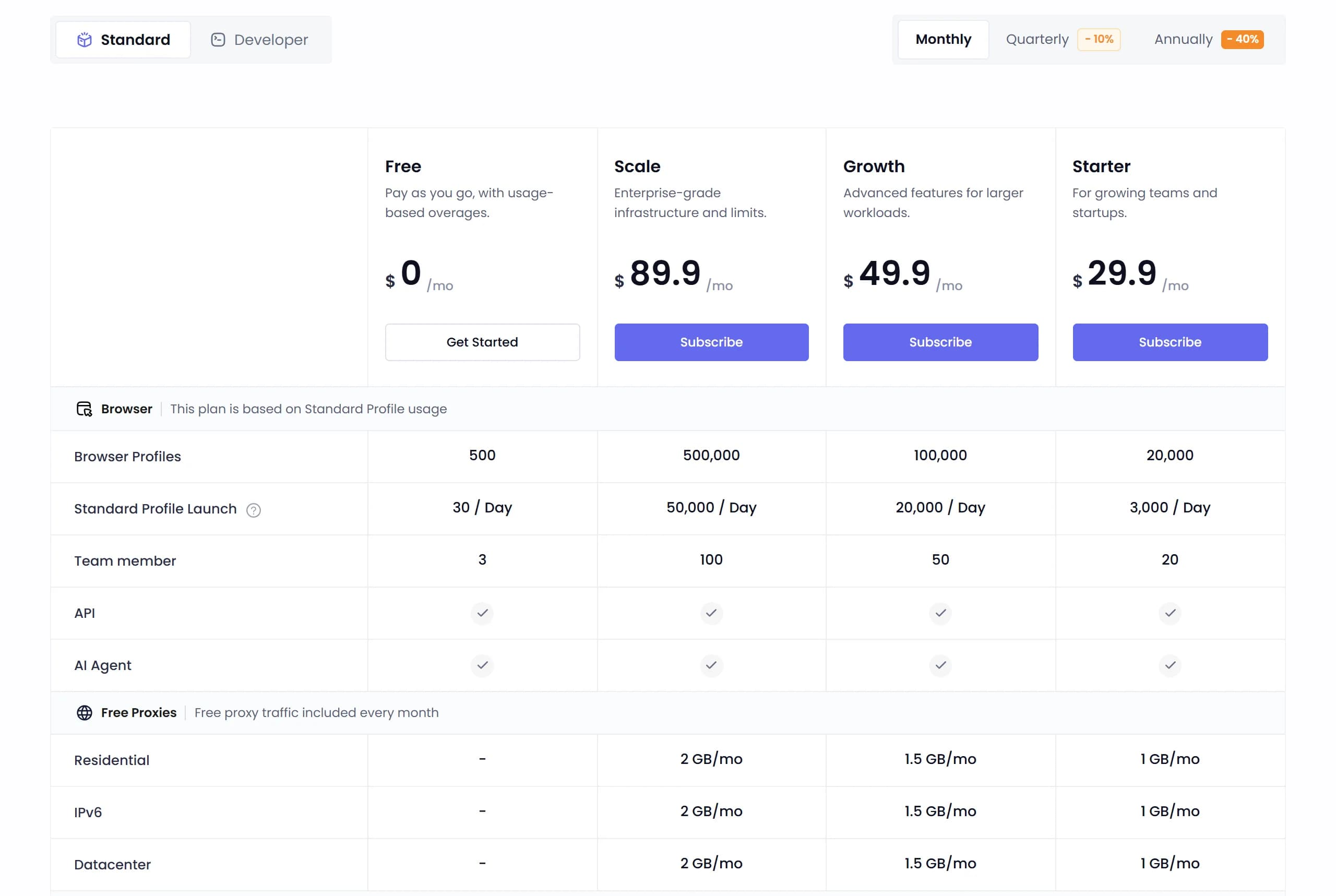
Plans limit launches a day rather than profiles. The free plan has 500 profiles, 30 launches a day and 3 team members with the API and AI agent included, and extra launches cost $0.01 each. Starter costs $29.90 a month for 20,000 profiles, 3,000 launches a day and 20 members, Growth $49.90 and Scale $89.90 raise those limits, and annual billing takes 40% off, so Starter costs $17.93 a month. Developer plans for cloud and Docker use start at $89.90. Subscriptions are paid by card or PayPal.
Automation runs through a REST API with Node.js and Python SDKs for Puppeteer, Playwright and Selenium, an RPA module with a marketplace, an AI agent and Browserless cloud sessions. Teams use custom permission groups by menu and profile group. Older documentation describes Android and iOS emulation in profiles; there are no cloud phones or mobile apps. Nstbrowser's affiliate program pays 15% of referred subscriptions for 24 months.
Nstbrowser: our review

Nstbrowser gives 500 free profiles but caps them at 30 launches a day; 3,000 launches cost $29.90 a month. The API and an AI agent come free. The catch: it doesn't publish its desktop kernel, its Docker image runs Chromium 153, and its terms ban fake accounts.
Nstbrowser has the biggest free plan among antidetect browsers: 500 profiles, 3 team members, and the API and an AI agent included. The number that matters is a different one: 30 launches a day. Nstbrowser prices its plans by how often you open profiles, not by how many you keep, so the free plan fits 30 accounts opened once a day, and 3,000 launches a day cost $29.90 a month.
This review is built on what Nstbrowser publishes: its pricing page, documentation, terms, download page, its Docker images and its GitHub, all checked on October 22 and 23, 2026. For how its engine situation compares with Dolphin, AdsPower, Octo and GoLogin, see Antidetect Browsers for Media Buyers 2026: Real Differences.
What is Nstbrowser, and who makes it?
An antidetect browser and a cloud browser for developers in one product. The desktop client runs on 64-bit Windows 10 and later and on macOS, Intel and Apple Silicon; the download page lists version 1.23.2. There's no Linux desktop client. On Linux, Nstbrowser runs only as a headless agent for Ubuntu 22.04 and 24.04 servers, managed from the command line.
The company is hard to pin down. The site footer says NST LABS TECH LTD, the terms are written for Nstbrowser LLC under United States law, and neither page gives a country of registration or an address.
The site sells scraping first. The home page leads with web scraping, Cloudflare bypass, a web unblocker and CAPTCHA solving, and only then with multi-account management. That tells you who the paid plans are designed for, and it explains the pricing model below.
Launches, not profiles: how Nstbrowser plans work
Every plan counts profile launches a day. A Standard Profile is the usual antidetect profile: it keeps cookies, logins, the fingerprint and local data between launches. A Once Profile is a fresh browser for one session that wipes everything when it closes, which suits scraping, not accounts.
For accounts, the free plan means 30 opens a day. That's 30 accounts opened once, or 10 accounts opened 3 times. Above the limit you don't get blocked: each extra Standard launch costs $0.01 and goes to an invoice, paid from prepaid credits at $1 per credit.
Run the math before you stay free. A buyer with 100 accounts who opens each one 3 times a day makes 300 launches. On the free plan that's 270 extra launches, $2.70 a day or about $81 a month. Starter costs $29.90 for 3,000 launches a day, or $17.93 a month on yearly billing, so past about 100 extra launches a day the paid plan is cheaper.
One quirk: extra launches cost $0.015 on Starter, more than the $0.01 on Free, falling to $0.008 on Scale. Starter's 3,000 launches a day cover most solo buyers, so few will hit it.
Ignore the home page's free plan. It still promises an "unlimited-time Free Professional subscription" with up to 1,000 launches a day and unlimited profiles and members. The pricing page, which is what you get, says 500 profiles, 30 launches and 3 members.
Which kernel is Nstbrowser running?
Nstbrowser runs its own Chromium build called nstchrome, and doesn't say which version the desktop client ships. The release notes page on the site stops at version 1.12.0 from October 23, 2024; the last kernel it names is nstchrome 128, from August 2024. Releases continued: Nstbrowser's agent on GitHub reached 1.23.2 on September 28, 2026, the same number the download page lists, but the releases say nothing about the kernel. The documentation says the client shows the kernel version in Settings, under Account and Version.
The only public number is the Docker image. Nstbrowser's official browserless image moved to nstchrome 153 on October 14, 2026, when Chrome 155 had been out for a week. Chrome 156 came out on October 20, so the image is now 3 versions behind. Its history shows the pace: 140 in September 2025, 143 in December, 146 in March 2026, 149 in June and 153 in October. That's a new kernel about every 3 months, while Chrome ships every 2 weeks.
Why it matters. A profile that claims an old Chrome stands out to the sites you log into. The desktop client may run a newer kernel than the Docker image, but nobody publishes it, so open Settings in the client and compare the number with the current Chrome version before you move accounts in.
How Nstbrowser handles fingerprints and profiles
It doesn't explain the method. Nstbrowser says it creates "authentic browser fingerprints based on users' real fingerprints." We found no published analysis of its fingerprints by a detection company or researchers, so judge it on your own checks.
Desktop profiles may be Windows only. The documentation says desktop profiles emulate only Windows and mobile ones Android and iOS. The page is undated and other parts of the docs are clearly old, so check in the client whether macOS profiles have appeared since.
The profile tools are practical: cookie import and export in JSON, launch logs and proxy logs for each profile, and up to 10 saved snapshots of a profile you can restore, if you turn on history sync for its group. Your account password is used as the key that encrypts cookies and session data, so pick a strong one and keep it.
Automation, cloud browsers and AI agents
This is where Nstbrowser is strongest, and most of it is free. The API and the AI agent are ticked on every plan, including Free. Scripts connect through the local API with Node.js and Python SDKs, and Puppeteer, Playwright and Selenium drive profiles. A no-code RPA module comes with a marketplace of ready scripts, and a synchronizer repeats your actions across browser windows.
AI Agent Skills let an AI agent drive profiles. Each skill is a folder with instructions the agent loads; Nstbrowser names OpenClaw as the agent runtime and publishes examples for X, Facebook, YouTube and TikTok. Its open-source command-line agent is on GitHub under the Apache 2.0 license. We found no official MCP server.
For developers there's a separate track: Developer plans billed by Once Profile launches, cloud browsers, dedicated servers and a Docker image you can host yourself. Most media buyers won't need it.
Built-in proxies and a CAPTCHA solver
Proxies are sold inside the client. Residential traffic costs $1.80 per GB on Free down to $1.50 on Scale, IPv6 $0.30 to $0.40, datacenter $0.60 to $0.80, and a static ISP address $2.50 per IP. Paid plans include 1 to 2 GB a month of each type. Nstbrowser doesn't name the network behind them, so test the IPs before you trust them with ad accounts.
The CAPTCHA solver is pay per use. The pricing page lists 7 types, priced per 1,000 requests: reCAPTCHA v2 costs $1.60 on Free and $1 on Scale, Cloudflare Turnstile $2 and $1.40. It's built for scraping; for ad accounts it's a detail.
Team work: members included, no per-seat price
Members come with the plan: 3 on Free, 20 on Starter, 50 on Growth and 100 on Scale. There's no price for an extra seat, because the limits are high enough that you don't need one.
Permissions are flexible. The owner builds permission groups with add, read, write and delete rights for each section of the client, and gives members access to specific profile groups. Profiles can be transferred or shared with another team. What we didn't find is a team activity log: the logs are per profile, launches and proxies, not a record of who did what.
Terms that matter for media buyers
Read them before you farm accounts. Nstbrowser's terms list "any form of creating fake accounts or content" and "any form of advertising fraud or click fraud" among prohibited uses. They also allow Nstbrowser to block an account or delete it with all its data, with no compensation, and the same terms rule out refunds.
No refunds, in any form. The terms say so in those words. You can cancel auto-renewal in the dashboard and keep access until the period ends. Upgrades take effect at once for the price difference; downgrades only take effect at the next renewal.
Signing up, our link and payment
Start on the free plan. Sign up through our link. We have no promo code for Nstbrowser, so there's nothing to enter at checkout.
Payment is by card (Visa, Mastercard, AMEX) through Stripe or by PayPal. Credits pay only for usage over the limits, not for subscriptions. Quarterly billing takes 10% off and yearly 40%.
If you want to refer people yourself, Nstbrowser's affiliate program pays 15% of referred subscriptions for 24 months.
Nstbrowser pricing in October 2026
Standard plans, from the pricing page on October 22, 2026, in USD:
- Free. Monthly: $0. Quarterly, per month: $0. Yearly, per month: $0. Profiles: 500. Launches a day: 30. Members: 3. Free proxy traffic, each type: none.
- Starter. Monthly: $29.90. Quarterly, per month: $26.90. Yearly, per month: $17.93. Profiles: 20,000. Launches a day: 3,000. Members: 20. Free proxy traffic, each type: 1 GB a month.
- Growth. Monthly: $49.90. Quarterly, per month: $44.90. Yearly, per month: $29.93. Profiles: 100,000. Launches a day: 20,000. Members: 50. Free proxy traffic, each type: 1.5 GB a month.
- Scale. Monthly: $89.90. Quarterly, per month: $80.90. Yearly, per month: $53.93. Profiles: 500,000. Launches a day: 50,000. Members: 100. Free proxy traffic, each type: 2 GB a month.
Extra Standard launches cost $0.01 on Free, $0.015 on Starter, $0.01 on Growth and $0.008 on Scale. The API, the AI agent, RPA, custom extensions, permissions, window management with sync, cookie management and batch creation are ticked on every plan.
Developer plans cost $89.90 a month for Basic (2,000 profiles, 100,000 Once launches and 500 Standard launches a day, 50 members) and $159.90 for Scale (5,000 profiles, 200,000 and 1,000 launches, 100 members), or $53.93 and $95.93 a month on yearly billing.
Nstbrowser vs other antidetect browsers
How it compares at about 100 profiles, on monthly billing, October 22, 2026:
- Nstbrowser. 100 profiles: $0 up to 30 launches a day, then $29.90. 3 people, about 100 profiles: $0 or $29.90. On the free plan: 500 profiles, API, AI agent. Mobile: Android and iOS profiles in the docs. Chromium kernel on October 22: 153 in Docker, desktop not published.
- AdsPower. 100 profiles: $36. 3 people, about 100 profiles: $46. On the free plan: synchronizer, no API. Mobile: iOS app. Chromium kernel on October 22: 155.
- MoreLogin. 100 profiles: $35. 3 people, about 100 profiles: $40. On the free plan: API, RPA, synchronizer. Mobile: cloud Android phones. Chromium kernel on October 22: 148 (last published, June).
- GoLogin. 100 profiles: $39. 3 people, about 100 profiles: $109 (Business). On the free plan: no API. Mobile: Android and iOS apps, Cloud Android. Chromium kernel on October 22: Orbita 153.
- Multilogin. 100 profiles: $40 (Business). 3 people, about 100 profiles: $40 (unlimited seats). On the free plan: no API. Mobile: cloud Android on real devices. Chromium kernel on October 22: Mimic 155.
- Dolphin{anty}. 100 profiles: $89. 3 people, about 100 profiles: $109. On the free plan: no API. Mobile: none yet. Chromium kernel on October 22: 155.
Nstbrowser vs AdsPower and MoreLogin. All 3 put a lot on cheap plans, and all 3 cost about $30 to $36 for a working setup. Nstbrowser wins on profiles and seats, which it barely limits; AdsPower publishes a current kernel, Chrome 155; MoreLogin has cloud Android phones. If you open accounts a few times a day, Nstbrowser's Starter is the cheapest of the 3. See our AdsPower review and MoreLogin review.
Nstbrowser vs Dolphin{anty} is price against track record: Dolphin costs 3 times as much for 100 profiles but runs Chromium 155 and is built around ad accounts, not scraping. Our Dolphin{anty} review has the details. For the whole field, see the antidetect browser pricing comparison and the best free antidetect browsers.
If you sign up for one of the others, here are our referral links: AdsPower, MoreLogin, GoLogin and Dolphin{anty}.
Pros and cons of Nstbrowser
Pros
- The biggest free plan: 500 profiles and 3 members, with the API and the AI agent included
- Starter at $29.90 a month, $17.93 on yearly billing, for 20,000 profiles and 3,000 launches a day
- 20 to 100 members included in paid plans, with permission groups by section and profile group
- Puppeteer, Playwright and Selenium support, Node.js and Python SDKs, no-code RPA and a synchronizer on every plan
- AI Agent Skills and an open-source command-line agent
- Built-in proxies and a CAPTCHA solver in the client, paid by usage
- Card or PayPal payment, 40% off on yearly billing
Cons
- The desktop kernel version isn't published; the Docker image runs Chromium 153, 3 versions behind Chrome
- The release notes page on the site stopped in October 2024
- The free plan allows only 30 launches a day, and the home page still advertises an older, bigger one
- Terms ban creating fake accounts and allow account deletion without compensation
- No refunds in any form
- The company's country and address aren't stated
- No team activity log and no Linux desktop client
- No published method or outside analysis of its fingerprints
Checklist: what to do
Questions about Nstbrowser
Is Nstbrowser free?
Yes. The free plan has 500 profiles, 3 team members, the API and the AI agent, with 30 profile launches a day. Extra launches cost $0.01 each.
How much does Nstbrowser cost?
Starter costs $29.90 a month for 20,000 profiles, 3,000 launches a day and 20 members; Growth $49.90 and Scale $89.90 raise the limits. Yearly billing takes 40% off, so Starter costs $17.93 a month. Developer plans start at $89.90.
Which Chrome version does Nstbrowser use?
Nstbrowser runs nstchrome, its own Chromium build, and doesn't publish the desktop version. Its official Docker image moved to nstchrome 153 on October 14, 2026; Chrome 156 came out on October 20. Check the version in the client's settings.
Is Nstbrowser safe?
We found no reported breaches. The concerns are transparency: the desktop kernel isn't published, the release notes stopped in 2024, the company's country isn't stated, and there's no outside analysis of its fingerprints. The terms also ban fake accounts and rule out refunds.
What is the difference between a Once Profile and a Standard Profile?
A Standard Profile keeps cookies, logins, the fingerprint and local data between launches; that's the one for accounts. A Once Profile is a fresh browser that wipes everything after the session, for scraping and one-off tasks. Once launches are cheaper.
Nstbrowser or AdsPower: which is better?
For many profiles and seats on little money, Nstbrowser: its free plan holds 500 profiles, and $29.90 covers 3,000 launches a day. For a published, current kernel and a product built around ad accounts, AdsPower: 100 profiles for $36 on Chrome 155.
Compare Nstbrowser with other antidetect browsers
- Cheapest Antidetect Browser With Team Features 2026: What 3, 5 and 10 People Really Pay
- Antidetect Browser Pricing Comparison 2026: What 31 Browsers Really Cost
- Average rating 5.0
- Average rating 4.8
- Average rating 4.8
- Average rating 4.7
Our verdict on Nstbrowser
A strong free or cheap tool for automation and large profile counts, but check its engine and its terms before you trust it with ad accounts.
Nstbrowser is built for developers and scrapers, and it shows in the good parts: the API, the AI agent, RPA and a synchronizer on the free plan, hundreds of profiles and dozens of seats for $29.90. The pricing by launches is fair once you count your opens. What holds it back for media buyers is transparency: the desktop kernel isn't published, the public changelog stopped in 2024, the only public kernel number is 3 versions behind Chrome, and the terms forbid the fake accounts that account farming produces.
My advice: sign up free through our link, check the nstchrome version in Settings, and run a couple of cheap accounts with your own proxies for a few weeks. If the kernel is current and your accounts hold, Starter is one of the cheapest setups on the market; if it isn't, AdsPower or MoreLogin cost a few dollars more.
Member reviews of Nstbrowser
No member reviews yet. Member reviews count 5 times more than ratings from other sites. Sign up free to write one.
No member reviews yet. Be the first to rate Nstbrowser.
Loading…
Are you this company? Claim the page
Nstbrowser reviews around the web
Public reviews from Trustpilot and G2. Their ratings count toward the users’ score with less weight than member reviews.
 Branislav Bjelic
Good anti-detect browser I've had a positive experience with NST Browser so far. The free version is more than enough to test all the core features and determine whether it fits your workflow. One of the biggest advantages is that NST provides a free API key, which is a great benefit for users who want to automate tasks without immediately upgrading to a paid plan. The browser is easy to set up, stable, and offers a solid fingerprint management system. The only downside is the limitation of 30 profile launches in the free plan. For small projects and testing, this is perfectly acceptable, but users managing larger operations will likely need to upgrade to one of the premium plans. Overall, NST Browser offers excellent value for anyone looking to evaluate an anti-detect browser before committing to a paid subscription.
- Thesopk
they don't help they don't help, their services ar crap, don't use them, it's a lot of bugs, you risks your accounts to get banned
 Ketmani P.
Profile Management Made Easy, Needs Better Update Automation I like Nstbrowser because it has a generous free plan where I can create as many profiles as I want and launch up to 10 per day. This feature is great because I need many different profiles for the most popular countries that visit us, and it helps me test how localization looks. Additionally, having a bunch of prepared profiles that I can launch with one click is really convenient. It asks too often to refresh the interface to update it (like at least once in a week). I think they can automate it and do it by themselves. The initial setup took a bit of time. It didn't work at first, and after asking support, it turned out I needed to download Chrome core at first to launch it. Nstbrowser lets me create different browser profiles with one click, solving the issue of quickly testing UI in various languages and resolutions.
- Michael
Low price, pay as you go plan, free API access, works great I've been using the free tier for months and it works just as you would expect any commercial anti-detect browser to work. I've been using it to maintain multiple YouTube accounts that I can use to bypass YouTube's anti-bot measures and download videos via python + ytdlp. Just wanted to write a review somewhere to support the dev. The API being available on the free (and pay as you go) plan is actually what I most value about NSTBrowser. There has been some issues with logging in (browser verification to login to desktop app hiccups) but I didn't even need to contact support to resolve it as the FAQ/known issues guide was sufficient. The dev is active and seems to be responsive, there's an active discord blah blah.
- Purachet C.
Generous Free Limit and Modern Interface Make It Stand Out Has good free limit, modern interface, a lot of feautures and good API. A bit expensive without their frequent discounts. Testing and using websites from multiple locations, without a need to switch time / turn on VPN every time.
- Marcus Ken
Not worth it Not worth it. Their browser won't open event after uninstalling and reinstalling it. I have tried to reach their customer support only for them to suggest that I have to contact them through discord and not any other channel for them to respond to my concerns.
- Final fantasy
NST is by far the best Honestly NST browser is the best…. It offers many options and utilities that can be used for very smooth browsing for just little cost. It's the best I've seen anywhere so far even though I can only create 10 profiles per day on the free plan it just cost little money to pay as you use… rather that most browsers I've seen…. Kudos team NST
- Razvan Cristian
NST Browser - A Revolutionary Tool for Online Navigation and Management I recently tested NST Browser, a specialized tool designed for professionals who need a secure and customized environment for managing their online activities. After a detailed analysis, I can confidently say that NST Browser not only delivers on its promises but also sets new standards in the anti-detect browser industry. What Makes NST Browser Unique? Advanced Anonymity and Security NST Browser is designed to mask digital fingerprints, making it impossible for websites or advanced tracking systems to detect activity. In a digital world where privacy is paramount, this browser provides powerful solutions for professionals who need to protect their identities. It's ideal for users working in fields like digital marketing, process automation, and competitor analysis. Multi-Profile Management One of its most impressive features is the ability to create and manage multiple user profiles, each with fully customized settings. Each profile operates in complete isolation, meaning activities in one profile do not influence or become detectable by others. This is crucial for individuals managing multiple accounts on social media platforms, e-commerce sites, or other systems where isolation is essential. Advanced Integrations: The browser is compatible with automation frameworks like Puppeteer, Playwright, and Selenium, making it extremely versatile. This integration allows professionals to streamline repetitive processes and save valuable time. Proxy Management System: An intuitive and easy-to-configure system simplifies navigating with multiple proxies. This allows users to access geo-restricted content or diversify their digital fingerprints. Cloud Synchronization: The cloud synchronization feature ensures complete accessibility across multiple devices, offering a seamless user experience. Who Is NST Browser For? This browser is tailored for professionals conducting their work with integrity and respect for ethical standards. For example: Digital marketing specialists who need multiple accounts to test and optimize campaigns. Researchers and analysts study competitors' markets without compromising their company's identity. Teams managing sales or support tasks requiring a scalable solution for simultaneous operations in various environments. Ethics and Responsibility in Usage: NST Browser is a powerful tool, but clear ethical principles should always guide its use. For instance: It's important to avoid using it for activities that violate platform terms of service or negatively impact others or organizations. Leveraging it for positive purposes, such as testing application security or optimizing marketing campaigns, is the right way to make the most of this technology. User Experience: The interface is intuitive and offers a wide range of customization options. Support for multiple languages and the ability to switch between dark and light themes add to the user experience. The setup is quick, and the available resources (tutorials and documentation) make the process accessible even for less technical users. Conclusion: NST Browser is more than just a browser – it's an advanced work platform designed for professionals who need anonymity, efficiency, and reliability. I recommend this browser to anyone working in fields where multi-account management, process automation, and security are priorities. This tool is an excellent choice, as long as it is used responsibly and in line with ethical principles in the online space. 🎉
- Romek Opmeer
The way they removed the free plan is kind of sad. With my current usage the price went from free to similar as other antidetect browser, more established names.. And removing the free plan without any prior notice is just frustrating. You could have went with the way of removing the free plan option for new/ unregistered buyers and give us a grace period of 2 weeks or a month, or a small amount of credit as compensation Either way, since I will be paying the same amount for other antidetect browser, having 100 concurrent browser option is much better then 100 browser launch
- Molnar
With the new price, there is a lot of cheaper alternative This level of price increase is just too much. We went from 1000 profile to 10 profile daily limit in the free plan.. I have been using Nstbrowser for around a month now. (and i was pretty satisfied) Since we now have a 10 hours browser limit as well, if you are using 100 browser launch a day, that would be 30$ a month, but 10 hour is just not enough, so its likely be 60$ a month. If you do any testing or experience any crash, then its even higher.. But for this price, there is a lot of alternative. You really need some cheap reasonably priced plan as well, like 10$ a month for daily 50/100 browser launch limit without this 10 hour thing (even if its without rpa and browserless features) edit: I have to add this The main problem with this limited browser launch is that I was just forcefully logged out of the app, all the browser closed, now I not only have to restart the apps, I have to pay for it again.. its funny edit2: its been a month since my original review, (2 start to 4 star) i only need 25 profile at the moment, and it only cost me around 5.5$ for the full month (10 free browser open and 15 paid daily) but its really annoying that around 2 times per month, i get forcefully logged out and all my browser close.. there is no notice or warning, you just check after half a day to see that everything is closed.. they need to do something with that
- Eros Mojica
Free plan gone without a word.. Free plan gone without a word.. I only use like 40 profiles, and suddenly I receive an email saying my credit/balance is insufficient/went into negative I was like ??? What's happening It turns out their free plan (which according to twitter/x only been around for half a year) suddenly gone.. What's even more ridiculous that they didn't even have the decency to send us an email, like 'free plan limit will be reduced to the minimum starting from next month' or anything like that… Just an email that your balance is negative
- Theyka
Better browser than its competitors They upgrade Chrome version quickly, Their support is also good and their prices are less than other browsers. People say that they allow you to open the browser 10 times a day but it is not true, you can open a browser as many times as you want in a day and this browser will consume one of your usage limit and instead of paying for a plan you can open a new browser for $0.01 per day.
- MD Rakibul Alom
Very bad marketing system Initially, it displayed 1,000 profiles daily and allowed 5 team members to participate in the free plan. However, after I registered, it shows only 10 profiles daily and allows just 2 team members. This is very frustrating.
- Son Gohan
Very BAD application You can only open the profile 10 times a day on the free plan (I repeat ONLY 10 TIMES). This app gives you a browser with very bad parameters and is easily detectable. This is a bad experience for me.
- Jj Lee
Whoever created this software thank you so much!!!! This browser is much better then any other I've tried (adspower, dolphin, gologin, octo, multilogin) and it's literally free! The dev deserve so much respect for it. Kudos
- we wac
Can't Login The entire registration and installation process was straightforward and user-friendly. However, the significant disappointment arose from the inability to access my account on the app. Despite attempting to locate the login problems page, which proved ineffective, I encountered difficulties in deleting my account. Furthermore, my search for relevant information on Google and the account settings page yielded no results. When I reached out to the chatbot for assistance, it redirected me to a human agent but didn't respond to provide further support.
- Sang Đỗ Tấn
Work good on Mac Work good on Mac Just download it, I tried differents browsers before, and i got to say this work best for me ! And its perfect for my needs!
About these reviews. We gather them from public pages so you can see how Nstbrowser is rated outside aliencpa. We take the latest reviews from each source, without picking them by tone. Each is quoted in full, word for word, and translated into English where marked; the source icon links to the original. We don’t verify them, and our editorial policy doesn’t cover them. Their ratings count toward the users’ score, but member reviews from aliencpa readers always weigh more and come first. Worked with Nstbrowser? Write a member review.
Nstbrowser is listed in our antidetect browser catalog. Paid packages can pin a card and extend it; they never buy a rating, a review or a verdict.
Comments on Nstbrowser
Open to everyone, no sign-up. Comments don’t change the rating.
No comments yet.
Add a comment