

MGID for Publishers: Requirements, Payouts and Ad Placements That Don't Kill UX

Independent and reader-supported. Some links here are affiliate links: if you sign up through them, we may earn a commission at no cost to you. It never changes our scores or verdicts. Affiliate disclosure

Contents 11
Updated on October 31, 2026: added quick facts, the full MGID publisher requirements, prohibited placements, and payout methods with minimums and fees.
AdSense is where most sites start, and relying on it alone means one policy change can cut your revenue overnight. Native advertising is the obvious second stream, and MGID is one of the largest native networks: the "sponsored content" blocks you see under articles on news sites. This guide walks through MGID's publisher requirements, getting a site approved, choosing and placing widgets, and getting paid without losing a quarter of a small payout to fees.
Every rule and number below is checked against MGID's own requirements page and help center on October 31, 2026. Where MGID's pages disagree with each other, I say so. For how MGID compares with AdSense, Ezoic, Mediavine and others, see Best Ad Networks for Website Monetization in 2026.
MGID publisher requirements and payouts: quick facts
What | MGID for publishers |
|---|---|
Minimum traffic | 5,000 unique visitors a day (the help center names 3,000 as the floor) |
Site basics | HTTPS, a privacy policy, cookie consent for EU visitors |
Content | 30+ original articles of 500+ words, the latest posted within 7 days |
Banned content | Fake news, shocking images, adult and illegal content |
Ad density | Up to 30% of the page, 200 words between in-article units |
Approval time | About 24 hours, the next business day at weekends |
Payment terms | Net 30, paid around the 30th for the previous month |
Minimum payout | $100 for PayPal and Tipalti, $1,000 for bank-to-bank transfers |
Payment methods | PayPal, Tipalti bank transfer, ACH and international bank transfer |
Transfer fees | Tipalti under $1,000: $5 to $26 a payout; PayPal: normal PayPal fees |
How MGID works for publishers
You add a widget (a block of code) to your pages. MGID fills it with native ads: content recommendations with a picture and a headline that match your audience's interests. Advertisers pay per click or per impression, and you get a share.
What publishers get:
- Control: you choose the widget types and where they go, and your account manager can block ad categories that don't fit your audience. Don't want gambling ads next to family content? Ask for them to be blocked.
- Pre-screened ads: creatives go through MGID's moderation before they reach your pages.
- Direct and programmatic demand, including prebid solutions for publishers who work with header bidding.
- Analytics: real-time stats on RPM and CTR by widget, with A/B testing of styles.
- AdSense compatibility: MGID calls itself fully compatible with Google AdSense, so you can keep Google and add MGID on top.
- Internal recirculation: widgets can mix your own articles with paid ads, which lifts pages per session.
- A referral program that pays a commission on the revenue of publishers you bring in.
How to sign up as an MGID publisher and pass ID verification
Go to MGID's publisher sign-up, choose "Publisher" and enter your name, email and website. Then comes the part many webmasters dislike: identity verification.
Individuals verify through iDenfy. You photograph a passport, national ID card, driving license or residence permit and take a live selfie that is matched to the document. Companies go through KYB instead: a signed onboarding form and company documents. MGID says only verified users can proceed with business cooperation, and it can ask you to verify again later, for example when a document expires.
It feels like a lot of personal data to hand over in this industry. The flip side is that verification keeps bot farms and scammers out, which is part of why advertisers keep paying decent rates for the inventory.
Native widgets for publishers: Net 30, payouts from $100
MGID publisher requirements: what a site needs to get approved
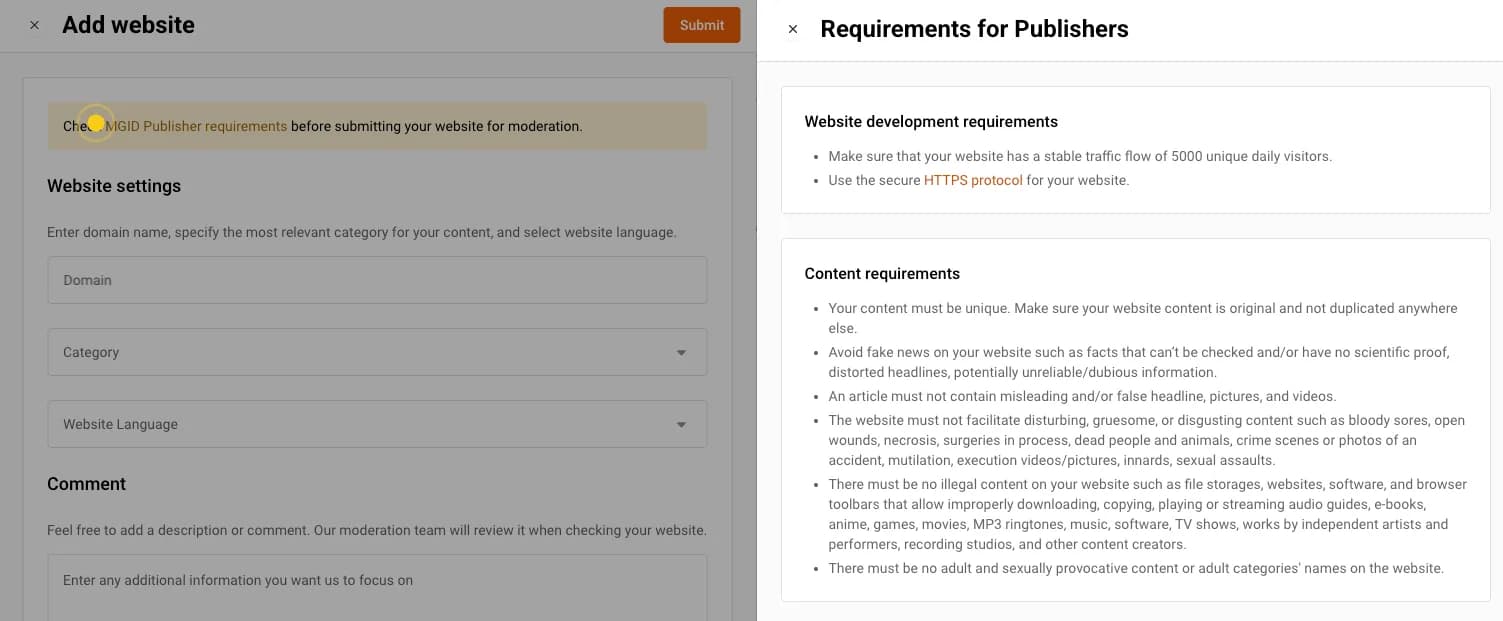
MGID doesn't approve thin sites. Its requirements page groups the rules into website development, content, content organization, advertising, widgets and privacy. Here is the full list in plain words, with MGID's own terms where they matter.
Traffic, HTTPS and privacy
- Traffic: a stable flow of 5,000 unique visitors a day. That's the figure on the requirements page. MGID's help center sets the floor lower, at 3,000 unique visitors a day (90,000+ a month), and tells publishers rejected for traffic who believe they qualify to give their manager guest access to Google Analytics.
- HTTPS on the whole site.
- Privacy policy: a visible section that discloses what data the site collects, shares and uses.
- Cookie consent: if the site sets cookies to collect information, European visitors must see a consent message.
Content requirements: no fake news, shocking or adult content
- Original content only: unique, not duplicated anywhere else, so no scraped or spun articles.
- No fake news. MGID defines it as "facts that cannot be checked and have no scientific proof, distorted headlines, potentially unreliable/dubious information."
- No misleading or false headlines, pictures and videos. A clickbait headline the article doesn't deliver on counts.
- No shocking content: nothing "disturbing, gruesome or disgusting", which MGID spells out as bloody sores, open wounds, necrosis, surgeries in process, dead people or animals, crime scene or accident photos, mutilation, execution videos, innards and sexual assaults.
- No illegal content: no file storages, torrents, software or browser toolbars for downloading or streaming pirated movies, music, games, e-books, software or TV shows.
- No adult content: nothing sexually provocative, and not even the names of adult categories on the site.
Content organization: volume, UX and media
- Posting history: at least 30 articles since the site was created, each of 500+ words.
- Fresh and dated: every article shows the date it was posted, and the latest went up within 7 days before you apply.
- UX: pages load fast, stay visually stable and respond, with clickable links and smooth navigation. MGID points to Core Web Vitals as the yardstick and still names First Input Delay, which Google replaced with Interaction to Next Paint in March 2024, so check INP instead.
- High-resolution media: all photos and videos are high resolution and fit regular screen sizes.
- No blurred photos or videos, except to protect a person's confidentiality.
- Social traffic: if social media is your main traffic source, link to those accounts from the site.
Advertising on the site: density and third-party ads
- Ad density: all advertising on the page, MGID's and everyone else's, takes no more than 30% of the page content. The exception is special formats that combine your own content and ads in one unit.
- Spacing: in-article placements sit at least 200 words or 1,000 characters apart.
- Third-party advertising: ads from other networks on the site must not promote adult or illegal content or products.
- No intrusive ads: no popunders and no pop-ups that can't be closed easily.
MGID widget requirements
- Separate widgets for every site: with a simple JS integration, each website gets its own widgets.
- One code per placement: if you run several MGID widgets on a page, even of the same format, each placement gets its own code.
- Nothing interferes with the widget: layout elements, third-party ad units and other scripts on the page must not interfere with the widget's proper functioning or with MGID's statistics calculation. A sticky banner on top of the widget or a script that stops it from loading breaks this rule.
- No prohibited placements: MGID keeps a separate list, covered in the placements section below.
Why MGID rejects sites
Approval usually takes about 24 hours, and the decision goes to your main email; moderation that falls on a weekend moves to the next business day. A rejection email states the reason, and MGID's help center lists the common ones:
- Low rating: not enough traffic.
- Low information value or no content: too few useful articles.
- Illegal content download: downloads, streaming or torrents.
- Pornographic or erotic content, including adult ads on the page.
- Redirects to another domain or the website could not be reached: the moderators can't see the content.
- Previous fraudulent activity: a site in the same account was blocked earlier by MGID's quality team.
The rejection notes set a lower bar than the requirements page: 3,000 daily uniques and at least 10 articles with up-to-date content. Aim for 5,000 and 30 anyway, and you won't depend on a manager's goodwill. Fix the reason and resubmit, or contact your manager if you disagree with it.
Bot traffic ends the relationship for good. MGID doesn't work with sites that buy bot traffic or use any non-human way to generate clicks, and says publishers who try "will be banned from the MGID platform with no further revenue refunds."
MGID widget types: which one to start with
In the dashboard, go to "Add Widget". Don't accept the defaults and walk away: the look of the widget decides much of its CTR.
- Under-article widget. The classic, and the best place to start: MGID calls it the main widget, with the best performance on most sites. The reader finishes your article and looks for the next thing to click.
- In-article widget. Sits between paragraphs and comes in impact, main and carousel subtypes; MGID says main usually gets more clicks. Useful on long reads, and it can carry video.
- Smart widget. Mixes native ads and display banners in one unit and picks what each user is most likely to click. MGID pitches it as the alternative to the under-article widget.
- Sidebar widget. Works on desktop. On mobile MGID moves it to the bottom of the page, so don't count on it if most of your traffic is mobile.
- Header widget. Very visible and very risky: MGID warns it may cause random clicks on mostly mobile sites, and a header widget with more than 1 row of pictures is a prohibited placement.
- Mobile site widget. Built for the mobile version only; MGID warns about random clicks here too.
- On-site notifications. Looks like push notifications inside your site, and you set the capping and the number of notifications yourself.
MGID also offers formats such as "MGID Story" and a "Read more" button that aim to lift RPM without heavy banners.
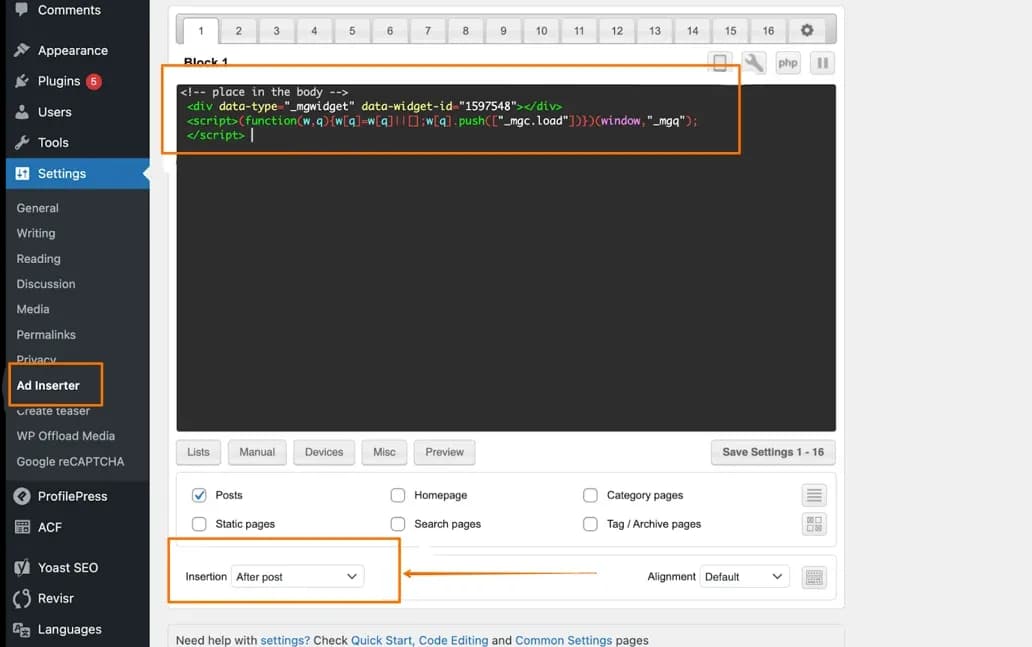
For WordPress sites, MGID's help center explains how to add widgets; many publishers use an ad-insertion plugin and place the code after the post content.
AMP and Instant Articles. MGID provides amp-embed codes for AMP pages. The original version of this guide also recommended MGID's codes for Facebook Instant Articles, but Meta shut Instant Articles down in 2023, so that option is gone.
Best MGID ad placements (how to avoid killing UX)
The classic rookie mistake is covering the site in ads. Readers bounce, session time drops and search rankings suffer. Start with an under-article plus an in-article widget, the pair MGID itself recommends to new publishers, and add more only when the numbers say so.
- Under the article: the default slot. The reader is done and looking for what to read next.
- Inside the article: after the first few paragraphs, with at least 200 words between it and any other in-article unit. Try the main subtype before impact or carousel.
- Sidebar: for desktop-heavy sites only.
- Header: 1 row of pictures at most, and skip it on mobile-heavy sites.
- Stacking with AdSense: keep AdSense in the high-value spots (above the fold, mid-content) and put MGID under the article or in the sidebar. You catch readers who ignore banners but click content recommendations.
- Internal exchange: set some units to show your own articles next to paid ads. More pages per session means more impressions and better engagement signals.
- Total load: all ads on the page, MGID's and everyone else's, stay under 30% of the content.
Placements MGID bans outright. These are on MGID's prohibited placements list:
- widgets over a video player, real or fake, with or without a close button
- widgets over the content or over another widget, or hidden in a transparent layer
- floating blocks that move with the scroll or sit over the content without a close button
- widgets covered by the site's own content
- widgets that auto-redirect or auto-refresh the page, and hidden on-click links that send users to an advertiser's landing page
- call-to-click headings such as "Click on ads", "Check our Sponsors" or "Please, click an ad to support this site", and arrows pointing at the widget
- a header widget with more than 1 row of pictures, or an impact widget before the main content
- any placement that produces lots of involuntary or fraudulent clicks, and any page with illegal downloads, streaming or torrents
A prohibited placement costs more than the slot. MGID says using any of them "will lead to a permanent account ban with no payments from the ad units performing in the prohibited placements", and that the list may change without notice. Check it again before you move a widget somewhere new.
How to optimize MGID widgets: CTR and RPM
Check the MGID dashboard for RPM (revenue per 1,000 impressions) and CTR by widget.
- Low CTR? The widget probably doesn't match your site. Adjust the native style, fonts and thumbnails so it blends in; MGID also suggests trying a different widget title and logo.
- Low RPM? You may be showing ads to low-value GEOs, or the widget sits too far down the page. Try moving it up.
- Swap subtypes before adding units. If an in-article impact widget underperforms, MGID suggests trying in-article main, or replacing the under-article widget with a Smart widget.
- One change at a time. Move a widget, test a format, adjust density, and let each change run long enough to read.
What publishers report earning
There is no honest single number. Earnings depend on niche, GEO, audience quality, season and placement. Publishers report RPMs of around $1 to $3 for under-article widgets on news and entertainment sites in mid-tier GEOs, and higher for premium niches (finance, health, tech) with Tier-1 traffic. One publisher on Reddit said their manager recommended combining MGID Story with in-article widgets, and that visibility and RPM rose by 35 to 40% after the change. Others describe a small site hitting the minimum payout several times with just a couple of widgets and patient support from MGID.
Treat these as anecdotes. Your own dashboard after a few weeks is the only number that counts.
MGID payout methods, minimum payment and fees
MGID pays publishers on Net 30 terms: a month's earnings are paid by the end of the following month, around the 30th. Each payout method has its own minimum, and the low $100 minimum for Tipalti comes with a fee.
Payout methods and minimums, from MGID's payout methods table:
- PayPal: $100 minimum; normal PayPal fees apply.
- Tipalti bank transfer: $100 minimum, to US and non-US bank accounts. For payouts below $1,000 Tipalti charges $5 for an eCheck in a non-USD currency, $16 for a non-USD wire and $26 for a USD wire. Above $1,000 the table lists no fee.
- ACH bank-to-bank transfer: $1,000 minimum, for banks in the USA. MGID lists no fee above $1,000, but your bank may charge to receive the money.
- International bank-to-bank transfer: $1,000 minimum, a wire to a bank outside the USA, with the same note about your bank's fees.
- Payoneer: MGID's "Getting paid" page still lists it with a $100 minimum, but the payout methods table doesn't. Check that your dashboard offers it before you count on it.
- No crypto: MGID doesn't pay in Bitcoin or any other cryptocurrency.
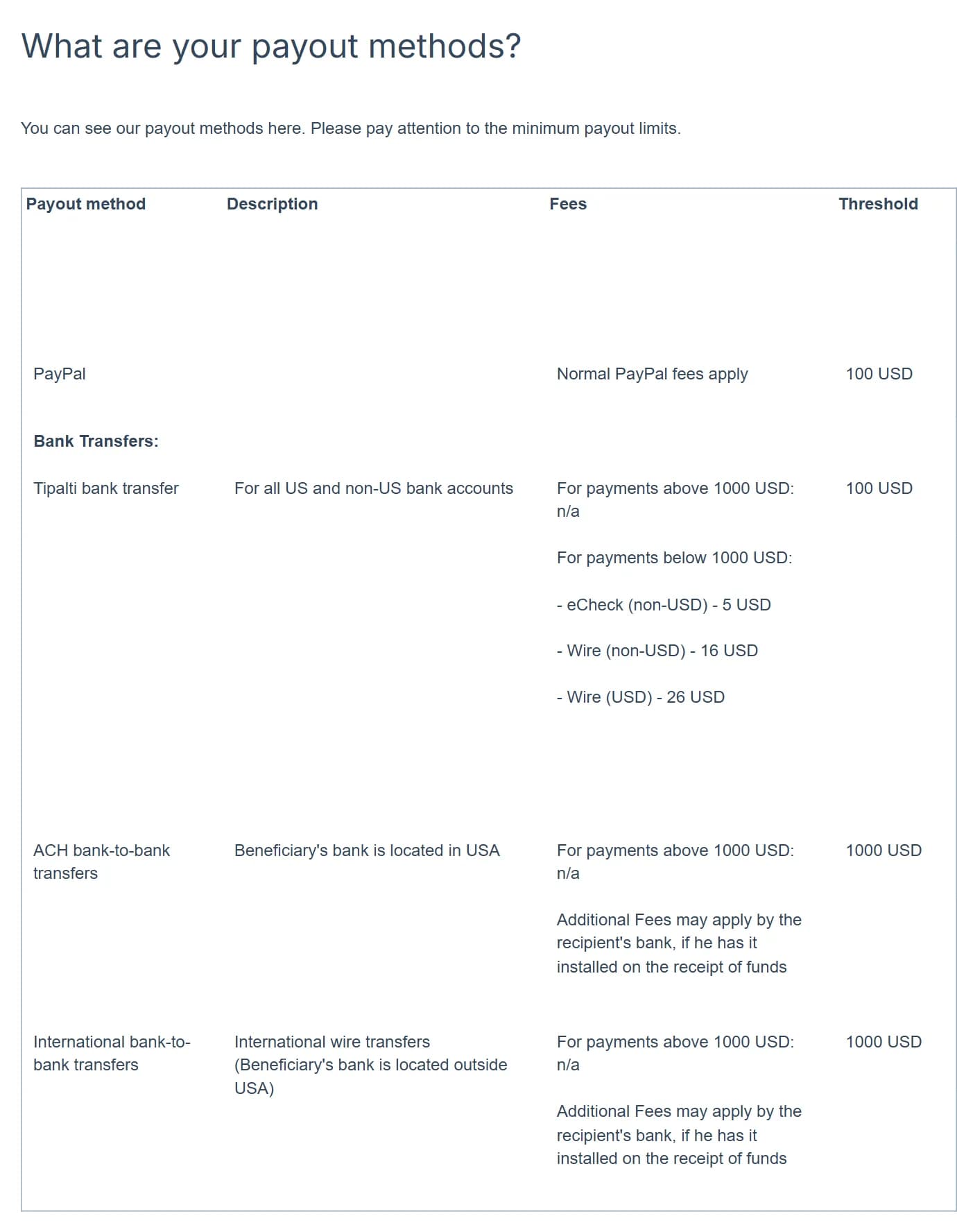
MGID's short answer on thresholds puts Tipalti at "$100 (with additional $26 fee)". On a $100 USD wire through Tipalti, the $26 fee is 26% of the payout. If your monthly earnings are small, PayPal costs less. If you want the money in a bank, you can ask your manager to put payouts on hold and let the balance pass $1,000, where the table lists no Tipalti fee.
How the schedule works:
- Payout requests are created automatically on the 1st of each month for balances that reached the minimum of your method. Reach it on the 2nd and you wait for the next 1st.
- Requests are reviewed before the 15th, so change payout details in the first half of the month. You can switch methods while the payout is "pending", not after it's "approved".
- MGID approves pending payouts before the 28th and sends them around the 30th, or on the next business day if that falls on a weekend. Allow 1 to 3 business days for the money to arrive.
- There is no way to get paid sooner: MGID sticks to Net 30.
Add a payment method before the month ends. MGID's own example: if you start on May 25 and add your details by May 31, you get May's earnings at the end of June. Add them in June, and May and June earnings both arrive at the end of July.
After adding a method, confirm the link MGID emails you, check that the method is active and click "Resume Payments". No payout goes out before that.
Checklist: what to do
Questions and answers
What are MGID's publisher requirements?
A stable 5,000 unique visitors a day, HTTPS, at least 30 original articles of 500+ words with the latest posted within 7 days, and a privacy policy with cookie consent for EU visitors. The site must have no fake news and no shocking, adult or illegal content, use high-resolution media, keep ads under 30% of the page and leave 200 words between in-article units.
How much traffic do I need for MGID?
The requirements page asks for a stable 5,000 unique visitors a day. The help center names 3,000 a day, or about 90,000 a month, as the minimum, so a site between the two can apply, but plan for 5,000. If you're rejected for traffic and believe you qualify, give your manager guest access to Google Analytics.
How fast is MGID approval?
Usually within 24 hours; at weekends, on the next business day. A rejection email states the reason, such as low rating, low information value or a redirect to another domain. Fix it and resubmit, or contact your manager if you disagree.
Can I run MGID and AdSense on the same site?
Yes. MGID describes itself as fully compatible with AdSense. Keep all ads together under 30% of the page and place the units so they don't compete for the same spot.
What is MGID's minimum payout, and are there fees?
$100 for PayPal and Tipalti, $1,000 for ACH and international bank-to-bank transfers. PayPal charges its normal fees. Tipalti payouts under $1,000 cost $5 for a non-USD eCheck, $16 for a non-USD wire and $26 for a USD wire; above $1,000 MGID lists no Tipalti fee.
When does MGID pay publishers?
On Net 30 terms: a month's earnings are paid around the 30th of the following month and arrive 1 to 3 business days later. Add and confirm your payment method before the month ends, or the payout moves 30 days later.
How much can a site earn with MGID widgets?
There's no reliable number. Earnings depend on niche, GEO, audience quality, season and placement. Publishers report RPMs from around $1 to $3 for under-article widgets in mid-tier GEOs, and more for premium niches with Tier-1 traffic, but treat any figure as anecdotal until you see your own data.
Author’s conclusion
MGID is a sensible second revenue stream for content sites that already have real traffic: approval takes about a day when the site meets the requirements, the widgets can match your design, and it coexists with AdSense. The trade-offs are a strict content policy that rules out fake news, shocking images and adult ads, a mandatory ID check, a list of placements that get accounts banned without pay, and Net 30 payouts where a small Tipalti transfer can lose $26.
My advice: walk through the requirements list above on your own pages before you apply, then start with one well-styled under-article widget, plus in-article on long reads. Measure for a week and add other widgets one at a time. Take payouts via PayPal until your monthly balance clears $1,000. Every unit you add should earn more than the engagement it costs you.
Lu Discover, Editor-in-chief
Sources for this article
- mgid.com — MGID: Publisher Requirements (traffic, HTTPS, content, fake news, disturbing content, multimedia, ad density, third-party advertising, widgets, privacy), checked October 31, 2026
- help.mgid.com — MGID Help: What are your payout methods? (methods, fees and thresholds)
- help.mgid.com — MGID Help: What is the payout threshold?
- help.mgid.com — MGID Help: Getting paid (Net 30, schedule, Payoneer, email confirmation, payment method deadline)
- help.mgid.com — MGID Help: Prohibited Placements
- help.mgid.com — MGID Help: General Information (rejection reasons, 3,000 daily visitors, 24-hour moderation, AdSense, bot traffic)
- help.mgid.com — MGID Help: Requirements for Publishers
- help.mgid.com — MGID Help: I meet your traffic requirements, but my website was rejected
- help.mgid.com — MGID Help: MGID Publishers verification program (KYC through iDenfy, KYB)
- help.mgid.com — MGID Help: What widget formats do you have?
- help.mgid.com — MGID Help: What widgets perform the best?
- help.mgid.com — MGID Help: How can I increase my revenue?
- help.mgid.com — MGID Help: What are the transaction fees?
- help.mgid.com — MGID Help: I have reached the threshold of $100/1000 but payment is not made (payout requests on the 1st)
- help.mgid.com — MGID Help: Can I put my payouts on hold?
- help.mgid.com — MGID Help: Can I receive my payout in Bitcoins?
- help.mgid.com — MGID Help: MGID Widget Code Installation on WordPress Websites
- web.dev — Interaction to Next Paint becomes a Core Web Vital on March 12
- aliencpa.com — Original guide (January 2026), rewritten
Companies in this article
- MGIDTraffic sourceNot rated yet
Related stories
 Guide
GuideHow Much Budget Do You Need to Test an Offer? What $100 Can and Can't Tell You
 Comparison
Best Ad Networks for Website Monetization in 2026: Who Takes 1,000 Visits, Who Wants 250K, Who Pays Weekly
 News
News
Comments
0 commentsNo comments yet.
Add a comment