

MGID for Publishers: How to Get Approved and Place Widgets Without Killing UX

Independent and reader-supported. Some links here are affiliate links: if you sign up through them, we may earn a commission at no cost to you. It never changes our scores or verdicts. Affiliate disclosure

Contents 11
AdSense is where most sites start, and relying on it alone means one policy change can cut your revenue overnight. Native advertising is the obvious second stream, and MGID is one of the largest native networks: the "sponsored content" blocks you see under articles on news sites. This guide walks through getting a site approved, choosing and placing widgets, and optimizing without wrecking the reader experience.
How MGID works for publishers
You add a widget (a block of code) to your pages. MGID fills it with native ads: content recommendations with a picture and a headline that match your audience's interests. Advertisers pay per click or per impression, and you get a share.
What publishers get:
- Control: you choose the widget types, placements and the ad categories you allow. Don't want gambling ads next to family content? Block them.
- Pre-screened ads: creatives go through MGID's moderation before they reach your pages.
- Direct and programmatic demand, including prebid solutions for publishers who work with header bidding.
- Analytics: real-time stats on RPM and CTR by widget, with A/B testing of styles.
- AdSense compatibility: you can keep Google and add MGID on top.
- Internal recirculation: widgets can mix your own articles with paid ads, which lifts pages per session.
- A referral program that pays a commission on the revenue of publishers you bring in.
Step 1: sign up and verify your identity
Go to MGID's publisher sign-up, choose "Publisher" and enter your name, email and website. Then comes the part many webmasters dislike: identity verification. MGID asks for a passport, ID card or driver's license and your real details before it pays you.
It feels like a lot of personal data to hand over in this industry. The flip side is that verification keeps bot farms and scammers out, which is part of why advertisers keep paying decent rates for the inventory.
Step 2: meet the site requirements
MGID doesn't approve thin sites. Before you submit, check the list:
- Traffic: a stable 5,000 unique visitors a day (exceptions exist for quality niche sites).
- HTTPS on the whole site.
- Original content only: no scraped, spun or duplicated articles, no fake news, clickbait or misleading headlines and images.
- No adult, illegal or shocking content: no piracy, torrents or warez, no gore or disturbing images.
- Enough content: at least 30 articles of 500+ words, a regular publishing history and a post within the last 7 days.
- Decent UX: fast loading, stable layout, working navigation, sharp images and videos.
- Social traffic: if social media is your main source, link your social accounts on the site.
- Ad density: ads (MGID and others) take no more than 30% of the page, with at least 200 words (or 1,000 characters) between in-article units; no intrusive pop-unders or pop-ups that are hard to close.
- Widget integrity: each MGID widget has its own code, and no other script interferes with MGID's stats.
- Privacy: a visible privacy policy and a cookie consent banner for European visitors.
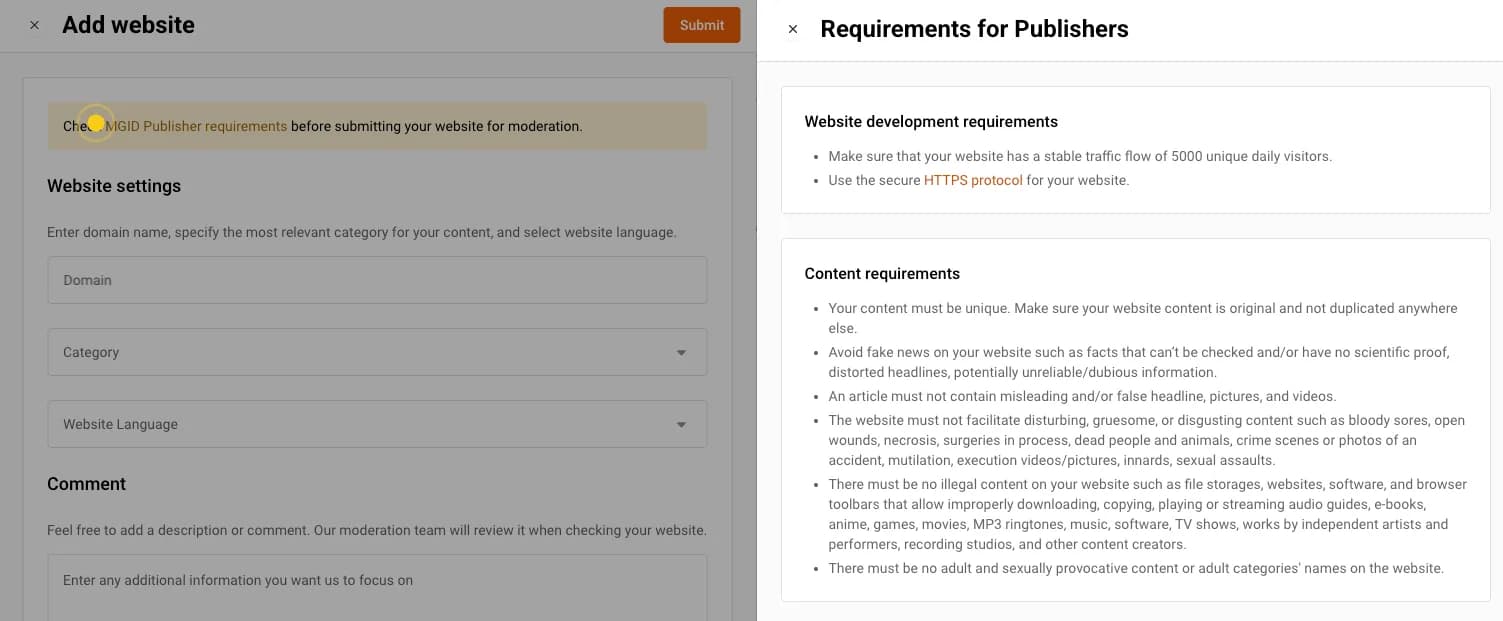
Approval usually takes about 24 hours. If you're rejected, fix what MGID points to and resubmit.
Step 3: choose your widgets
In the dashboard, go to "Add Widget". Don't accept the defaults and walk away: the look of the widget decides much of its CTR.
- Under-article widget. The classic, and the best place to start. The reader finishes your article and looks for the next thing to click.
- In-article widget. Sits between paragraphs; useful on long reads, and it can carry video.
- Sidebar widget. Works on desktop; most traffic is mobile, so don't count on it.
- Header widget. Very visible and very risky: don't hit readers with ads the second they land.
- Mobile widgets. Built for small screens; worth testing if most of your audience is on phones.
- Smart widget. Mixes native ads and display banners in one unit and picks what each user is most likely to click. Less manual testing for you.
MGID also offers formats such as "MGID Story" and a "Read more" button that aim to lift RPM without heavy banners.
For WordPress sites, MGID's help center explains how to add widgets; many publishers use an ad-insertion plugin and place the code after the post content.
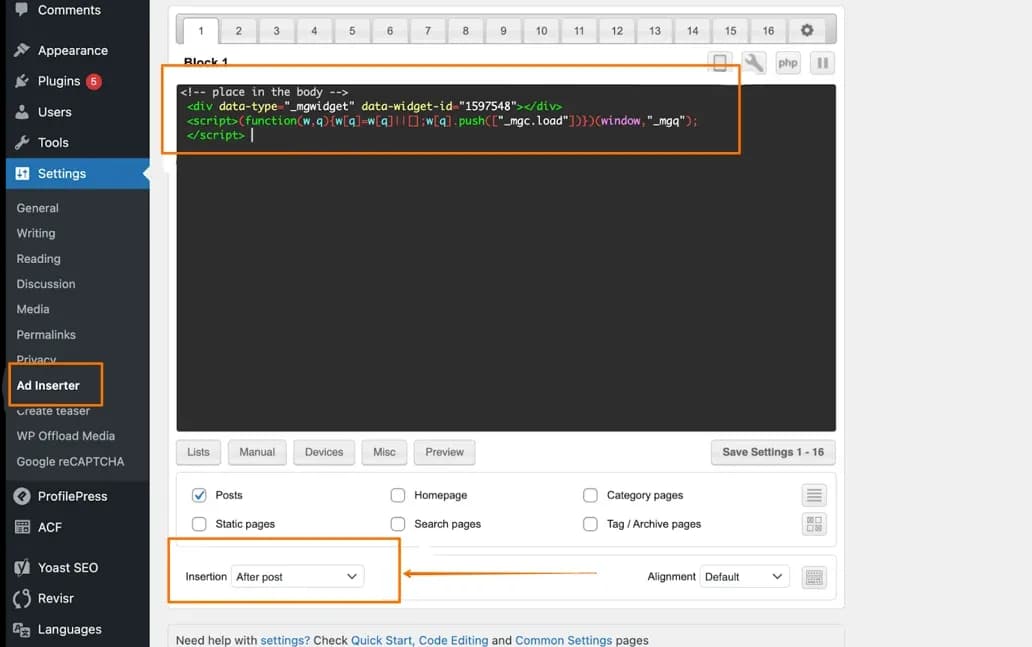
AMP and Instant Articles. MGID provides amp-embed codes for AMP pages. The original version of this guide also recommended MGID's codes for Facebook Instant Articles, but Meta shut Instant Articles down in 2023, so that option is gone.
Step 4: place ads without being greedy
The classic rookie mistake is covering the site in ads. Readers bounce, session time drops and search rankings suffer. The rule is balance:
- Stacking with AdSense: keep AdSense in the high-value spots (above the fold, mid-content) and put MGID under the article or in the sidebar. You catch readers who ignore banners but click content recommendations.
- Internal exchange: set some units to show your own articles next to paid ads. More pages per session means more impressions and better engagement signals.
Step 5: optimize
Check the MGID dashboard for RPM (revenue per 1,000 impressions) and CTR by widget.
- Low CTR? The widget probably doesn't match your site. Adjust the native style, fonts and thumbnails so it blends in.
- Low RPM? You may be showing ads to low-value GEOs, or the widget sits too far down the page. Try moving it up.
- One change at a time. Move a widget, test a format, adjust density, and let each change run long enough to read.
What publishers report earning
There is no honest single number. Earnings depend on niche, GEO, audience quality, season and placement. Publishers report RPMs of around $1 to $3 for under-article widgets on news and entertainment sites in mid-tier GEOs, and higher for premium niches (finance, health, tech) with Tier-1 traffic. One publisher on Reddit said their manager recommended combining MGID Story with in-article widgets, and that visibility and RPM rose by 35 to 40% after the change. Others describe a small site hitting the minimum payout several times with just a couple of widgets and patient support from MGID.
Treat these as anecdotes. Your own dashboard after a few weeks is the only number that counts.
Getting paid
MGID pays publishers net-30: a month's earnings are paid by the end of the following month. Minimums: $100 for PayPal, Payoneer and Tipalti, and $1,000 for a wire transfer. When you add or change payment details, MGID sends a confirmation link to your email, and payments only go out once you confirm it.
Checklist: what to do
Questions and answers
How much traffic do I need for MGID?
MGID's requirement is a stable flow of 5,000 unique visitors a day. The company makes exceptions for quality niche sites, but plan for the threshold.
Can I run MGID and AdSense on the same site?
Yes. Many publishers run both. Keep all ads clean and compliant, don't overload the page, and place the units so they don't compete for the same spot.
How fast is approval?
Usually about 24 hours. If the site is rejected, fix the content or UX issues MGID lists and resubmit.
When and how does MGID pay publishers?
Net-30: a month's earnings are paid at the end of the following month. The minimum is $100 for PayPal, Payoneer and Tipalti, and $1,000 for a wire transfer. New payment details must be confirmed through a link sent by email.
How much can a site earn with MGID widgets?
There's no reliable number. Earnings depend on niche, GEO, audience quality, season and placement. Publishers report RPMs from around $1 to $3 for under-article widgets in mid-tier GEOs, and more for premium niches with Tier-1 traffic, but treat any figure as anecdotal until you see your own data.
Author’s conclusion
MGID is a sensible second revenue stream for content sites that already have real traffic: approval is quick when the site meets the requirements, the widgets can match your design, and it coexists with AdSense. The trade-offs are a strict content policy, a mandatory ID check and net-30 payments.
My advice: start with one well-styled under-article widget, measure for a week, then add in-article or smart widgets one at a time. Every unit you add should earn more than the engagement it costs you.
Lu Discover, Editor-in-chief
Sources for this article
- aliencpa.com — Original guide (January 2026), rewritten
- mgid.com — MGID publisher requirements
- help.mgid.com — MGID help center for publishers
- help.mgid.com — MGID help center: payouts
- help.mgid.com — MGID: how to add widgets to WordPress
Companies in this article
- MGIDTraffic sourceNot rated yet

Related stories
 Guide
GuideHow Much Budget Do You Need to Test an Offer? What $100 Can and Can't Tell You
 Comparison
Best Ad Networks for Website Monetization in 2026: Who Takes 1,000 Visits, Who Wants 250K, Who Pays Weekly
 Analysis
Comments
0 commentsNo comments yet.
Add a comment