

How to Compress a GIF Ad Creative to 150 KB: Four Methods for Affiliates

Contents 11
You've made a great creative or trimmed the perfect piece of video, and the file is still too big for the ad network. Here's how to bring a GIF down to 150 KB without wrecking it, so it passes moderation and still stops the scroll.
The problem with big GIF files
Internet speeds have changed a lot; ad network rules for creatives, much less. Google Ads is the classic example: image ads, including animated GIFs, have a maximum file size of 150 KB.
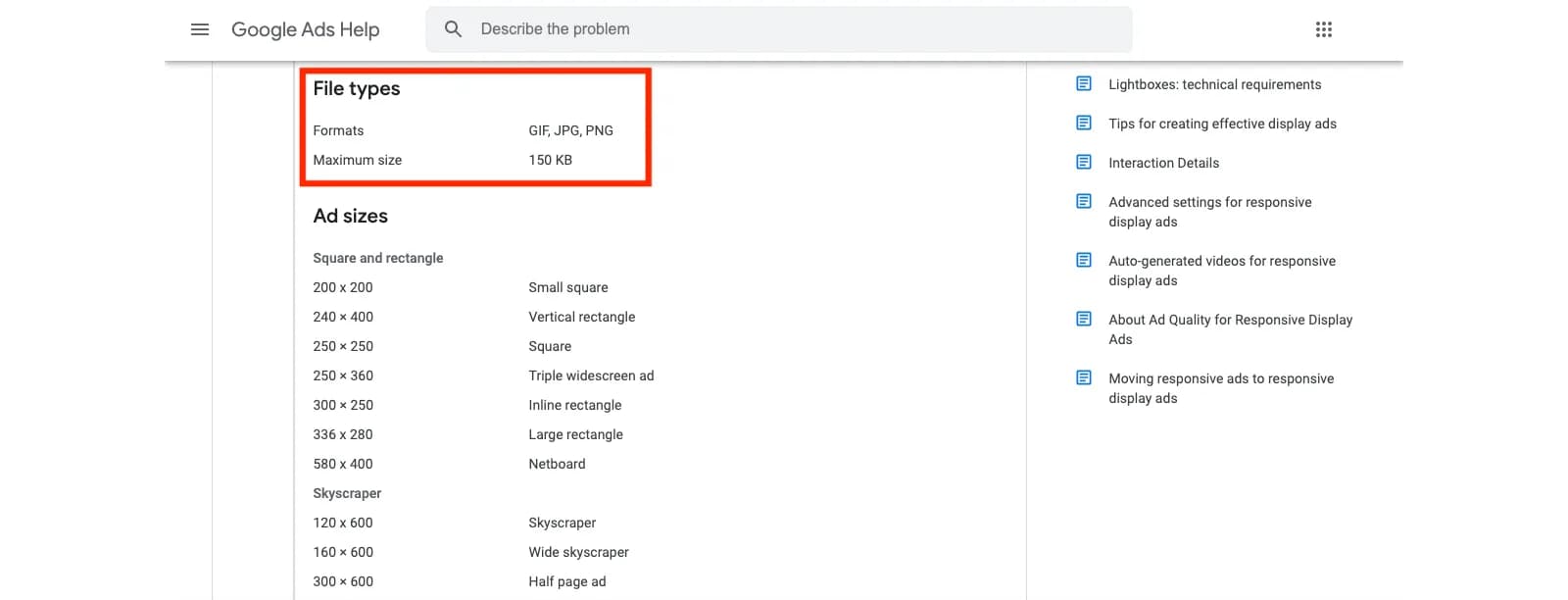
For animation there are more rules: the animation must last 30 seconds or less (a loop has to stop after 30 seconds), and the frame rate must be 5 frames per second or slower. Other networks set their own limits; check them before you design.
You have two ways out: switch to HTML5 where the network accepts it, or compress the GIF without losing the message. This guide covers the second.
What makes a GIF heavy
A GIF is a sequence of frames plus timing for each frame. Its size depends mainly on:
- the number of frames: every frame adds weight;
- the number of colors: a GIF palette holds up to 256 colors, and each extra color costs;
- the pixel dimensions of the image;
- how much changes between frames: fades, gradients and camera movement are expensive; flat areas are cheap.
So compression comes down to four levers: frames, colors, duration and dimensions.
Before you start
Open the GIF in an editor that shows frames, such as Photoshop or any tool that splits a GIF into frames. You'll work frame by frame, then export with new settings.
Method 1: delete unnecessary and duplicate frames
The easiest win. Go through the animation frame by frame and remove duplicates and frames that add nothing. The creative gets tighter and lighter.
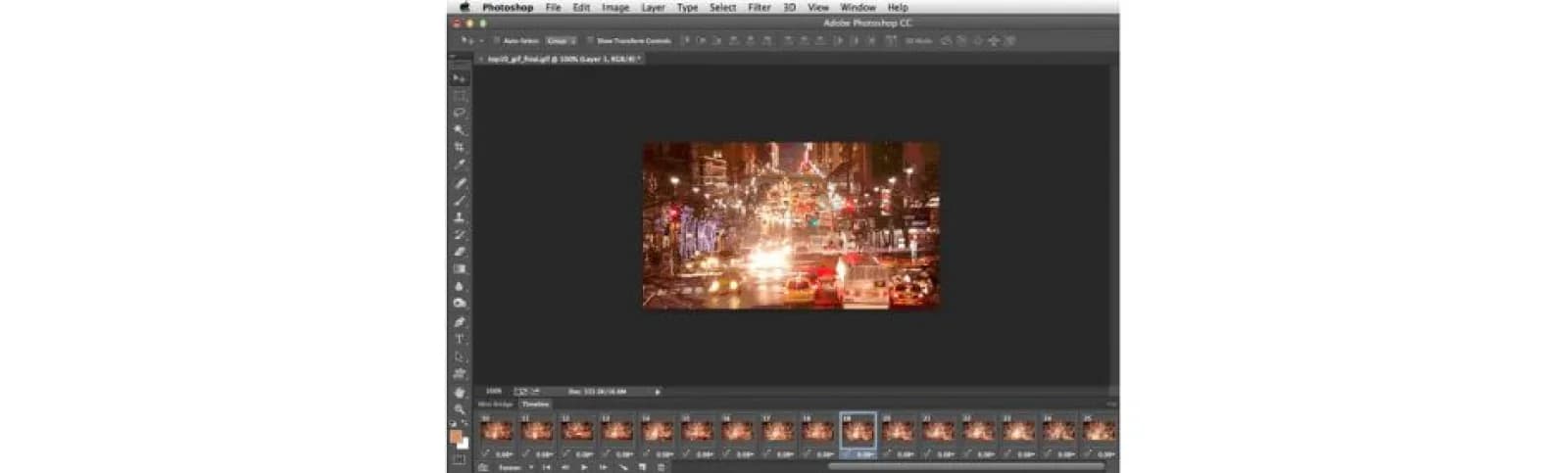
After removing frames, fix the delays so the pacing stays the same: give the remaining frame the time the deleted ones used to take. Otherwise the animation speeds up or stutters.
Method 2: use as few colors as possible
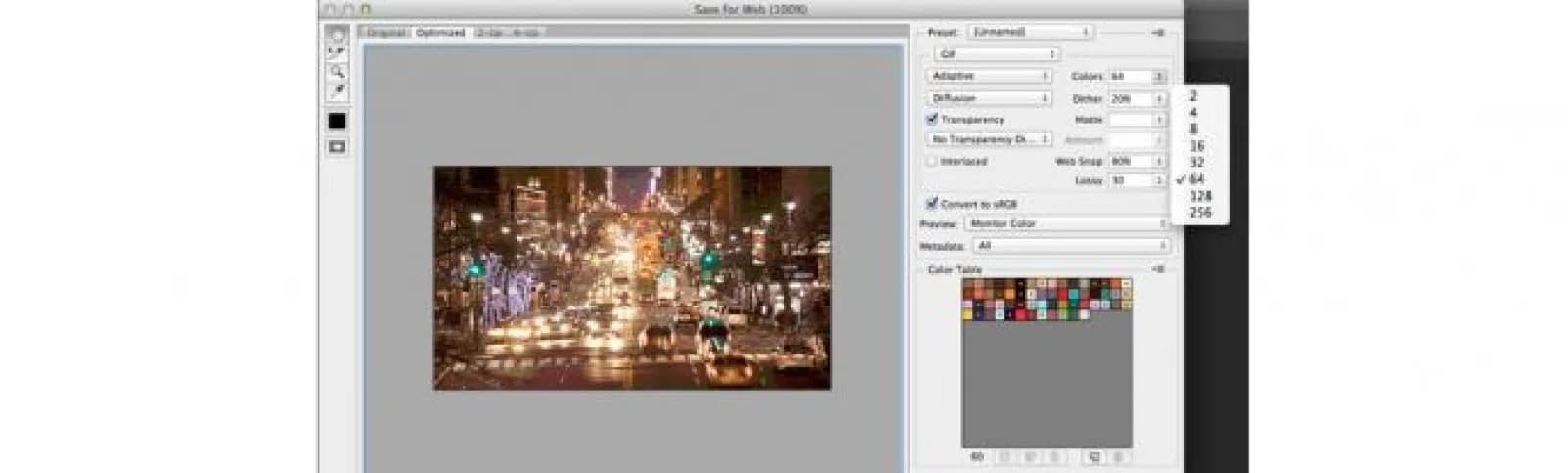
Fewer colors, smaller file. You don't have to go to black and white, but most ad creatives look fine with far fewer than 256 colors.
- Use adaptive color reduction: it keeps the colors that appear most often and balances file size against color accuracy.
- In Photoshop's export dialog, lower the number of colors step by step (128, 64, 32) and watch the preview.
- A monochrome or limited palette in the design itself makes this step painless, and toning down harsh brightness helps too.
Method 3: shorten the animation
A shorter GIF is a lighter GIF. Trim parts that don't carry the message; even a few seconds less helps. If you're converting from video, cut it before converting.
- Replace fades with cuts. A fade generates many frames full of intermediate colors. A hard cut between scenes costs almost nothing.
- Use slides instead of dissolves if you want a transition: one frame sliding over the previous one keeps the color count low.
Method 4: optimize in Photoshop or online
Photoshop. When you import video with File > Import > Video Frames to Layers, you can keep only every second or every fourth frame. That cuts the frame count at the source; then export with the reduced palette.
Online optimizers. If you'd rather not use Photoshop, run the file through an optimizer. Most let you set a quality level and reduce colors or frames in seconds. Options include:
- Ezgif
- iLoveIMG
- Online-Convert
- Compressor.io
- GIF Compressor
- GifGifs
- GifMaker.me
Check each tool's upload limit, and always compare the result with the original before uploading. Use an optimizer as the final step, or as a fallback when the methods above aren't enough.
The order that works
- Cut duplicate and unnecessary frames, then fix the delays.
- Reduce the colors.
- Shorten the animation and replace fades with cuts.
- Finish with an optimizer and check the quality.
Then make sure the file meets every rule of the network, not just the size, before you submit it for moderation.
Checklist: what to do
Questions and answers
What are Google's limits for animated GIF ads?
For image ads, Google Ads accepts GIF, JPG and PNG files up to 150 KB. Animated GIFs must be 30 seconds or shorter (a looping animation must stop after 30 seconds) and run at 5 frames per second or slower.
What makes a GIF file big?
Mostly the number of frames, the number of colors, the pixel dimensions and how much changes between frames. Gradients, fades and photographic footage are the heaviest.
Which is the quickest way to shrink a GIF?
Delete duplicate frames and reduce the color palette. Those two steps alone often bring a creative under the limit without visible damage.
Can I compress a GIF without Photoshop?
Yes. Online optimizers such as Ezgif, iLoveIMG, Compressor.io or GifMaker.me let you cut frames, reduce colors and apply compression in the browser. Check each tool's own upload limit.
Should I use HTML5 instead?
Where the network accepts HTML5 or responsive display ads, they often give you better quality at the same weight. GIF remains the simplest format that works almost everywhere.
Author’s conclusion
File-size limits on ad networks feel dated, but they aren't going away, and a creative that fails moderation earns nothing. The order that works: cut frames first, then colors, then duration, and use an online optimizer to finish.
My advice: build creatives with the limits in mind from the start (fewer frames, flat colors, hard cuts), and you'll rarely need to rescue a 600 KB GIF at the last minute.
Lu Discover, Editor-in-chief
Sources for this article
- aliencpa.com — Original guide (June 2021), rewritten
- support.google.com — Google Ads: image ad requirements (150 KB, animation limits)
- ezgif.com — Ezgif GIF optimizer
Related stories
 News
NewsAsian Gaming Congress 2027 in Manila: Newport, DigiPlus, Jade and PCSO Take the Stage
 News
NewsSPiCE International 2026 in Cebu: Online Took Over the Philippines, Then the Rules Tightened
 News
News
Comments
0 commentsNo comments yet.
Add a comment