
AI Tools for SEO and Affiliate Marketing: The Stack Worth Paying For

Contents 14
We've tested a lot of AI tools, and the honest reason isn't a love of software. Every task a machine can take over is an hour you get back. That's the real change in affiliate work: AI doesn't replace marketers, it replaces the boring parts of the job. You still work; the work changes shape. Less doing, more directing.
Below is a shortlist grouped by the job each tool does, with field notes on what worked, what didn't, and how to avoid paying for a stack you don't use.
Why the rules changed for SEO and affiliates
If you still picture SEO as climbing ten blue links, you're optimizing for a search engine that mostly doesn't exist anymore. Search has become an answer engine: Google's AI Overviews answer on the results page, and a growing share of buyers start their research in ChatGPT, Perplexity or Gemini.
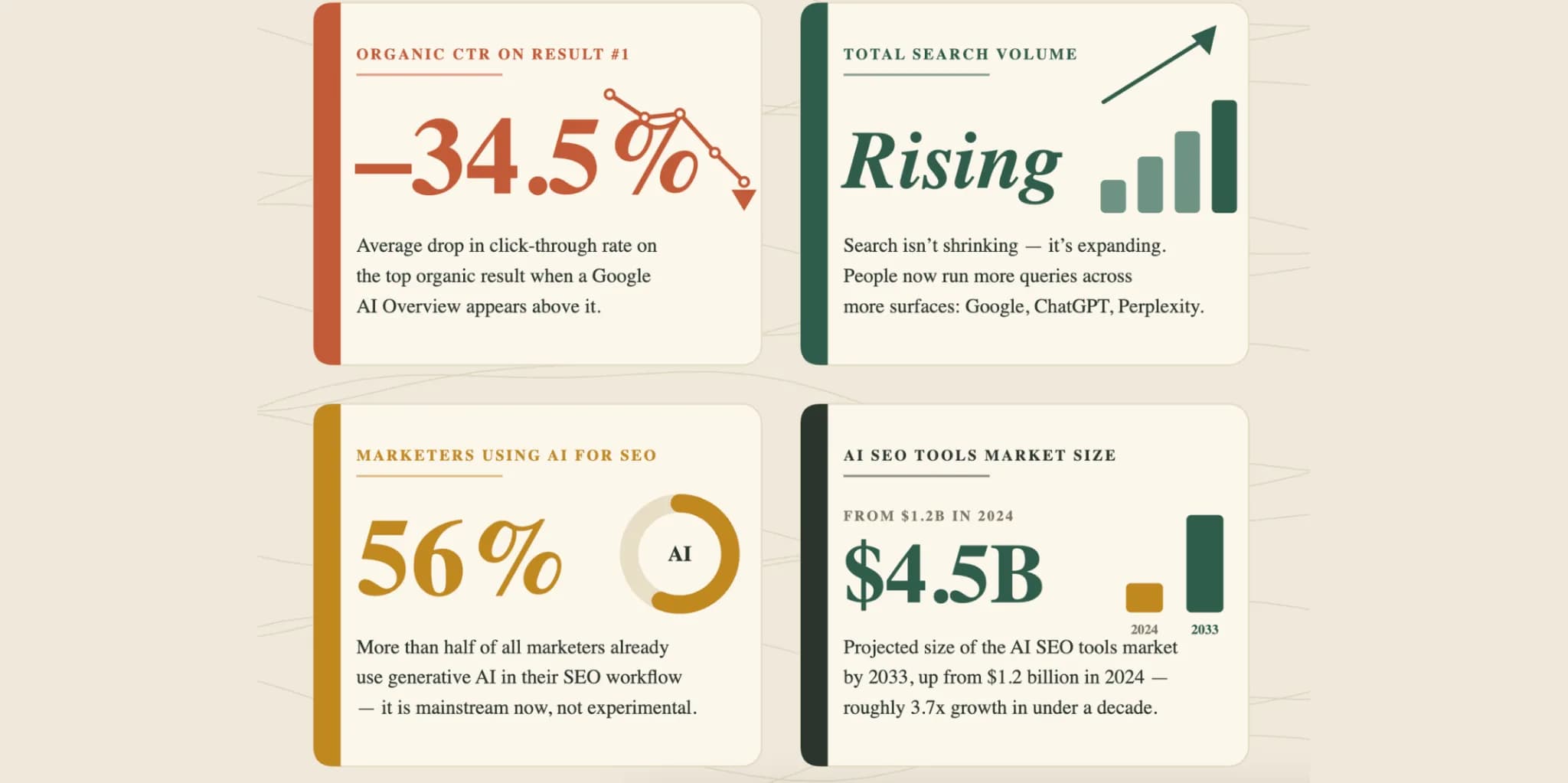
That created a new discipline, often called generative engine optimization (GEO): the goal is not only to rank, but to be cited inside the AI answer. The stakes are measurable. Ahrefs found that an AI Overview above the results cut the click-through rate of the top result by 34.5% on average.
For an affiliate or a webmaster, that means three things:
- content has to be extractable, not just rankable: structured, sourced, original;
- production speed is a competitive weapon;
- the work is multi-channel: one funnel touches a blog, a short video, an email sequence and a chatbot.
No single tool covers that. You need a stack, and more importantly a system: one tool per job, learned properly, connected into a loop.
LLMs and research assistants: your multilingual back office
The moment you work across countries, a language model becomes indispensable: client emails, offers, ad copy, social posts and forum replies in any language.
- ChatGPT. The default workhorse for testing hypotheses and estimating launch costs. Our experience: weak for real long-form content even on paid plans, but excellent at scaling ad copy for native, push and search ads. Use it as an ad-copy machine, not as a writer.
- Perplexity. A search engine that shows its sources, great for citation-backed research. It digs deeper than most: contacts, a route to a direct advertiser, reviews, even whether a program's reps will be at a conference you're attending.
- Jasper. A writing assistant you can train on your own voice, sharp or strictly professional. It fixes grammar and carries tone (including sarcasm) across languages; strongest in English, solid in several European languages.
- Gemini with Deep Research. Good for tracking marketing news and finding genuine news hooks, with sourced reports.
- Claude. A strong general assistant for long, complex tasks and clean writing, and an agent that can operate a browser or build and deploy small projects.
- Consensus for finding research papers when a niche needs scientific backing (health, finance); QuillBot for paraphrasing and polishing drafts; DeepSeek for very cheap high-volume generation.
A rule from experience: an LLM is a brilliant first-draft and ad-copy engine and an unreliable encyclopedia. Verify facts. The AI engines deciding whether to cite you can tell real expertise from confident filler.
SEO and on-page optimization
These tools tell you what to fix so search engines and AI assistants read your pages more easily, and show how competitors did it.
- SurferSEO. Topic research, keyword analysis, clusters, competitor analysis and content scoring. Long a favorite; lately less so for us: it surfaces outdated topics and keywords, and prices rose while features were trimmed.
- Writesonic. Works like an SEO agent that connects to Ahrefs and Search Console, analyzes competitors and drafts optimized content.
- MarketMuse. Content planning and topical-authority analysis: the depth of coverage AI engines reward.
- AISEO and Bertha AI for SEO-oriented drafts, titles and meta descriptions, the latter inside WordPress.
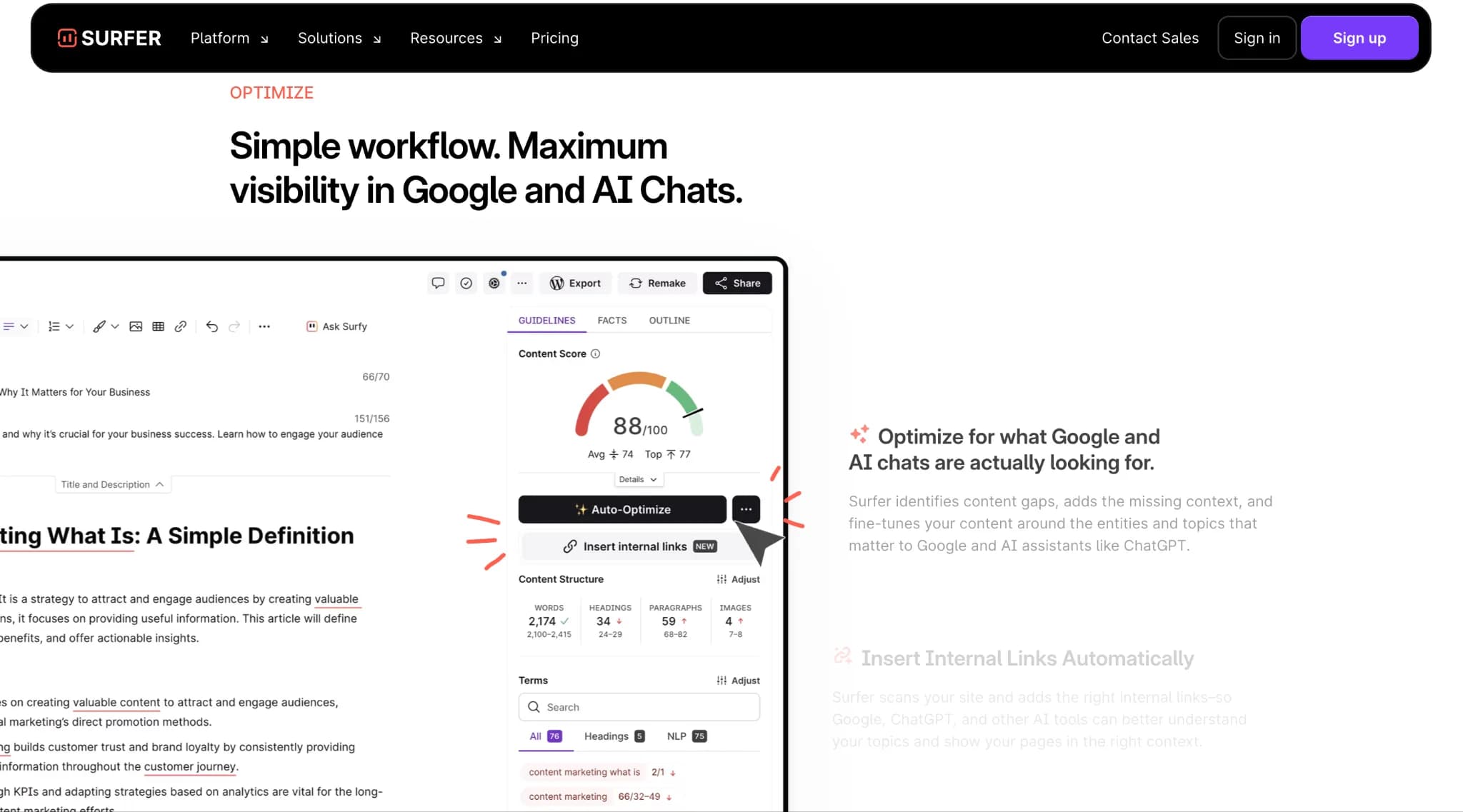
Our take: treat SEO tools as advisors, not oracles. The algorithm moves faster than any tool's data. Use them to find clusters and gaps, then add what no tool can fake: your experience, your data and your point of view.
Analytics and conversion intelligence
Scaling in affiliate marketing is moving towards AI agents that optimize budgets, bids and creatives and react to the first signal instead of waiting for you to wake up. Today most tools here are copilots rather than autonomous agents.
- FactorsAI: identifies companies behind anonymous traffic and optimizes ad ROAS.
- Fullstory: maps user journeys and shows where conversions leak.
- Neurons: predicts how a page or an ad will perform before you spend.
- Akkio: analytics for agencies that turns campaign data into quick decisions.
- LeadiQ: builds ideal-customer profiles and tracks buying triggers.
- octane: quiz-style product recommendation funnels for Shopify stores.
- Omni Calculator: a large library of calculators, useful for modeling and as embeddable, link-earning content.
The mindset shift: stop measuring only "did it convert" and start measuring "why, and how fast can a model react."
Email and cold outreach
Affiliate work lives on relationships: partnerships, list nurturing, getting a reply from a direct advertiser. These tools remove the friction of writing the hundredth personalized message.
- Warmer AI for personalized cold emails;
- Lavender for coaching email quality and reply rates;
- Twain for bulk outreach that still sounds human;
- Regie for automated prospecting with AI agents;
- Retainly for email, SMS and push sequences.
Let AI draft the message, but keep a human eye on the list. A perfect email to the wrong person is still wasted.
Social media: where we disagree with the hype
Distribution is half the game, and one piece of content should feed a dozen posts. But schedulers assume a clean, single-identity setup.
SMMplanner was nearly useless for our setup: more than nine client accounts, frequent errors and dropped connections, and preparing posts took as long as publishing by hand from an antidetect browser where each client has a separate profile. What worked better was letting an AI agent operate inside that browser the way a person would.
Useful elsewhere: Popsters for competitor content analytics, Ocoya and PostWise for creating and scheduling posts, All Hashtag for hashtags, imgflip, Supermeme and Giphy for cheap meme content, Tweet Hunter and Hypefury for growth on X.
Website and landing page builders
You no longer need a developer or a template with someone's watermark to launch a landing page. An agent such as Claude can clone a reference site, build a clean version and deploy it, often in one working session. Builders like Durable, 60SecSite, 10Web, Dora, Replit, Galileo and SiteKick turn a description into a site or an app in minutes.
The caveat: AI builds the structure. Making it convert (the offer, the proof, the angle) is still your job.
AI video and audio
Video is now a ranking and conversion channel, and "I don't want to be on camera" is no longer a barrier.
- HeyGen. Video avatars, generated or a digital copy of you: record once, reuse your digital twin. The biggest single time-saver in our video workflow.
- Runway, Kling, Hailuo, Vidu and Krea for video generation, from versatile to cinematic;
- OpusClip and 2short AI to cut long videos into shorts;
- Captions for subtitles and translation (most social video is watched muted);
- Revid AI for fast short-form video;
- Suno for royalty-free music; ElevenLabs and Murf for voiceover; Krisp for noise removal.
Images, design and ad creatives
This is where AI most visibly replaces a small team.
- Midjourney. The quality benchmark for generated images. It worked well for aggressive creatives in nutra, but you could tell at a glance that a model made them: good for concepts and volume, weaker when authenticity matters.
- Recraft. Our go-to: icons, illustrations and banners in any style, including "the same banner in six colors."
- Canva with Leonardo AI. Canva covers everyday design and brand style; when that's not enough, Leonardo generates custom graphics and comes bundled with Canva's paid plan.
- Ideogram when the ad needs readable text in the image; Remove.bg and Cleanup for cutouts and clean-ups; Creatopy for ad creatives at scale.
Chatbots and automation: the connective tissue
Tools stay tools until something connects them. ManyChat and Chatfuel for chatbots on social and web, Podium for always-on lead handling, Bardeen for go-to-market automations, Taskade for task and workflow generation, SheetAI for AI inside Google Sheets, Fireflies for call transcripts. There's An AI For That is the catalog for finding new tools by task.
Stacks for three scenarios
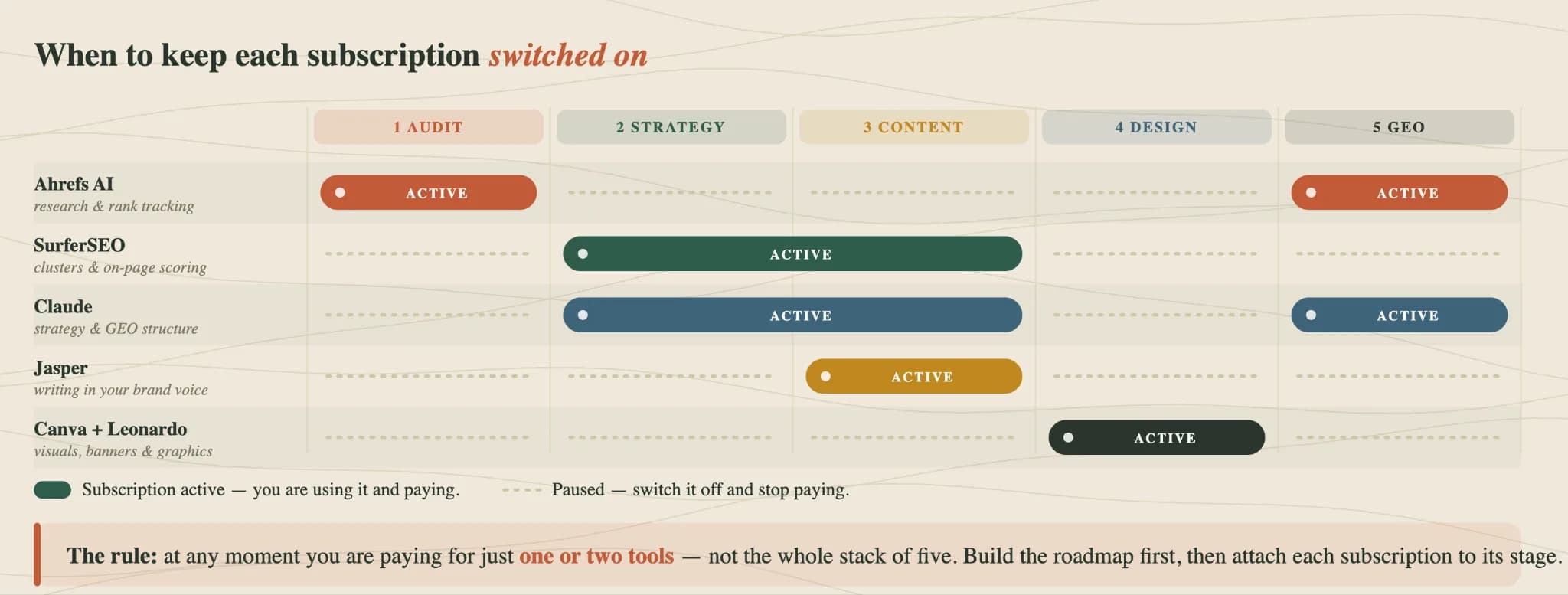
SEO and GEO for a site or store: Ahrefs, SurferSEO, Claude, Jasper, Canva with Leonardo. Don't pay for all of them at once: plan the project by stage and switch each subscription on only when its stage arrives.
Influencer marketing: Claude, Perplexity, Canva, HeyGen and Revid AI, to find trending ideas, choose influencers, check streams for bot audiences and produce joint creatives.
Paid ads on Facebook, Google and TikTok: Creatopy for creatives in every placement format, Aiter for fast ad-copy volume, Neurons to predict creative performance before spending, Akkio for campaign analytics, FactorsAI for attribution and ROAS.
These are copilots: they create, predict and optimize alongside you. The fully autonomous ad agent is coming; build the copilot stack now so you're ready when it arrives.
Checklist: what to do
Questions and answers
What's the best AI tool for affiliate marketing?
There isn't one. Different jobs need different tools: an LLM for research and ad copy, an SEO optimizer for content, a video or image generator for creatives, an automation layer to connect them. Pick one tool per job.
Can AI write my affiliate content?
It can draft it. In our experience general chatbots are strong at ad copy and weak at long-form content that ranks and converts. Your own experience, data and point of view are what make a page worth citing, and every fact the model writes needs checking.
Do I still need SEO tools with AI Overviews around?
Yes, but use them differently. The goal is no longer only ranking but being cited in AI answers. Use SEO tools to find topic clusters and gaps, then write content that is structured, sourced and original.
How much should I spend on AI tools?
Less than you think. Build a roadmap for the project, and at any moment pay only for the one or two tools the current stage needs. Most tools in this list have free tiers for testing.
Can AI run my ad campaigns for me?
Not fully, yet. Today's tools are copilots: they predict creative performance, analyze campaigns and suggest optimizations. Fully autonomous agents that move budget on the first signal are coming, but you still set the strategy and approve the spend.
Author’s conclusion
AI doesn't replace marketers; it replaces the boring parts of the job. Drafting ad copy, cutting clips, resizing banners and watching dashboards can be handed off, and the time you get back is real.
What doesn't change: the strategy, the offer, the angle and the judgment about who to target and why. The winning setup isn't the one with the most subscriptions. Pick one tool per job, learn it properly, connect the tools into a loop, and check the dashboard when you're back at the desk, not before.
Lu Discover, Editor-in-chief
Sources for this article
- aliencpa.com — Original guide (May 2026), rewritten
- ahrefs.com — Ahrefs: AI Overviews reduce clicks by 34.5%
Related stories
 Guide
GuideIs a Payment Processor Legit? 6 Checks Before You Route a Single Transaction
 Guide
GuideAccept Payments Without a Business: 4 Routes That Work, and Why One Word Can Cut Off a Skincare Store
 Guide
Guide
Comments
0 commentsNo comments yet.
Add a comment